Tag: data-management

  • Logging Failed Redirects

    Logging Failed Redirects

    WordPress has a built-in function called wp_safe_redirect().  This allows you to create redirects in code, but only to whitelisted domains (via the allowed_redirect_hosts filter).

    The downside to this is that you have to remember to whitelist the domains.  It’s easy to forget if you’re doing a lot of redirects, for instance with the WPCOM Legacy Redirector plugin.

    When this happens, all un-whitelisted redirects will be redirected by default to /wp-admin/ instead, and can cause a headache trying to figure out what’s going wrong.

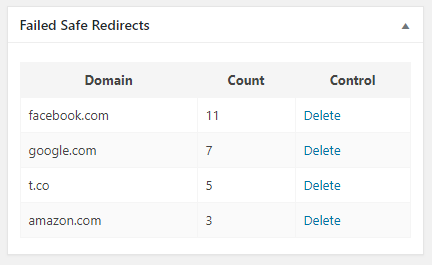
    I had an idea to solve this problem.  A simple logging plugin that logs failed redirects and adds a dashboard widget to show the domains and number of times the redirect has failed:

    The code behind this:

    <?php
    class Emrikol_WSRD_Dashboard {
    	public static function instance() {
    		static $instance = false;
    		if ( ! $instance ) {
    			$instance = new Emrikol_WSRD_Dashboard();
    		}
    		return $instance;
    	}
    
    	public function __construct() {
    		add_action( 'init', array( $this, 'init' ) );
    		add_filter( 'allowed_redirect_hosts', array( $this, 'check_redirect' ), PHP_INT_MAX, 2 );
    	}
    
    	public function init() {
    		if ( $this->is_admin() && isset( $_GET['wsrd_delete'] ) && check_admin_referer( 'wsrd_delete' ) && isset( $_GET['ID'] ) ) {
    			$post_id = (int) $_GET['ID'];
    
    			if ( 'wsrd' !== get_post_type( $post_id ) ) {
    				// This isn't the right post type, abort!
    				add_action( 'admin_notices', array( $this, 'message_log_not_deleted' ) );
    				return;
    			}
    
    			$delete = wp_delete_post( $post_id, true );
    			wp_cache_delete( 'wsrd_report' );
    
    			if ( $delete ) {
    				add_action( 'admin_notices', array( $this, 'message_log_deleted' ) );
    			} else {
    				add_action( 'admin_notices', array( $this, 'message_log_not_deleted' ) );
    			}
    		}
    
    		$args = array(
    			'supports' => array( 'title' ),
    			'public'   => false,
    		);
    		register_post_type( 'wsrd', $args );
    
    		add_action( 'wp_dashboard_setup', array( $this, 'add_dashboard_widgets' ) );
    	}
    
    	public function add_dashboard_widgets() {
    		if ( $this->is_admin() ) {
    			wp_add_dashboard_widget( 'emrikol_wsrd_dashboard', 'Failed Safe Redirects', array( $this, 'show_admin_dashboard' ) );
    		}
    	}
    
    	public function check_redirect( $allowed_hosts, $redirect_host ) {
    		if ( ! in_array( $redirect_host, $allowed_hosts, true ) ) {
    			// No redirect, please record.
    			$found_host = new WP_Query( array(
    				'fields'                 => 'ids',
    				'name'                   => md5( $redirect_host ),
    				'post_type'              => 'wsrd',
    				'post_status'            => 'any',
    				'no_found_rows'          => true,
    				'posts_per_page'         => 1,
    				'update_post_term_cache' => false,
    				'update_post_meta_cache' => false,
    			) );
    
    			if ( empty( $found_host->posts ) ) {
    				// No past redirect log found, create one.
    				$args   = array(
    					'post_name'  => md5( $redirect_host ),
    					'post_title' => $redirect_host,
    					'post_type'  => 'wsrd',
    					'meta_input' => array(
    						'count' => 1,
    					),
    				);
    				$insert = wp_insert_post( $args );
    			} else {
    				// Found!  Update count.
    				$count = absint( get_post_meta( $found_host->posts[0], 'count', true ) );
    				$count++;
    				update_post_meta( $found_host->posts[0], 'count', $count );
    			}
    		}
    		// We don't want to modify, always return allowed hosts unharmed.
    		return $allowed_hosts;
    	}
    
    	public function show_admin_dashboard() {
    		global $wpdb;
    
    		$report = wp_cache_get( 'wsrd_report' );
    		if ( false === $report ) {
    			$report = $wpdb->get_results( "SELECT ID, post_title AS host, meta_value AS count FROM $wpdb->posts LEFT JOIN $wpdb->postmeta ON ( $wpdb->posts.ID = $wpdb->postmeta.post_id ) WHERE post_type='wsrd'  ORDER BY ABS( count ) DESC LIMIT 20;" );
    			wp_cache_set( 'wsrd_report', $report, 'default', MINUTE_IN_SECONDS * 5 );
    		}
    
    		?>
    		<style>
    			table#wsrd {
    				border-collapse: collapse;
    				width: 100%;
    			}
    			table#wsrd th {
    				background: #f5f5f5;
    			}
    
    			table#wsrd th, table#wsrd td {
    				border: 1px solid #f5f5f5;
    				padding: 8px;
    			}
    
    			table#wsrd tr:nth-child(even) {
    				background: #fafafa;
    			}
    		</style>
    		<div class="activity-block">
    			<?php if ( empty( $report ) ) : ?>
    			<p><strong>None Found!</strong></p>
    			<?php else : ?>
    			<table id="wsrd">
    				<thead>
    					<tr>
    						<th>Domain</th>
    						<th>Count</th>
    						<th>Control</th>
    					</tr>
    				</thead>
    				<tbody>
    					<?php foreach ( $report as $line ) : ?>
    						<tr>
    							<td><?php echo esc_html( $line->host ); ?></td>
    							<td><?php echo esc_html( $line->count ); ?></td>
    							<td><a href="<?php echo esc_url( wp_nonce_url( add_query_arg( array( 'wsrd_delete' => true, 'ID' => rawurlencode( $line->ID ) ), admin_url() ), 'wsrd_delete' ) ); ?>">Delete</a></td>
    						</tr>
    					<?php endforeach; ?>
    				</tbody>
    			</table>
    			<?php endif; ?>
    		</div>
    		<?php
    	}
    
    	public function message_log_deleted() {
    		echo '<div id="message" class="notice notice-success is-dismissible"><p>Redirect log deleted!</p></div>';
    	}
    
    	public function message_log_not_deleted() {
    		echo '<div id="message" class="notice notice-error is-dismissible"><p>Redirect log delete failed!</p></div>';
    	}
    
    
    	private function is_admin() {
    		if ( current_user_can( 'manage_options' ) ) {
    			return true;
    		}
    		return false;
    	}
    }
    Emrikol_WSRD_Dashboard::instance();
    Code language: HTML, XML (xml)

  • Purging All The Caches!

    Purging All The Caches!

    One of the best ways to ensure that a WordPress site–well any site really–stays performant and not broken is by leveraging caching.

    WordPress by default doesn’t do much caching other than some in-memory caching of objects, and the odd database caching via the Transients API.

    This site currently has three layers of caching:

    This means I have three different plugins that I have to manage with these caches:

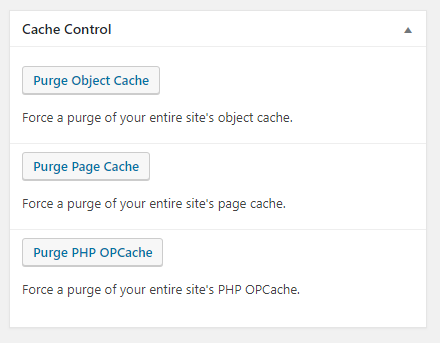
    So if I am doing some development and want to purge one or more caches, I need to go dig around three different places to purge these, and that’s not fun.  To help combat this, I made myself a simple Admin Dashboard widget with quick access to purge each of these:

    Here’s the code:

    <?php
    class Emrikol_Cache_Dashboard {
    	public static function instance() {
    		static $instance = false;
    		if ( ! $instance ) {
    			$instance = new Emrikol_Cache_Dashboard();
    		}
    		return $instance;
    	}
    
    	public function __construct() {
    		add_action( 'init', array( $this, 'init' ) );
    	}
    
    	public function init() {
    		if ( $this->is_admin() && isset( $_GET['ead_purge_object_cache'] ) && check_admin_referer( 'manual_purge' ) ) {
    			$did_flush = wp_cache_flush();
    			if ( $did_flush ) {
    				add_action( 'admin_notices', array( $this, 'message_object_cache_purge_success' ) );
    			} else {
    				add_action( 'admin_notices', array( $this, 'message_object_cache_purge_failure' ) );
    			}
    		} elseif ( $this->is_admin() && isset( $_GET['ead_purge_wp_super_cache'] ) && check_admin_referer( 'manual_purge' ) ) {
    			global $file_prefix;
    			wp_cache_clean_cache( $file_prefix, true );
    			add_action( 'admin_notices', array( $this, 'message_wp_super_cache_purge_success' ) );
    		} elseif ( $this->is_admin() && isset( $_GET['ead_purge_OPcache'] ) && check_admin_referer( 'manual_purge' ) ) {
    			// Taken from: https://wordpress.org/plugins/flush-opcache/
    			// Check if file cache is enabled and delete it if enabled.
    			// phpcs:ignore WordPress.VIP.FileSystemWritesDisallow.file_ops_is_writable
    			if ( ini_get( 'OPcache.file_cache' ) && is_writable( ini_get( 'OPcache.file_cache' ) ) ) {
    				$files = new RecursiveIteratorIterator( new RecursiveDirectoryIterator( ini_get( 'OPcache.file_cache' ), RecursiveDirectoryIterator::SKIP_DOTS ), RecursiveIteratorIterator::CHILD_FIRST );
    				foreach ( $files as $fileinfo ) {
    					$todo = ( $fileinfo->isDir() ? 'rmdir' : 'unlink' );
    					$todo( $fileinfo->getRealPath() );
    				}
    			}
    
    			// Flush OPcache.
    			$did_flush = OPcache_reset();
    			if ( $did_flush ) {
    				add_action( 'admin_notices', array( $this, 'message_OPcache_purge_success' ) );
    			} else {
    				add_action( 'admin_notices', array( $this, 'message_OPcache_purge_failure' ) );
    			}
    		}
    
    		add_action( 'wp_dashboard_setup', array( $this, 'add_dashboard_widgets' ) );
    	}
    
    	public function add_dashboard_widgets() {
    		if ( $this->is_admin() ) {
    			wp_add_dashboard_widget( 'emrikol_admin_dashboard', 'Cache Control', array( $this, 'show_admin_dashboard' ) );
    		}
    	}
    
    	public function show_admin_dashboard() {
    		if ( false === get_parent_class( $GLOBALS['wp_object_cache'] ) ) {
    			// Persistent Object Cache detected.
    			?>
    			<div class="activity-block">
    				<span class="button"><a href="<?php echo esc_url( wp_nonce_url( admin_url( '?ead_purge_object_cache' ), 'manual_purge' ) ); ?>"><strong>Purge Object Cache</strong></a></span>
    				<p>Force a purge of your entire site's object cache.</p>
    			</div>
    			<?php
    		} else {
    			// Transients!
    			?>
    			<div class="activity-block">
    				<h3>Transients</h3>
    				<p>Transients cannot currently be removed manually.</p>
    			</div>
    			<?php
    		}
    		if ( function_exists( 'wp_cache_clean_cache' ) ) {
    			// WP Super Cache!
    			?>
    			<div class="activity-block">
    				<span class="button"><a href="<?php echo esc_url( wp_nonce_url( admin_url( '?ead_purge_wp_super_cache' ), 'manual_purge' ) ); ?>"><strong>Purge Page Cache</strong></a></span>
    				<p>Force a purge of your entire site's page cache.</p>
    			</div>
    			<?php
    		}
    		if ( function_exists( 'OPcache_reset' ) ) {
    			// PHP OPcache.
    			?>
    			<div class="activity-block">
    				<span class="button"><a href="<?php echo esc_url( wp_nonce_url( admin_url( '?ead_purge_OPcache' ), 'manual_purge' ) ); ?>"><strong>Purge PHP OPcache</strong></a></span>
    				<p>Force a purge of your entire site's PHP OPcache.</p>
    			</div>
    			<?php
    		}
    	}
    
    	public function message_wp_super_cache_purge_success() {
    		echo '<div id="message" class="notice notice-success is-dismissible"><p>Page Cache purged!</p></div>';
    	}
    
    	public function message_object_cache_purge_success() {
    		echo '<div id="message" class="notice notice-success is-dismissible"><p>Object Cache purged!</p></div>';
    	}
    
    	public function message_object_cache_purge_failure() {
    		echo '<div id="message" class="notice notice-error is-dismissible"><p>Object Cache purge failed!</p></div>';
    	}
    
    	public function message_OPcache_purge_success() {
    		echo '<div id="message" class="notice notice-success is-dismissible"><p>PHP OPcache purged!</p></div>';
    	}
    
    	public function message_OPcache_purge_failure() {
    		echo '<div id="message" class="notice notice-error is-dismissible"><p>PHP OPcache purge failed!</p></div>';
    	}
    
    	private function is_admin() {
    		if ( current_user_can( 'manage_options' ) ) {
    			return true;
    		}
    		return false;
    	}
    }
    Emrikol_Cache_Dashboard::instance();
    Code language: HTML, XML (xml)
  • Windows, SFTP, and the Registry

    Windows, SFTP, and the Registry

    One of the tasks that I have to do often at work is copying data to and from an SFTP directory.  Previously I had a constant domain and port that I was able to connect to, an I could save this in a WinSCP profile for ease of use.  Due to some recent architectural changes though, we’re now dynamically generating IPs and ports to connect to, which caused a bit of a headache.  Luckily though, we do get a really nice sftp://user@domain.example.com:1234 URI that gives us this information, and some terminal clients even allow you to click it (ConEmu).

    Unfortunately, I can’t just register WinSCP as the default handler for sftp URIs because I needed to provide other data, such as a private key and proxy information.

    To fix this,  I created a wrapper, poorly named scp.cmd that does all of this work:

    @echo off
    :: Set some necessary path variables.
    :: I would recommend WinSCP Portable, but that's just me.
    set WINSCP_PATH="C:\Path To\winscp.exe"
    set PRIVKEY_PPK="C:\Path To\Private Key.ppk"
    :: Run the actual SCP command.
    %WINSCP_PATH% %1 /privatekey=%PRIVKEY_PPK% /rawsettings ProxyMethod=2 ProxyHost="127.0.0.1" ProxyPort=8080
    :: Unset the variables now that we don't need them.
    set WINSCP_PATH=
    set PRIVKEY_PPK=Code language: PHP (php)

    From here I can create a Windows Registry file (or manually do it with regedit.exe but that’s crazy) to register the sftp URI handler and point it to my scp.cmd file:

    Windows Registry Editor Version 5.00
    
    [HKEY_CLASSES_ROOT\sftp\shell\open\command]
    @="\"C:\\Windows\\scp.cmd\" \"%1\""Code language: JavaScript (javascript)

    Now I can easily click on sftp links for work, I can paste them into the Windows Run dialog, or even open them via the command line with start.  This is a wonderful time saver!

  • Validating WordPress attachments with WP-CLI

    Validating WordPress attachments with WP-CLI

    I recently worked on migrating a site to a different server and for one reason or another, some of the images did not come over properly. While I could have just re-downloaded and re-imported all of the media, it would have taken quite a while since the media library was well over 100Gb. Instead, I opted to use WP-CLI to help find what images were missing:

    (more…)