Tag: disable

  • Stop WordPress From Sending Emails (And Log Them Too!)

    Stop WordPress From Sending Emails (And Log Them Too!)

    While doing some development work recently, I wanted to make sure that I disabled all email sending in my test site so that no users imported would get any weird emails.

    To do this I had ChatGPT whip me up a quick plugin, and after cleaning it up here it is to share with the world:

    <?php
    /**
     * Plugin Name: Restrict and Log Emails
     * Description: Blocks emails for users and logs all email attempts.
     * Version: 1.3
     * Author: Emrikol
     */
    
    if ( ! defined( 'ABSPATH' ) ) {
    	exit; // Prevent direct access.
    }
    define( 'REL_EMAIL_LOG_DB_VERSION', '1.2' );
    
    /**
     * Database installation and upgrade function.
     * Creates or updates the email_log table if needed based on a stored version option.
     *
     * @return void
     */
    function rel_install() {
    	global $wpdb;
    	$table_name      = $wpdb->prefix . 'email_log';
    	$charset_collate = $wpdb->get_charset_collate();
    
    	$sql = "CREATE TABLE $table_name (
    	   id mediumint(9) NOT NULL AUTO_INCREMENT,
    	   recipient_email varchar(100) NOT NULL,
    	   subject text NOT NULL,
    	   message text NOT NULL,
    	   status varchar(20) NOT NULL,
    	   sent_at datetime DEFAULT '0000-00-00 00:00:00' NOT NULL,
    	   PRIMARY KEY (id)
    	) $charset_collate;";
    
    	require_once ABSPATH . 'wp-admin/includes/upgrade.php';
    	dbDelta( $sql );
    
    	// Update the database version option.
    	update_option( 'rel_email_log_db_version', REL_EMAIL_LOG_DB_VERSION, false );
    }
    register_activation_hook( __FILE__, 'rel_install' );
    
    /**
     * Adds the Email Log submenu to Tools in the WordPress admin area.
     *
     * @return void
     */
    function rel_add_admin_menu(): void {
    	if ( function_exists( 'add_submenu_page' ) ) {
    		add_submenu_page(
    			'tools.php',
    			'Email Log',
    			'Email Log',
    			'manage_options',
    			'email-log',
    			'rel_email_log_page'
    		);
    	}
    }
    add_action( 'admin_menu', 'rel_add_admin_menu' );
    
    /**
     * Displays the Email Log page in the WordPress admin area.
     *
     * @return void
     */
    function rel_email_log_page(): void {
    	global $wpdb;
    	$table_name = $wpdb->prefix . 'email_log';
    	$logs       = $wpdb->get_results( "SELECT * FROM $table_name ORDER BY sent_at DESC LIMIT 50" ); // phpcs:ignore WordPress.DB.DirectDatabaseQuery.DirectQuery, WordPress.DB.DirectDatabaseQuery.NoCaching, WordPress.DB.PreparedSQL.InterpolatedNotPrepared
    
    	echo '<div class="wrap">';
    	echo '<h1>Email Log</h1>';
    
    	if ( current_user_can( 'manage_options' ) ) {
    		// Process toggle form submission.
    		if ( isset( $_POST['rel_toggle_blocking'] ) && check_admin_referer( 'rel_toggle_blocking_action', 'rel_toggle_blocking_nonce' ) ) {
    			// Sanitize and update the blocking option.
    			if ( isset( $_POST['rel_email_blocking_enabled'] ) && in_array( $_POST['rel_email_blocking_enabled'], array( 'enabled', 'disabled' ), true ) ) {
    				$blocking = $_POST['rel_email_blocking_enabled']; // phpcs:ignore WordPress.Security.ValidatedSanitizedInput.InputNotSanitized
    			} else {
    				$blocking = 'enabled';
    			}
    
    			update_option( 'rel_email_blocking_enabled', $blocking, false );
    			echo '<div class="updated notice"><p>Email blocking has been ' . ( 'enabled' === $blocking ? 'enabled' : 'disabled' ) . '.</p></div>';
    		}
    		$current_blocking = get_option( 'rel_email_blocking_enabled', true );
    
    		echo '<form method="post" style="margin-bottom:20px;">';
    		wp_nonce_field( 'rel_toggle_blocking_action', 'rel_toggle_blocking_nonce' );
    		echo '<p>Email blocking is currently <strong>' . ( 'enabled' === $current_blocking ? 'enabled' : 'disabled' ) . '</strong>.';
    		echo '<br/><br/><label for="rel_email_blocking_enabled">Toggle: </label>';
    		echo '<select id="rel_email_blocking_enabled" name="rel_email_blocking_enabled">';
    		echo '<option value="enabled"' . selected( $current_blocking, 'enabled', false ) . '>Enabled</option>';
    		echo '<option value="disabled"' . selected( $current_blocking, 'disabled', false ) . '>Disabled</option>';
    		echo '</select> ';
    		echo '<input type="submit" name="rel_toggle_blocking" value="Update" class="button-primary" />';
    		echo '</p>';
    		echo '</form>';
    	}
    
    	echo '<table class="widefat fixed" cellspacing="0">';
    	echo '<thead><tr><th>ID</th><th>Email</th><th>Subject</th><th>Message</th><th>Status</th><th>Sent At</th></tr></thead>';
    	echo '<tbody>';
    
    	if ( $logs ) {
    		foreach ( $logs as $log ) {
    			$truncated_message = ( strlen( $log->message ) > 30 ) ? substr( $log->message, 0, 30 ) . '…' : $log->message;
    			echo wp_kses_post(
    				'<tr>
    					<td>' . $log->id . '</td>
    					<td>' . $log->recipient_email . '</td>
    					<td>' . $log->subject . '</td>
    					<td>' . $truncated_message . '</td>
    					<td>' . $log->status . '</td>
    					<td>' . $log->sent_at . '</td>
    				  </tr>'
    			);
    		}
    	} else {
    		echo '<tr><td colspan="6">No emails logged yet.</td></tr>';
    	}
    
    	echo '</tbody></table>';
    	echo '</div>';
    }
    
    /**
     * Intercepts email sending attempts, restricts emails for users without the 'manage_options' capability, and logs the attempt.
     *
     * @param null|bool $short_circuit Default value if email is allowed.
     * @param array     $atts An array of email attributes (to, subject, etc.).
     * @return bool|null Returns a non-null value to short-circuit email sending if restricted.
     */
    function rel_prevent_email( $short_circuit, $atts ) {
    	global $wpdb;
    	$table_name = $wpdb->prefix . 'email_log';
    
    	$recipient_email = isset( $atts['to'] ) ? $atts['to'] : '';
    	$subject         = isset( $atts['subject'] ) ? $atts['subject'] : '';
    	$message         = isset( $atts['message'] ) ? $atts['message'] : '';
    	$sent_at         = current_time( 'mysql' );
    
    	// Check if email blocking is enabled (default true).
    	$blocking = get_option( 'rel_email_blocking_enabled', 'enabled' );
    	switch ( $blocking ) {
    		case 'enabled':
    			$blocking_enabled = true;
    			break;
    		case 'disabled':
    			$blocking_enabled = false;
    			break;
    		default:
    			$blocking_enabled = true;
    			break;
    	}
    
    	// Determine status based on blocking setting.
    	if ( true === $blocking_enabled ) {
    		$status = 'Blocked';
    	} else {
    		$status = 'Sent';
    	}
    
    	// Log the email attempt.
    	$wpdb->insert( // phpcs:ignore WordPress.DB.DirectDatabaseQuery.DirectQuery
    		$table_name,
    		array(
    			'recipient_email' => $recipient_email,
    			'subject'         => $subject,
    			'message'         => $message,
    			'status'          => $status,
    			'sent_at'         => $sent_at,
    		)
    	);
    
    	// If blocking is enabled and the current user cannot manage options, block the email, otherwise allow sending.
    	if ( $blocking_enabled ) {
    		return true;
    	}
    	return null;
    }
    add_filter( 'pre_wp_mail', 'rel_prevent_email', 10, 2 );
    
    /**
     * Checks the current database version and updates the email_log table if necessary.
     *
     * @return void
     */
    function rel_check_db_version() {
    	if ( get_option( 'rel_email_log_db_version' ) !== REL_EMAIL_LOG_DB_VERSION ) {
    		rel_install();
    	}
    }
    add_action( 'init', 'rel_check_db_version' );
    
    Code language: PHP (php)

    As usual, don’t use this slop, nor anything you read here because this is my blarg and I can’t be trusted to do anything correct.

  • Quick Tip: Disable WordPress Block Editor Fullscreen Mode

    Quick Tip: Disable WordPress Block Editor Fullscreen Mode

    I don’t know why, but any time I edit posts on this site, the block editor always goes into fullscreen mode. Even if I disable it, the next time I edit a post or refresh, it goes right back. My preferences aren’t being saved.

    Oh well, we can fix that with some PHP!

    if ( is_admin() ) {
         function jba_disable_editor_fullscreen_by_default() {
             $script = "jQuery( window ).load(function() { const isFullscreenMode = wp.data.select( 'core/edit-post' ).isFeatureActive( 'fullscreenMode' ); if ( isFullscreenMode ) { wp.data.dispatch( 'core/edit-post' ).toggleFeature( 'fullscreenMode' ); } });";
             wp_add_inline_script( 'wp-blocks', $script );
         }
         add_action( 'enqueue_block_editor_assets', 'jba_disable_editor_fullscreen_by_default' );
     }Code language: PHP (php)

    Many thanks to Jean-Baptiste Audras for this snippet he shared on his site last year 🥳

  • Securing WordPress Plugins with more Plugins

    Securing WordPress Plugins with more Plugins

    I’ve written before about disabling plugin deactivation in WordPress, but I’ve finally used that knowledge in practice–on this site.

    The Problem

    Let’s say you’re going along your day, developing things, and fixing things, and making the world a better place when all of a sudden you get a call from a client that their website is broken!!  After a bit of panicking and digging around, it turns out that they’ve been “optimizing” things by disabling random, but critical, plugins on the site.

    The Solution

    One way that you might fix this is to not install the plugins via the WordPress UI and require() them either in the theme directory, or as an mu-plugin.  The downside with this is that you lose the ability to easily and auto-update the plugins (if you’re okay with that).  You also the ability to easily see what plugins are active and installed in the admin UI.

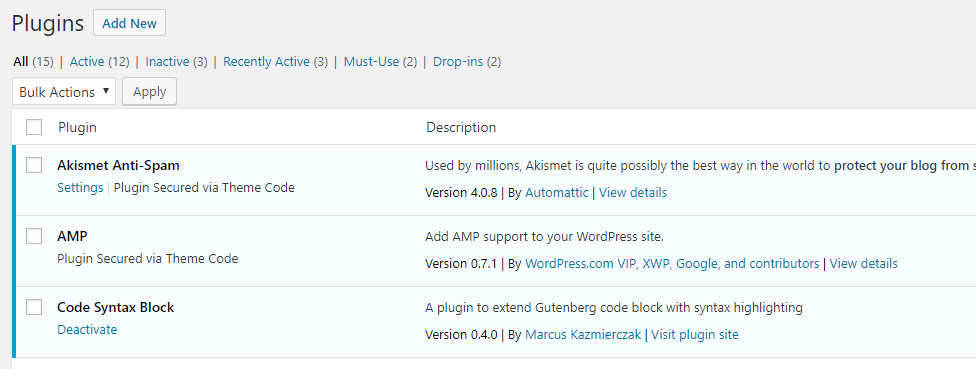
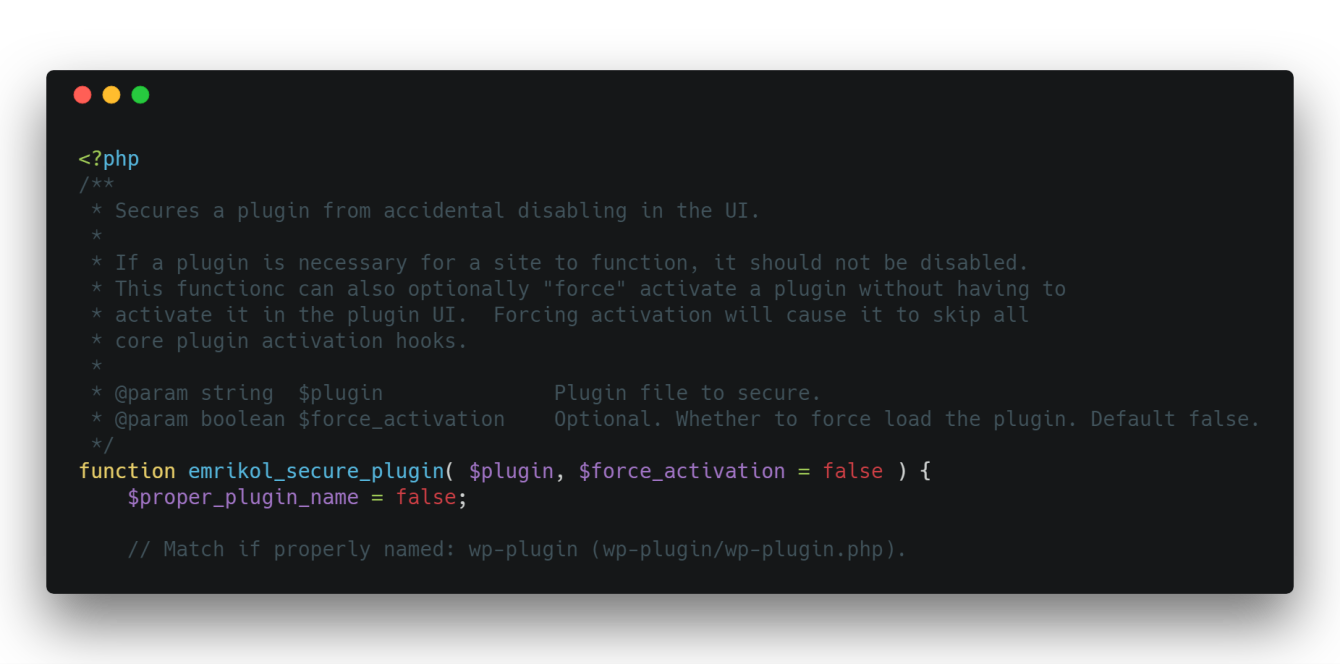
    The way I’ve got around this is to create this helper function inside an mu-plugin that allows the plugins to be installed and managed in the UI, but not disabled:

    <?php
    /**
     * Secures a plugin from accidental disabling in the UI.
     *
     * If a plugin is necessary for a site to function, it should not be disabled.
     * This functionc can also optionally "force" activate a plugin without having to
     * activate it in the plugin UI.  Forcing activation will cause it to skip all
     * core plugin activation hooks.
     *
     * @param string  $plugin              Plugin file to secure.
     * @param boolean $force_activation    Optional. Whether to force load the plugin. Default false.
     */
    function emrikol_secure_plugin( $plugin, $force_activation = false ) {
    	$proper_plugin_name = false;
    
    	// Match if properly named: wp-plugin (wp-plugin/wp-plugin.php).
    	if ( file_exists( WP_PLUGIN_DIR . '/' . $plugin . '/' . $plugin . '.php' ) && is_file( WP_PLUGIN_DIR . '/' . $plugin . '/' . $plugin . '.php' ) ) {
    		$proper_plugin_name = $plugin . '/' . $plugin . '.php';
    	} else {
    		// Match if improperly named: wp-plugin/cool-plugin.php.
    		if ( file_exists( WP_PLUGIN_DIR . '/' . $plugin ) && is_file( WP_PLUGIN_DIR . '/' . $plugin ) ) {
    			$proper_plugin_name = $plugin;
    		}
    	}
    
    	if ( false !== $proper_plugin_name ) {
    		if ( true === $force_activation ) {
    			// Always list the plugin as active.
    			add_filter( 'option_active_plugins', function( $active_plugins ) use ( $proper_plugin_name ) {
    				// Crappy hack to prevent infinite loops.  Surely there's a better way.
    				global $emrikol_is_updating_active_plugins;
    
    				if ( true === $emrikol_is_updating_active_plugins ) {
    					unset( $emrikol_is_updating_active_plugins );
    					return array_unique( $active_plugins );
    				}
    
    				if ( ! in_array( $proper_plugin_name, $active_plugins, true ) ) {
    					$active_plugins[]                   = $proper_plugin_name;
    					$emrikol_is_updating_active_plugins = true;
    
    					update_option( 'active_plugins', array_unique( $active_plugins ) );
    				}
    				return array_unique( $active_plugins );
    			}, 1000, 1 );
    		}
    
    		// Ensure the plugin doesn't get disabled somehow.
    		// TODO: Diff arrays.  Only run if the plugin is being removed.
    		add_filter( 'pre_update_option_active_plugins', function ( $active_plugins ) use ( $proper_plugin_name ) {
    			if ( ! in_array( $proper_plugin_name, $active_plugins, true ) ) {
    				$active_plugins[] = $proper_plugin_name;
    			}
    			return array_unique( $active_plugins );
    		}, 1000, 1 );
    
    		// Remove the disable button.
    		$plugin_basename = plugin_basename( $proper_plugin_name );
    		add_filter( "plugin_action_links_$plugin_basename", function( $links ) use ( $proper_plugin_name, $force_activation ) {
    			if ( isset( $links['deactivate'] ) ) {
    				$links['deactivate'] = sprintf(
    					'<span class="emrikol-secure-plugin wp-ui-text-primary">%s</span>',
    					$force_activation ? 'Plugin Activated via Theme Code' : 'Plugin Secured via Theme Code'
    				);
    			}
    			return $links;
    		}, 1000, 1 );
    	}
    }
    Code language: HTML, XML (xml)

    It’s not perfect, but it’s working for me right now.  Like, right now on this site as you’re reading this. I’ve added it as an mu-plugin like so:

    <?php
    require_once( plugin_dir_path( __FILE__ ) . 'emrikol-defaults/secure-plugins.php' );
    
    emrikol_secure_plugin( 'akismet' );
    emrikol_secure_plugin( 'amp' );
    emrikol_secure_plugin( 'jetpack' );
    emrikol_secure_plugin( 'wp-super-cache/wp-cache.php' );Code language: HTML, XML (xml)

    As you can see, this completely removes the “Deactivate” link in the UI:

    The emrikol_secure_plugin() function takes two arguments:

    • The plugin to secure.  This can either be the plugin slug (ex. jetpack) or the full plugin path if the plugin doesn’t follow standard naming conventions (wp-super-cache/wp-cache.php)
    • A boolean, defaults to false.  If it is true the plugin will be forced to activate without user intervention.  This can be used to activate a plugin on a new install without having to manually enable it in the UI or via WP-CLI