Tag: logging

  • Stop WordPress From Sending Emails (And Log Them Too!)

    Stop WordPress From Sending Emails (And Log Them Too!)

    While doing some development work recently, I wanted to make sure that I disabled all email sending in my test site so that no users imported would get any weird emails.

    To do this I had ChatGPT whip me up a quick plugin, and after cleaning it up here it is to share with the world:

    <?php
    /**
     * Plugin Name: Restrict and Log Emails
     * Description: Blocks emails for users and logs all email attempts.
     * Version: 1.3
     * Author: Emrikol
     */
    
    if ( ! defined( 'ABSPATH' ) ) {
    	exit; // Prevent direct access.
    }
    define( 'REL_EMAIL_LOG_DB_VERSION', '1.2' );
    
    /**
     * Database installation and upgrade function.
     * Creates or updates the email_log table if needed based on a stored version option.
     *
     * @return void
     */
    function rel_install() {
    	global $wpdb;
    	$table_name      = $wpdb->prefix . 'email_log';
    	$charset_collate = $wpdb->get_charset_collate();
    
    	$sql = "CREATE TABLE $table_name (
    	   id mediumint(9) NOT NULL AUTO_INCREMENT,
    	   recipient_email varchar(100) NOT NULL,
    	   subject text NOT NULL,
    	   message text NOT NULL,
    	   status varchar(20) NOT NULL,
    	   sent_at datetime DEFAULT '0000-00-00 00:00:00' NOT NULL,
    	   PRIMARY KEY (id)
    	) $charset_collate;";
    
    	require_once ABSPATH . 'wp-admin/includes/upgrade.php';
    	dbDelta( $sql );
    
    	// Update the database version option.
    	update_option( 'rel_email_log_db_version', REL_EMAIL_LOG_DB_VERSION, false );
    }
    register_activation_hook( __FILE__, 'rel_install' );
    
    /**
     * Adds the Email Log submenu to Tools in the WordPress admin area.
     *
     * @return void
     */
    function rel_add_admin_menu(): void {
    	if ( function_exists( 'add_submenu_page' ) ) {
    		add_submenu_page(
    			'tools.php',
    			'Email Log',
    			'Email Log',
    			'manage_options',
    			'email-log',
    			'rel_email_log_page'
    		);
    	}
    }
    add_action( 'admin_menu', 'rel_add_admin_menu' );
    
    /**
     * Displays the Email Log page in the WordPress admin area.
     *
     * @return void
     */
    function rel_email_log_page(): void {
    	global $wpdb;
    	$table_name = $wpdb->prefix . 'email_log';
    	$logs       = $wpdb->get_results( "SELECT * FROM $table_name ORDER BY sent_at DESC LIMIT 50" ); // phpcs:ignore WordPress.DB.DirectDatabaseQuery.DirectQuery, WordPress.DB.DirectDatabaseQuery.NoCaching, WordPress.DB.PreparedSQL.InterpolatedNotPrepared
    
    	echo '<div class="wrap">';
    	echo '<h1>Email Log</h1>';
    
    	if ( current_user_can( 'manage_options' ) ) {
    		// Process toggle form submission.
    		if ( isset( $_POST['rel_toggle_blocking'] ) && check_admin_referer( 'rel_toggle_blocking_action', 'rel_toggle_blocking_nonce' ) ) {
    			// Sanitize and update the blocking option.
    			if ( isset( $_POST['rel_email_blocking_enabled'] ) && in_array( $_POST['rel_email_blocking_enabled'], array( 'enabled', 'disabled' ), true ) ) {
    				$blocking = $_POST['rel_email_blocking_enabled']; // phpcs:ignore WordPress.Security.ValidatedSanitizedInput.InputNotSanitized
    			} else {
    				$blocking = 'enabled';
    			}
    
    			update_option( 'rel_email_blocking_enabled', $blocking, false );
    			echo '<div class="updated notice"><p>Email blocking has been ' . ( 'enabled' === $blocking ? 'enabled' : 'disabled' ) . '.</p></div>';
    		}
    		$current_blocking = get_option( 'rel_email_blocking_enabled', true );
    
    		echo '<form method="post" style="margin-bottom:20px;">';
    		wp_nonce_field( 'rel_toggle_blocking_action', 'rel_toggle_blocking_nonce' );
    		echo '<p>Email blocking is currently <strong>' . ( 'enabled' === $current_blocking ? 'enabled' : 'disabled' ) . '</strong>.';
    		echo '<br/><br/><label for="rel_email_blocking_enabled">Toggle: </label>';
    		echo '<select id="rel_email_blocking_enabled" name="rel_email_blocking_enabled">';
    		echo '<option value="enabled"' . selected( $current_blocking, 'enabled', false ) . '>Enabled</option>';
    		echo '<option value="disabled"' . selected( $current_blocking, 'disabled', false ) . '>Disabled</option>';
    		echo '</select> ';
    		echo '<input type="submit" name="rel_toggle_blocking" value="Update" class="button-primary" />';
    		echo '</p>';
    		echo '</form>';
    	}
    
    	echo '<table class="widefat fixed" cellspacing="0">';
    	echo '<thead><tr><th>ID</th><th>Email</th><th>Subject</th><th>Message</th><th>Status</th><th>Sent At</th></tr></thead>';
    	echo '<tbody>';
    
    	if ( $logs ) {
    		foreach ( $logs as $log ) {
    			$truncated_message = ( strlen( $log->message ) > 30 ) ? substr( $log->message, 0, 30 ) . '…' : $log->message;
    			echo wp_kses_post(
    				'<tr>
    					<td>' . $log->id . '</td>
    					<td>' . $log->recipient_email . '</td>
    					<td>' . $log->subject . '</td>
    					<td>' . $truncated_message . '</td>
    					<td>' . $log->status . '</td>
    					<td>' . $log->sent_at . '</td>
    				  </tr>'
    			);
    		}
    	} else {
    		echo '<tr><td colspan="6">No emails logged yet.</td></tr>';
    	}
    
    	echo '</tbody></table>';
    	echo '</div>';
    }
    
    /**
     * Intercepts email sending attempts, restricts emails for users without the 'manage_options' capability, and logs the attempt.
     *
     * @param null|bool $short_circuit Default value if email is allowed.
     * @param array     $atts An array of email attributes (to, subject, etc.).
     * @return bool|null Returns a non-null value to short-circuit email sending if restricted.
     */
    function rel_prevent_email( $short_circuit, $atts ) {
    	global $wpdb;
    	$table_name = $wpdb->prefix . 'email_log';
    
    	$recipient_email = isset( $atts['to'] ) ? $atts['to'] : '';
    	$subject         = isset( $atts['subject'] ) ? $atts['subject'] : '';
    	$message         = isset( $atts['message'] ) ? $atts['message'] : '';
    	$sent_at         = current_time( 'mysql' );
    
    	// Check if email blocking is enabled (default true).
    	$blocking = get_option( 'rel_email_blocking_enabled', 'enabled' );
    	switch ( $blocking ) {
    		case 'enabled':
    			$blocking_enabled = true;
    			break;
    		case 'disabled':
    			$blocking_enabled = false;
    			break;
    		default:
    			$blocking_enabled = true;
    			break;
    	}
    
    	// Determine status based on blocking setting.
    	if ( true === $blocking_enabled ) {
    		$status = 'Blocked';
    	} else {
    		$status = 'Sent';
    	}
    
    	// Log the email attempt.
    	$wpdb->insert( // phpcs:ignore WordPress.DB.DirectDatabaseQuery.DirectQuery
    		$table_name,
    		array(
    			'recipient_email' => $recipient_email,
    			'subject'         => $subject,
    			'message'         => $message,
    			'status'          => $status,
    			'sent_at'         => $sent_at,
    		)
    	);
    
    	// If blocking is enabled and the current user cannot manage options, block the email, otherwise allow sending.
    	if ( $blocking_enabled ) {
    		return true;
    	}
    	return null;
    }
    add_filter( 'pre_wp_mail', 'rel_prevent_email', 10, 2 );
    
    /**
     * Checks the current database version and updates the email_log table if necessary.
     *
     * @return void
     */
    function rel_check_db_version() {
    	if ( get_option( 'rel_email_log_db_version' ) !== REL_EMAIL_LOG_DB_VERSION ) {
    		rel_install();
    	}
    }
    add_action( 'init', 'rel_check_db_version' );
    
    Code language: PHP (php)

    As usual, don’t use this slop, nor anything you read here because this is my blarg and I can’t be trusted to do anything correct.


  • Syntax Highlighting SQL in Terminal

    Syntax Highlighting SQL in Terminal

    Do you ever find yourself doing some debugging with error_log() or its friends? Does that debugging ever involve SQL queries? Are you tired of staring at grey queries all the time? I have just the product for you!

    Introducing Syntax Highlighting SQL in Terminal! Brought to you by our friends at Large Language Models, Incorporated, this new PHP function will use ANSI escape sequences to colorize your SQL queries for easier viewing and debugging!

    <?php
    
    /**
     * Highlights SQL queries.
     *
     * This method takes a SQL query as input and returns the query with syntax highlighting applied.
     *
     * @param string $sql The SQL query to highlight.
     *
     * @return string The highlighted SQL query.
     */
    function highlight_sql( string $sql ): string {
    	$keywords = array(
    		'SELECT',
    		'FROM',
    		'WHERE',
    		'AND',
    		'OR',
    		'INSERT',
    		'INTO',
    		'VALUES',
    		'UPDATE',
    		'SET',
    		'DELETE',
    		'CREATE',
    		'TABLE',
    		'ALTER',
    		'DROP',
    		'JOIN',
    		'INNER',
    		'LEFT',
    		'RIGHT',
    		'ON',
    		'AS',
    		'DISTINCT',
    		'GROUP',
    		'BY',
    		'ORDER',
    		'HAVING',
    		'LIMIT',
    		'OFFSET',
    		'UNION',
    		'ALL',
    		'COUNT',
    		'SUM',
    		'AVG',
    		'MIN',
    		'MAX',
    		'LIKE',
    		'IN',
    		'BETWEEN',
    		'IS',
    		'NULL',
    		'NOT',
    		'PRIMARY',
    		'KEY',
    		'FOREIGN',
    		'REFERENCES',
    		'DEFAULT',
    		'AUTO_INCREMENT',
    	);
    
    	$functions = array(
    		'COUNT',
    		'SUM',
    		'AVG',
    		'MIN',
    		'MAX',
    		'NOW',
    		'CURDATE',
    		'CURTIME',
    		'DATE',
    		'TIME',
    		'YEAR',
    		'MONTH',
    		'DAY',
    		'HOUR',
    		'MINUTE',
    		'SECOND',
    		'TIMESTAMP',
    	);
    
    	$colors = array(
    		'keyword'  => "\033[1;34m", // Blue.
    		'function' => "\033[1;32m", // Green.
    		'string'   => "\033[1;33m", // Yellow.
    		'comment'  => "\033[1;90m", // Bright Black (Gray).
    		'reset'    => "\033[0m",
    	);
    
    	// Highlight comments.
    	$sql = preg_replace( '/\/\*.*?\*\//s', $colors['comment'] . '$0' . $colors['reset'], $sql );
    
    	// Highlight single-quoted strings.
    	$sql = preg_replace( '/\'[^\']*\'/', $colors['string'] . '$0' . $colors['reset'], $sql );
    
    	// Highlight double-quoted strings.
    	$sql = preg_replace( '/"[^"]*"/', $colors['string'] . '$0' . $colors['reset'], $sql );
    
    	// Highlight functions.
    	foreach ( $functions as $function ) {
    		$sql = preg_replace( '/\b' . preg_quote($function, '/') . '\b/i', $colors['function'] . '$0' . $colors['reset'], $sql );
    	}
    
    	// Highlight keywords.
    	foreach ( $keywords as $keyword ) {
    		$sql = preg_replace( '/\b' . preg_quote($keyword, '/') . '\b/i', $colors['keyword'] . '$0' . $colors['reset'], $sql );
    	}
    
    	return $sql;
    }
    
    echo highlight_sql( 'SELECT COUNT(*) AS total FROM users WHERE id = 1 AND user_id = "example"; /* YEAH! Comment! */' ) . PHP_EOL;Code language: PHP (php)

    Don’t blame me if this breaks anything, use at your own debugging risk.

  • Super Simple OpenAI PHP Class

    Super Simple OpenAI PHP Class

    I’ve been playing around with hooking up ChatGPT/Dall-E to WordPress and WP-CLI. To do this, I whipped up a super simple class to make this easier:

    <?php
    class OpenAI_API {
    	public const API_KEY = 'hunter2';  // Get your own darn key!
    
    	/**
    	 * Generates an image based on the provided prompt using the OpenAI API.
    	 *
    	 * @param string $prompt The text prompt to generate the image from. Default is an empty string.
    	 * @return string The response body from the OpenAI API, or a JSON-encoded error message if the request fails.
    	 */
    	public static function generate_image( string $prompt = '' ): string {
    		$data = array(
    			'model'   => 'dall-e-3',
    			'prompt'  => trim( $prompt ),
    			'quality' => 'hd',
    			'n'       => 1,
    			'size'    => '1024x1024',
    		);
    
    		$args = array(
    			'body'        => wp_json_encode( $data ),
    			'headers'     => array(
    				'Content-Type'  => 'application/json',
    				'Authorization' => 'Bearer ' . OpenAI_API::API_KEY,
    			),
    			'method'      => 'POST',
    			'data_format' => 'body',
    		);
    
    		$response = wp_remote_post( 'https://api.openai.com/v1/images/generations', $args );
    
    		if ( is_wp_error( $response ) ) {
    			return wp_json_encode( $response );
    		} else {
    			$body = wp_remote_retrieve_body( $response );
    			return $body;
    		}
    	}
    
    	/**
    	 * Creates a chat completion using the OpenAI GPT-3.5-turbo model.
    	 *
    	 * @param string $prompt The user prompt to be sent to the OpenAI API.
    	 * @param string $system_prompt Optional. The system prompt to be sent to the OpenAI API. Defaults to a predefined prompt.
    	 * 
    	 * @return string The response body from the OpenAI API, or a JSON-encoded error message if the request fails.
    	 */
    	public static function create_chat_completion( string $prompt = '', string $system_prompt = '' ): string {
    		if ( empty( $system_prompt ) ) {
    			$system_prompt = 'You are a virtual assistant designed to provide general support across a wide range of topics. Answer concisely and directly, focusing on essential information only. Maintain a friendly and approachable tone, adjusting response length based on the complexity of the question.';
    		}
    
    		// The data to send in the request body
    		$data = array(
    			'model'    => 'gpt-3.5-turbo',
    			'messages' => array(
    				array(
    					'role'    => 'system',
    					'content' => trim( $system_prompt ),
    				),
    				array(
    					'role'    => 'user',
    					'content' => trim( $prompt ),
    				),
    			),
    		);
    
    		$args = array(
    			'body'        => wp_json_encode( $data ),
    			'headers'     => array(
    				'Content-Type'  => 'application/json',
    				'Authorization' => 'Bearer ' . OpenAI_API::API_KEY,
    			),
    			'method'      => 'POST',
    			'data_format' => 'body',
    			'timeout'     => 15,
    		);
    
    		// Perform the POST request
    		$response = wp_remote_post( 'https://api.openai.com/v1/chat/completions', $args );
    
    		// Error handling
    		if ( is_wp_error( $response ) ) {
    			return wp_json_encode( $response );
    		} else {
    			if ( wp_remote_retrieve_response_code( $response ) !== 200 ) {
    				return wp_json_encode( array( 'error' => 'API returned non-200 status code', 'response' => wp_remote_retrieve_body( $response ) ) );
    			}
    
    			// Assuming the request was successful, you can access the response body as follows:
    			$body = wp_remote_retrieve_body( $response );
    			return $body;
    		}
    	}
    }Code language: PHP (php)

    I can generate images and get back text from the LLM. Here’s some examples ChatGPT made to show how you can use these:


    Example 1: Generating an Image

    This example generates an image of a “cozy cabin in the snowy woods at sunset” using the generate_image method and displays it in an <img> tag.

    <?php
    $image_url = OpenAI_API::generate_image("A cozy cabin in the snowy woods at sunset");
    
    if ( ! empty( $image_url ) ) {
        echo '<img src="' . esc_url( $image_url ) . '" alt="Cozy cabin in winter">';
    } else {
        echo 'Image generation failed.';
    }
    ?>Code language: PHP (php)

    Example 2: Simple Chat Completion

    This example sends a question to the create_chat_completion method and prints the response directly.

    <?php
    $response = OpenAI_API::create_chat_completion("How does photosynthesis work?");
    echo $response;
    ?>Code language: PHP (php)

    Example 3: Chat Completion with Custom System Prompt

    This example sets a custom system prompt for a specific tone, here focusing on culinary advice, and asks a relevant question.

    <?php
    $system_prompt = "You are a culinary expert. Please provide advice on healthy meal planning.";
    $response = OpenAI_API::create_chat_completion("What are some good meals for weight loss?", $system_prompt);
    echo $response;
    ?>Code language: PHP (php)

    Here are some key limitations of this simple API implementation and why these are crucial considerations for production:

    • Lack of Robust Error Handling:
      • This API implementation has basic error handling that only checks if an error occurred during the request. It doesn’t provide specific error messages for different types of failures (like rate limits, invalid API keys, or network issues).
      • Importance: In production, detailed error handling allows for clearer diagnostics and faster troubleshooting when issues arise.
    • No Caching:
      • The current API makes a fresh request for each call, even if the response might be identical to a recent query.
      • Importance: Caching can reduce API usage costs, improve response times, and reduce server load, particularly for commonly repeated queries.
    • No API Rate Limiting:
      • This implementation doesn’t limit the number of requests sent within a certain time frame.
      • Importance: Rate limiting prevents hitting API request quotas and helps avoid unexpected costs or blocked access if API limits are exceeded.
    • No Logging for Debugging:
      • There’s no logging in place for tracking request errors or failed attempts.
      • Importance: Logs provide an audit trail that helps diagnose issues over time, which is crucial for maintaining a stable application in production.
    • Lack of Security for API Key Management:
      • The API key is currently hard coded into the class.
      • Importance: In production, it’s best to use environment variables or a secure key management system to protect sensitive information and prevent accidental exposure of the API key.
    • No Response Parsing or Validation:
      • The code assumes that the API response format is always correct, without validation.
      • Importance: Inconsistent or unexpected responses can cause failures. Validation ensures the app handles different cases gracefully.

    Why Not Use in Production?

    Due to these limitations, this API should be considered a prototype or learning tool rather than a production-ready solution. Adding robust error handling, caching, rate limiting, and logging would make it more resilient, secure, and efficient for a production environment.


    Alright, so listen to the LLM and don’t do anything stupid with this, like I am doing.

  • Logging Failed Redirects

    Logging Failed Redirects

    WordPress has a built-in function called wp_safe_redirect().  This allows you to create redirects in code, but only to whitelisted domains (via the allowed_redirect_hosts filter).

    The downside to this is that you have to remember to whitelist the domains.  It’s easy to forget if you’re doing a lot of redirects, for instance with the WPCOM Legacy Redirector plugin.

    When this happens, all un-whitelisted redirects will be redirected by default to /wp-admin/ instead, and can cause a headache trying to figure out what’s going wrong.

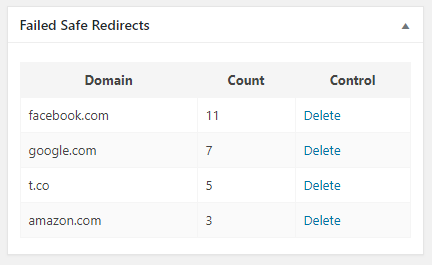
    I had an idea to solve this problem.  A simple logging plugin that logs failed redirects and adds a dashboard widget to show the domains and number of times the redirect has failed:

    The code behind this:

    <?php
    class Emrikol_WSRD_Dashboard {
    	public static function instance() {
    		static $instance = false;
    		if ( ! $instance ) {
    			$instance = new Emrikol_WSRD_Dashboard();
    		}
    		return $instance;
    	}
    
    	public function __construct() {
    		add_action( 'init', array( $this, 'init' ) );
    		add_filter( 'allowed_redirect_hosts', array( $this, 'check_redirect' ), PHP_INT_MAX, 2 );
    	}
    
    	public function init() {
    		if ( $this->is_admin() && isset( $_GET['wsrd_delete'] ) && check_admin_referer( 'wsrd_delete' ) && isset( $_GET['ID'] ) ) {
    			$post_id = (int) $_GET['ID'];
    
    			if ( 'wsrd' !== get_post_type( $post_id ) ) {
    				// This isn't the right post type, abort!
    				add_action( 'admin_notices', array( $this, 'message_log_not_deleted' ) );
    				return;
    			}
    
    			$delete = wp_delete_post( $post_id, true );
    			wp_cache_delete( 'wsrd_report' );
    
    			if ( $delete ) {
    				add_action( 'admin_notices', array( $this, 'message_log_deleted' ) );
    			} else {
    				add_action( 'admin_notices', array( $this, 'message_log_not_deleted' ) );
    			}
    		}
    
    		$args = array(
    			'supports' => array( 'title' ),
    			'public'   => false,
    		);
    		register_post_type( 'wsrd', $args );
    
    		add_action( 'wp_dashboard_setup', array( $this, 'add_dashboard_widgets' ) );
    	}
    
    	public function add_dashboard_widgets() {
    		if ( $this->is_admin() ) {
    			wp_add_dashboard_widget( 'emrikol_wsrd_dashboard', 'Failed Safe Redirects', array( $this, 'show_admin_dashboard' ) );
    		}
    	}
    
    	public function check_redirect( $allowed_hosts, $redirect_host ) {
    		if ( ! in_array( $redirect_host, $allowed_hosts, true ) ) {
    			// No redirect, please record.
    			$found_host = new WP_Query( array(
    				'fields'                 => 'ids',
    				'name'                   => md5( $redirect_host ),
    				'post_type'              => 'wsrd',
    				'post_status'            => 'any',
    				'no_found_rows'          => true,
    				'posts_per_page'         => 1,
    				'update_post_term_cache' => false,
    				'update_post_meta_cache' => false,
    			) );
    
    			if ( empty( $found_host->posts ) ) {
    				// No past redirect log found, create one.
    				$args   = array(
    					'post_name'  => md5( $redirect_host ),
    					'post_title' => $redirect_host,
    					'post_type'  => 'wsrd',
    					'meta_input' => array(
    						'count' => 1,
    					),
    				);
    				$insert = wp_insert_post( $args );
    			} else {
    				// Found!  Update count.
    				$count = absint( get_post_meta( $found_host->posts[0], 'count', true ) );
    				$count++;
    				update_post_meta( $found_host->posts[0], 'count', $count );
    			}
    		}
    		// We don't want to modify, always return allowed hosts unharmed.
    		return $allowed_hosts;
    	}
    
    	public function show_admin_dashboard() {
    		global $wpdb;
    
    		$report = wp_cache_get( 'wsrd_report' );
    		if ( false === $report ) {
    			$report = $wpdb->get_results( "SELECT ID, post_title AS host, meta_value AS count FROM $wpdb->posts LEFT JOIN $wpdb->postmeta ON ( $wpdb->posts.ID = $wpdb->postmeta.post_id ) WHERE post_type='wsrd'  ORDER BY ABS( count ) DESC LIMIT 20;" );
    			wp_cache_set( 'wsrd_report', $report, 'default', MINUTE_IN_SECONDS * 5 );
    		}
    
    		?>
    		<style>
    			table#wsrd {
    				border-collapse: collapse;
    				width: 100%;
    			}
    			table#wsrd th {
    				background: #f5f5f5;
    			}
    
    			table#wsrd th, table#wsrd td {
    				border: 1px solid #f5f5f5;
    				padding: 8px;
    			}
    
    			table#wsrd tr:nth-child(even) {
    				background: #fafafa;
    			}
    		</style>
    		<div class="activity-block">
    			<?php if ( empty( $report ) ) : ?>
    			<p><strong>None Found!</strong></p>
    			<?php else : ?>
    			<table id="wsrd">
    				<thead>
    					<tr>
    						<th>Domain</th>
    						<th>Count</th>
    						<th>Control</th>
    					</tr>
    				</thead>
    				<tbody>
    					<?php foreach ( $report as $line ) : ?>
    						<tr>
    							<td><?php echo esc_html( $line->host ); ?></td>
    							<td><?php echo esc_html( $line->count ); ?></td>
    							<td><a href="<?php echo esc_url( wp_nonce_url( add_query_arg( array( 'wsrd_delete' => true, 'ID' => rawurlencode( $line->ID ) ), admin_url() ), 'wsrd_delete' ) ); ?>">Delete</a></td>
    						</tr>
    					<?php endforeach; ?>
    				</tbody>
    			</table>
    			<?php endif; ?>
    		</div>
    		<?php
    	}
    
    	public function message_log_deleted() {
    		echo '<div id="message" class="notice notice-success is-dismissible"><p>Redirect log deleted!</p></div>';
    	}
    
    	public function message_log_not_deleted() {
    		echo '<div id="message" class="notice notice-error is-dismissible"><p>Redirect log delete failed!</p></div>';
    	}
    
    
    	private function is_admin() {
    		if ( current_user_can( 'manage_options' ) ) {
    			return true;
    		}
    		return false;
    	}
    }
    Emrikol_WSRD_Dashboard::instance();
    Code language: HTML, XML (xml)