Tag: parsing

  • Rescuing Tampermonkey Scripts from a LevelDB Backup

    Rescuing Tampermonkey Scripts from a LevelDB Backup

    I have a confession to make. I didn’t back up my Tampermonkey scripts. I recently switched to a new computer, and thought I had copied all of my important information over from the old one.

    It turns out, I did not. Luckily I did have a full disk backup that I thought I could just pull the .user.js files off of. OH BOY WAS I WRONG.

    The Oops: No Script Backup

    I’d cobbled together a dozen userscripts or more over years, but never bothered to add them to a backup routine. When I opened Tampermonkey on the new machine, it greeted me with the emptiest dashboard imaginable.

    Digging Into Chrome’s LevelDB

    It turns out Chrome buries extension data in your profile directory. The Tampermonkey store lives in a LevelDB folder named after its extension ID:

    /Volumes/OldHDD/derrick/Library/Application Support/Google/Chrome/Profile 1/IndexedDB/\
    chrome-extension_dhdgffkkebhmkfjojejmpbldmpobfkfo_0.indexeddb.leveldb

    Dumping with leveldbutil

    I used leveldbutil, a C++ command-line tool for dumping LevelDB databases. I had to clone the repo and compile it from source before it would run on macOS.

    ./leveldbutil dump "/Volumes/OldHDD/derrick/Library/Application Support/Google/Chrome/Profile 1/IndexedDB/chrome-extension_dhdgffkkebhmkfjojejmpbldmpobfkfo_0.indexeddb.leveldb" > tampermonkey-dump.txtCode language: Bash (bash)

    This produced a massive text dump (tampermonkey-dump.txt) of JSON blobs—metadata, source code, state… you name it.
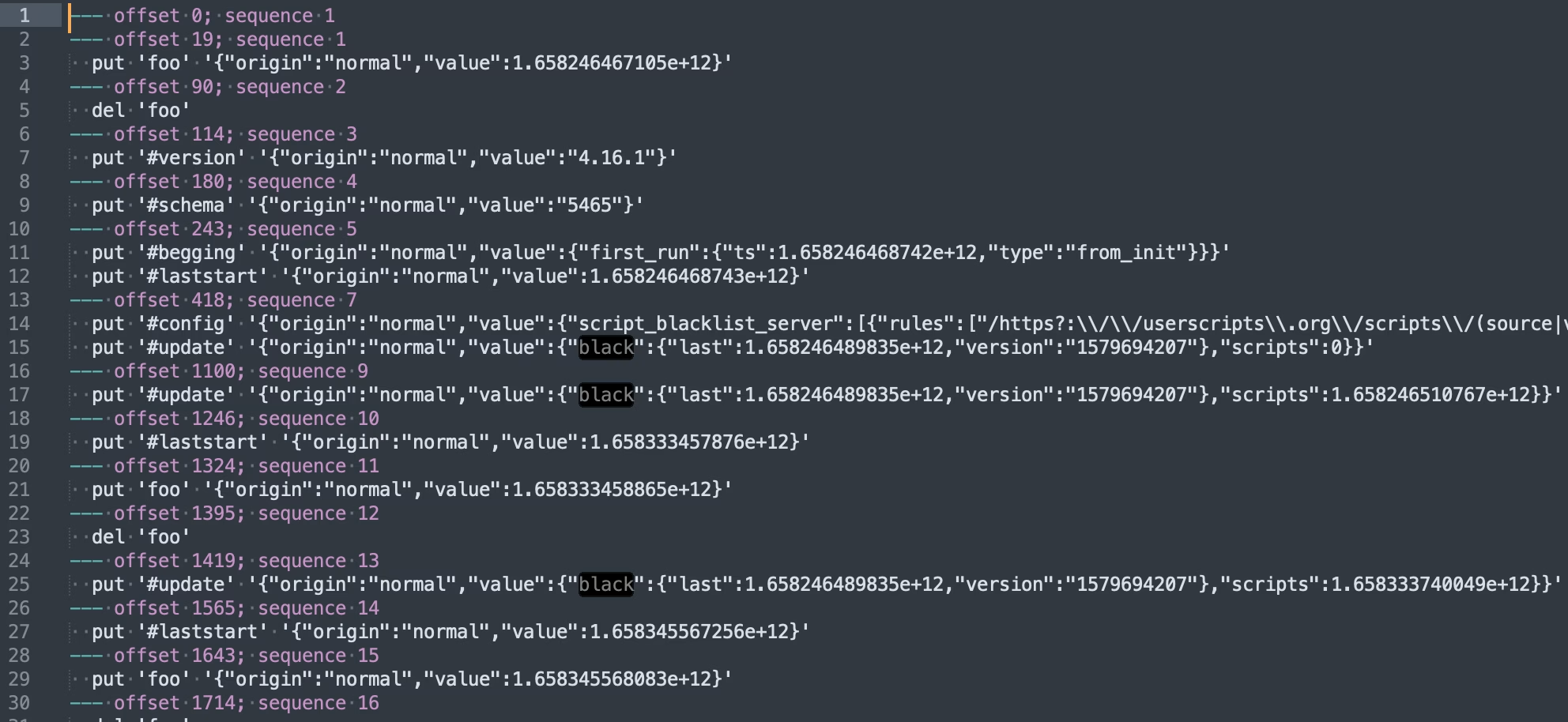
    Parsing the Dump: My One-Off Script

    Rather than manually eyeballing hundreds of lines, I whipped up a throwaway PHP script, let’s call it ScriptSalvager, to automate recovery. It:

    1. Loads the dump file.
    2. Scans for script entries via regex.
    3. json_decode()s each blob.
    4. Writes out individual script files.
    <?php
    /**
     * Exports Tampermonkey userscripts from a raw dump to per-script directories.
     *
     * This script reads the Tampermonkey IndexedDB dump, splits it into
     * individual userscript segments, parses each piece (meta, source,
     * rules, state, etc.), and writes each to its own file.
     */
    
    // Path to the raw Tampermonkey dump.
    $file = __DIR__ . '/tampermonkey-dump.txt';
    
    if ( ! is_readable( $file ) ) {
    	fwrite( STDERR, 'Cannot read file: ' . $file . "\n" );
    	exit( 1 );
    }
    
    // Load the file.
    $contents = file_get_contents( $file );
    
    // Split on lines like: "--- offset 123456; sequence 789".
    $segments = preg_split( '/^--- offset \d+; sequence \d+/m', $contents );
    
    // Remove any leading empty segment
    if ( isset( $segments[0] ) && trim( $segments[0] ) === '' ) {
    	array_shift( $segments );
    }
    
    // Collect only the userscript segments (those with both @meta and @source).
    $userscripts = [];
    foreach ( $segments as $segment ) {
    	if ( str_contains( $segment, "put '@meta#" ) && str_contains( $segment, "put '@source#" ) ) {
    		  // Normalize line endings and split into lines for readability.
    		  $normalized = str_replace( [ "\r\n", "\r" ], "\n", $segment );
    		  $lines = explode( "\n", $normalized );
    
    		  // Trim each line, and remove empty or external-resource lines.
    		  $filtered = [];
    		  foreach ( $lines as $line ) {
    			  $line = trim( $line );
    			  // Skip blank lines.
    			  if ( $line === '' ) {
    				  continue;
    			  }
    			  // Skip external-resource entries.
    			  if ( str_starts_with( $line, "put '@ext#" ) ) {
    				  continue;
    			  }
    			  $filtered[] = $line;
    		  }
    
    		  $userscripts[] = $filtered;
    	}
    }
    
    // Free memory we no longer need.
    unset( $contents, $segments );
    
    // Build an associative array of scripts by their UID values.
    $scripts = [];
    foreach ( $userscripts as $lines ) {
    	$items = [];
    	$script_uuid = null;
    	foreach ( $lines as $line ) {
    		  $trimmed = trim( $line );
    		  if ( ! str_starts_with( $trimmed, "put '" ) ) {
    			  echo "Error: Expected line to start with 'put '\n";
    			  die();
    		  }
    		  // Strip off leading "put '".
    		  $rest = substr( $trimmed, strlen( "put '" ) );
    		  // Split into type and remainder.
    		  [ $type, $after_hash ] = explode( '#', $rest, 2 );
    		  // Split remainder into UUID+closing-quote and JSON blob.
    		  [ $uid_quoted, $json_with_quote ] = explode( "' ", $after_hash, 2 );
    		  // Extract the UUID (no quotes).
    		  $uuid = trim( $uid_quoted, "'" );
    		  if ( $script_uuid === null ) {
    			  $script_uuid = $uuid;
    		  }
    
    		  // Trim single-quotes from JSON.
    		  $json_blob = trim( $json_with_quote, "'" );
    		  $value = $json_blob;
    		  $value = json_decode( $json_blob, true );
    		  if ( '@source' === $type ) {
    			  // Decode the source JSON.
    			  $value = json_decode( $json_blob, true );
    			  $value = $value['value'];
    		  } else {
    			$value = json_encode( $value['value'] ) ?? $json_blob;
    		}
    
    		  // Store, allowing duplicates to become arrays.
    		  if ( isset( $items[$type] ) ) {
    			  if ( ! is_array( $items[$type] ) ) {
    				  $items[$type] = [ $items[$type] ];
    			  }
    			  $items[$type][] = $value;
    		  } else {
    			  $items[$type] = $value;
    		  }
    	}
    	// Use the extracted UUID as the script key.
    	if ( $script_uuid === null ) {
    		echo "Error: Could not extract script UUID\n";
    		die();
    	}
    
    	if ( ! isset( $scripts[$script_uuid] ) ) {
    		$scripts[$script_uuid] = [];
    	}
    
    	$scripts[$script_uuid][] = $items;
    }
    
    // Add script names to the array.
    foreach ( $scripts as $uuid => $script ) {
    	foreach ( $script as $index => $version ) {
    		$name = $uuid;
    		// Check if the script has a name.
    		if ( isset( $version['@uid'] ) ) {
    			$uid = $version['@uid'];
    			$name = $uid;
    		} elseif ( isset( $version['@source'] ) ) {
    			$source = $version['@source'];
    			$normalized_source = str_replace( [ "\r\n", "\r" ], "\n", $source ?? '' );
    			$lines_source = explode( "\n", $normalized_source );
    			foreach( $lines_source as $line_source ) {
    				$line_source = trim( $line_source );
    				// Skip blank lines.
    				if ( $line_source === '' ) {
    					continue;
    				}
    
    				if ( str_contains( $line_source, "@name" ) ) {
    					$name_lines = explode( "@name", $line_source );
    					$name = trim( $name_lines[1] );
    					break;
    				}
    			}
    		}
    		if ( $name === $uuid ) {
    			echo "Error: Could not extract script name\n";
    			die();
    		}
    
    		// Remove leading and trailing quotes.
    		$name = trim( $name, '"' );
    
    		// Store the name in the script array.
    		$scripts[$uuid][$index]['@name'] = $name;
    	}
    }
    
    // If a script has multiple meta entries, split them into separate scripts.
    foreach ( $scripts as $uuid => $script ) {
    	foreach ( $script as $index => $version ) {
    		// Check if the script has multiple meta entries.
    		if ( isset( $version['@meta'] ) && is_array( $version['@meta'] ) ) {
    			foreach ( $version['@meta'] as $meta_index => $meta_value ) {
    				// Copy the script data to a new entry.
    				$new_script = $scripts[$uuid][$index];
    				// Remove the meta entry from the original script.
    				unset( $new_script['@meta'] );
    				// Copy the single meta entry to the new script.
    				$new_script['@meta'] = $meta_value;
    				// Unset the meta entry from the original script.
    				unset( $scripts[$uuid][$index]['@meta'] );
    				// Add the new script to the array.
    				$scripts[$uuid][] = $new_script;
    			}
    			// After splitting, remove the original script entry.
    			unset( $scripts[$uuid][$index] );
    		}
    	}
    }
    
    // Add lastModified to the array.
    foreach ( $scripts as $uuid => $script ) {
    	foreach ( $script as $index => $version ) {
    		// Check if the script has a lastModified.
    		if ( isset( $version['@meta'] ) ) {
    			$meta = $version['@meta'];
    			$meta = json_decode( $meta, true );
    			$meta = $meta['value'] ?? $meta;
    		   
    			if ( isset( $meta['lastModified'] ) ) {
    				$last_modified = $meta['lastModified'];
    				$scripts[$uuid][$index]['@lastModified'] = $last_modified;
    				$scripts[$uuid][$index]['@lastModifiedHuman'] = date( 'Y-m-d H:i:s', intval($last_modified/1000 ));
    			}
    
    			if ( isset( $meta['version'] ) ) {
    				$version_number = $meta['version'];
    				$scripts[$uuid][$index]['@version'] = $version_number;
    			}
    
    		}
    	}
    }
    
    // Export each script’s data into its own directory, with a unique name, timestamp, and version.
    foreach ( $scripts as $uuid => $script ) {
    	$latest_version = 0;
    	foreach ( $script as $index => $version ) {
    		// Determine directory name based on script name (fallback to UUID).
    		$name = $version['@name'];
    
    		$directory = $name . '/' . $version['@lastModifiedHuman'] . ' - v' . $version['@version'];
    
    		// Create or clear directory.
    		if ( ! is_dir( $directory ) ) {
    			mkdir( $directory, 0777, true );
    		}
    
    		// Write each part to its own JSON file.
    		foreach ( $version as $type => $value ) {
    			$base = trim( $type, '@' );
    
    			if ( 'source' === $base) {
    				// Export the userscript source unescaped so code remains intact.
    				$file_name = "{$directory}/{$base}.user.js";
    				file_put_contents( $file_name, $value );
    			} else {
    				// Single value, write normally.
    				if ( ! in_array( $base, [ 'name', 'lastModified', 'lastModifiedHuman', 'version' ] ) ) {
    					$value = json_decode( $value, true );
    				}
    				$file_name = "{$directory}/{$base}.json";
    				file_put_contents( $file_name, json_encode( $value, JSON_PRETTY_PRINT | JSON_UNESCAPED_SLASHES ) );
    			}
    		}
    
    		// Find the most recent lastModified date and set it as the "latest" version.
    		if ( isset( $version['@lastModified'] ) && $version['@lastModified'] > $latest_version ) {
    			$latest_version = $version['@lastModified'];
    
    			// Are we at the end of the array?
    			if ( $index === count( $script ) - 1 ) {
    				// Create the latest version directory.
    				$latest_directory = $name . '/latest';
    				if ( ! is_dir( $latest_directory ) ) {
    					mkdir( $latest_directory, 0777, true );
    				}
    				// Write each part to its own JSON file.
    				foreach ( $version as $type => $value ) {
    					if ( $latest_version !== $version['@lastModified'] ) {
    						continue;
    					}
    					$base = trim( $type, '@' );
    
    					if ( 'source' === $base) {
    						// Export the userscript source unescaped so code remains intact.
    						$file_name = "{$latest_directory}/{$base}.user.js";
    						file_put_contents( $file_name, $value );
    					} else {
    						// Single value, write normally.
    						if ( ! in_array( $base, [ 'name', 'lastModified', 'lastModifiedHuman', 'version' ] ) ) {
    							$value = json_decode( $value, true );
    						}
    						$file_name = "{$latest_directory}/{$base}.json";
    						file_put_contents( $file_name, json_encode( $value, JSON_PRETTY_PRINT | JSON_UNESCAPED_SLASHES ) );
    					}
    				}
    			}
    		}
    	}
    }Code language: PHP (php)

    Note: This was a one-and-done hack, don’t judge my variable names.

    The Recovery Steps

    1. Mount or locate your backup folder.
    2. Dump the LevelDB files: ./leveldbutil dump "/path/to/<profile>.leveldb" > tampermonkey-dump.txt
    3. Run ScriptSalvager: php scriptsalvager.php
    4. Cross your fingers and hope it dumps out all of your scripts.

    Lessons (That I Probably Won’t Learn)

    • Always export your userscripts from Tampermonkey–seriously.
    • Add them to your actual backup routine.
    • Or just never switch laptops again. 😬

    Happy salvaging!

  • Bash Script: Calculate before/after averages

    Bash Script: Calculate before/after averages

    I’ve been doing some performance testing, and wanted a quick way to test how well or poorly changes affect a site. Normally I’d whip out the ol’ calculator app and do this manually. That got tiring after a while, so instead with the help of ChatGPT, I made this little bash script that will do the work for you:

    #!/bin/bash
    
    # Function to calculate the average of a list of numbers
    average() {
    	local sum=0
    	local count=0
    
    	for num in "$@"; do
    		sum=$(echo "$sum + $num" | bc -l)
    		count=$((count+1))
    	done
    
    	echo "$sum / $count" | bc -l
    }
    
    # Parse arguments
    for i in "$@"; do
    	case $i in
    		--before=*)
    		BEFORE="${i#*=}"
    		shift
    		;;
    		--after=*)
    		AFTER="${i#*=}"
    		shift
    		;;
    		*)
    		# unknown option
    		;;
    	esac
    done
    
    # Check if both BEFORE and AFTER parameters are provided
    if [ -z "$BEFORE" ] || [ -z "$AFTER" ]; then
    	echo "Error: Missing required parameters."
    	echo "Usage: $0 --before=<comma-separated-values> --after=<comma-separated-values>"
    	exit 1
    fi
    
    IFS=',' read -ra BEFORE_LIST <<< "$BEFORE"
    IFS=',' read -ra AFTER_LIST <<< "$AFTER"
    
    # Calculate average for before and after lists
    BEFORE_AVG=$(printf "%.2f\n" $(average "${BEFORE_LIST[@]}"))
    AFTER_AVG=$(printf "%.2f\n" $(average "${AFTER_LIST[@]}"))
    
    echo "Before average: $BEFORE_AVG"
    echo "After average: $AFTER_AVG"
    
    # Calculate average percent increase, decrease or no change for the list
    if [ "$BEFORE_AVG" != "0.00" ]; then
    	PERCENT_CHANGE=$(echo "(($AFTER_AVG - $BEFORE_AVG) / $BEFORE_AVG) * 100" | bc -l)
    	if [ "$(echo "$PERCENT_CHANGE > 0" | bc -l)" -eq 1 ]; then
    		printf "Average percent increased: %.2f%%\n" "$PERCENT_CHANGE"
    	elif [ "$(echo "$PERCENT_CHANGE < 0" | bc -l)" -eq 1 ]; then
    		printf "Average percent decreased: %.2f%%\n" "$PERCENT_CHANGE" | tr -d '-'
    	else
    		echo "No change in average."
    	fi
    else
    	echo "Percent change from before to after: undefined (division by zero)"
    fi
    Code language: Bash (bash)

    It runs like this:

    $ average.sh --before=13.07,9.75,16.14,7.71,10.32 --after=1.22,1.28,1.13,1.19,1.26
    Before average: 11.40
    After average: 1.22
    Average percent decreased: 89.30%
    

    In this instance, it was calculating seconds–but you need to remember that it only goes to two decimal places, so if you need something finer you’ll need to adjust the code or your inputs.

    Happy Slacking!

  • Fixing a broken ATOM Feed

    Fixing a broken ATOM Feed

    My city is not known for being technologically adept, and I’m at least lucky they have a website with a CMS. Sadly though, the website offers only a broken ATOM 1.0 feed, a standard that’s old enough to drink in some countries.

    Unfortunately, this doesn’t work with NewsBlur, so I had to sort to building a proxy that would parse the XML and output a JSON Feed.

    Through the power of Phpfastcache (only for a little bit of caching), I am embarassed to show you this cobbled together mess:

    <?php
    define( 'DEBUG', false );
    
    if ( defined( 'DEBUG') && DEBUG ) {
    	ini_set('display_errors', 1);
    	ini_set('display_startup_errors', 1);
    	error_reporting(E_ALL);
    }
    
    use Phpfastcache\Helper\Psr16Adapter;
    require 'vendor/autoload.php';
    
    $cache     = new Psr16Adapter( 'Files' );
    $url       = 'https://www.cityoflinton.com/egov/api/request.egov?request=feed;dateformat=%25B%20%25d%20at%20%25X%23%23%25b%2B%2B%25d;featured=3;title=Upcoming%20Events;ctype=1;order=revdate';
    $cache_key = 'atom-feed_' . md5( $url );
    
    // Get and/or fill the cache.
    if ( ! $cache->has( $cache_key ) ) {
    	$atom_feed = file_get_contents( $url );
    	$cache->set( $cache_key, $atom_feed, 60 * 60 * 1 ); // 1 hour.
    } else {
    	$atom_feed = $cache->get( $cache_key );
    }
    
    $feed_data = new SimpleXMLElement( $atom_feed );
    
    $json_feed = array(
    	'version'       => 'https://jsonfeed.org/version/1.1',
    	'title'         => filter_var( trim( $feed_data->title ) ?? 'Upcoming Events for the City of Linton', FILTER_SANITIZE_STRING ),
    	'home_page_url' => 'https://www.cityoflinton.com/',
    	'feed_url'      => 'https://decarbonated.org/tools/cityoflinton-rss/',
    	'language'      => 'en-US',
    	'items'         => array(),
    );
    
    foreach( $feed_data->entry as $entry ) {
    	$json_feed['items'][] = array(
    		'id'            => md5( $entry->id ),
    		'url'           => filter_var( trim( $entry->link['href'] ) ?? 'NO LINK FOUND', FILTER_SANITIZE_URL ),
    		'title'         => filter_var( trim( $entry->title ) ?? 'NO TITLE FOUND', FILTER_SANITIZE_STRING ),
    		'content_text'  => filter_var( trim( $entry->summary ) ?? 'NO CONTENT FOUND', FILTER_SANITIZE_STRING ),
    		'date_modified' => ( new DateTime( trim( $entry->updated ) ?? now(), new DateTimeZone( 'America/New_York' ) ) )->format( DateTimeInterface::RFC3339 ),
    	);
    }
    
    if ( defined( 'DEBUG ' ) && DEBUG ) {
    	header( 'Content-Type: text/plain' );
    	var_dump( $json_feed );
    } else {
    	header( 'Content-Type: application/feed+json' );
    	echo json_encode( $json_feed );
    }
    Code language: HTML, XML (xml)

    This will convert the XML from (prettified):

    <?xml version="1.0" encoding="ISO-8859-1"?>
    <feed xmlns="http://www.w3.org/2005/Atom">
    	<title>Upcoming Events</title>
    	<link rel="self" href="https://www.cityoflinton.com/egov/api/request.egov?request=feed;dateformat=%25B%20%25d%20at%20%25X%23%23%25b%2B%2B%25d;featured=3;title=Upcoming%20Events;ctype=1;order=revdate" />
    	<updated>2021-12-09T10:14:40</updated>
    	<id>https://www.cityoflinton.com/egov/api/request.egov?request=feed;dateformat=%25B%20%25d%20at%20%25X%23%23%25b%2B%2B%25d;featured=3;title=Upcoming%20Events;ctype=1;order=revdate</id>
    	<author>
    		<name>Organization Information</name>
    	</author>
    	<entry>
    		<title>City Hall Closed</title>
    		<link rel="alternate" href="https://www.cityoflinton.com/egov/apps/events/calendar.egov?view=detail;id=501" />
    		<updated>2021-12-09T10:14:40</updated>
    		<id>https://www.cityoflinton.com/egov/apps/events/calendar.egov?view=detail;id=501</id>
    		<featured>0</featured>
    		<summary type="html">City Hall Closed</summary>
    	</entry>
    </feed>Code language: HTML, XML (xml)

    to JSON like:

    {
      "version": "https://jsonfeed.org/version/1.1",
      "title": "Upcoming Events",
      "home_page_url": "https://www.cityoflinton.com/",
      "feed_url": "https://decarbonated.org/tools/cityoflinton-rss/",
      "language": "en-US",
      "items": [
        {
          "id": "9b0bcc229cdc4266e539a785d77b4a8f",
          "url": "https://www.cityoflinton.com/egov/apps/events/calendar.egov?view=detail;id=501",
          "title": "City Hall Closed",
          "content_text": "City Hall Closed",
          "date_modified": "2021-12-09T10:14:40-05:00"
        }
      ]
    }Code language: JSON / JSON with Comments (json)

    That’s all ¯\_(ツ)_/¯

  • Quick Tip: Bash CLI params

    Quick Tip: Bash CLI params

    While working on a bash script, I stumbled upon what I think may be the cleanest and simplest way to add CLI params to a bash script so far:

    https://stackoverflow.com/questions/192249/how-do-i-parse-command-line-arguments-in-bash/14203146#14203146

    This lets you use short (-V), long (--version), space separated (--user john), and equal separated (--user=john) arguments.

    It’s not perfect, but for a quick bash script hack, I’ve found it very useful!

  • Quick Tip: Export WordPress SQL output via WP-CLI

    Quick Tip: Export WordPress SQL output via WP-CLI

    If for some reason you can’t run wp db query, but need to export SQL output to a CSV or other file, then have a look at this small WP-CLI command I whipped up that should allow this:

    /**
     * Runs a SQL query against the site database.
     *
     * ## OPTIONS
     *
     * 
     * : SQL Query to run.
     *
     * [--format=]
     * : Render output in a particular format.
     * ---
     * default: table
     * options:
     * - table
     * - csv
     * - json
     * - count
     * - yaml
     * ---
     *
     * [--dry-run=]
     * : Performa a dry run
     *
     * @subcommand sql
     */
    public function sql( $args, $assoc_args ) {
         global $wpdb;
     
         $sql     = $args[0];
         $format  = WP_CLI\Utils\get_flag_value( $assoc_args, 'format', 'table' );
         $dry_run = WP_CLI\Utils\get_flag_value( $assoc_args, 'dry-run', 'true' );
     
         // Just some precautions.
         if ( preg_match( '/[update|delete|drop|insert|create|alter|rename|truncate|replace]/i', $sql ) ) {
             WP_CLI::error( 'Please do not modify the database with this command.' );
         }
     
         if ( 'false' !== $dry_run ) {
             WP_CLI::log( WP_CLI::colorize( '%gDRY-RUN%n: <code>EXPLAIN</code> of the query is below: https://mariadb.com/kb/en/explain/' ) );
             $sql = 'EXPLAIN ' . $sql;
         }
     
         // Fetch results from database.
         $results = $wpdb->get_results( $sql, ARRAY_A ); // phpcs:ignore WordPress.DB
     
         // Output data.
         WP_CLI\Utils\format_items( $format, $results, array_keys( $results[0] ) );
    }Code language: PHP (php)

    I’d add an example here, but I don’t have any right now that I can share 😐 I’ll try to find one later (don’t hold your breath on me remembering to do that)