Tag: theme-development

  • Quick Tip: DreamHost cron and WP-CLI

    Quick Tip: DreamHost cron and WP-CLI

    If you’re hosting your WordPress website on DreamHost, and use their cron system to offload your WordPress faux-cron for better reliability, be careful of what version of PHP you have in your code.

    I recently had an issue where my cron events weren’t firing, and after enabling email output, I ended up with something like this PHP error message:

    Parse error: syntax error, unexpected '?' in /path/to/file.php on line 123

    It turns out that WP-CLI was running PHP 5.x via the DreamHost cron system.  I had PHP 7.x specific code in my theme.
    To fix this, I had to set the WP_CLI_PHP environment variable in my cron job:

    export WP_CLI_PHP=/usr/local/php72/bin/php
    wp cron event run --due-now --path=/home/path/to/wp/ --url=https://example.com/Code language: JavaScript (javascript)
  • Auto-enable WP_DEBUG with a cookie

    Auto-enable WP_DEBUG with a cookie

    One of the most important things to do when working on new themes, plugins, or debugging issues in WordPress is to turn on WP_DEBUG.  According to the Codex:

    WP_DEBUG is a PHP constant (a permanent global variable) that can be used to trigger the “debug” mode throughout WordPress. It is assumed to be false by default and is usually set to true in the wp-config.php file on development copies of WordPress.

    It’s common to edit the wp-config.php file every time you want to turn this off and on, but another way to do it is via a secret cookie:

    if ( isset( $_COOKIE[ 'wp_secret_debug_cookie' ] ) ) {
    	define( 'WP_DEBUG', true );
    }Code language: PHP (php)

    I also like to pair my WP_DEBUG with these extra settings:

    if ( defined( 'WP_DEBUG' ) && true === WP_DEBUG ) {
    	define( 'WP_DEBUG_LOG', true );
    	define( 'SCRIPT_DEBUG', true );
    	define( 'WP_DEBUG_DISPLAY', true );
    	define( 'CONCATENATE_SCRIPTS', false );
    	define( 'SAVEQUERIES', true );
    }Code language: JavaScript (javascript)

    I set the cookie in an mu-plugin like this (Note: This code could definitely be improved)

    function emrikol_admin_debug() {
    	if ( is_super_admin() ) {
    		setcookie( 'wp_secret_debug_cookie', 'on', time() + 86400, '/', wp_parse_url( get_site_url(), PHP_URL_HOST ) );
    		setcookie( 'wp_secret_debug_cookie', 'on', time() + 86400, '/', wp_parse_url( get_home_url(), PHP_URL_HOST ) );
    		setcookie( 'wp_secret_debug_cookie', 'on', time() + 86400, '/', wp_parse_url( get_admin_url(), PHP_URL_HOST ) );
    
    		// Allow sites to set extra domains to add cookie to--good for subdomain multisite.
    		$extra_domains = apply_filters( 'emrikol_admin_debug_domain', false );
    		if ( false !== $extra_domains ) {
    			if ( is_array( $extra_domains ) ) {
    				foreach ( $extra_domains as $extra_domain ) {
    					setcookie( 'wp_secret_debug_cookie', 'on', time() + 86400, '/', $extra_domain );
    				}
    			} else {
    					setcookie( 'wp_secret_debug_cookie', 'on', time() + 86400, '/', $extra_domains );
    			}
    		}
    	}
    }
    add_action( 'init', 'emrikol_admin_debug', 10 );
    add_action( 'admin_init', 'emrikol_admin_debug', 10 );Code language: PHP (php)

  • Disabling plugin deactivation in WordPress

    Disabling plugin deactivation in WordPress

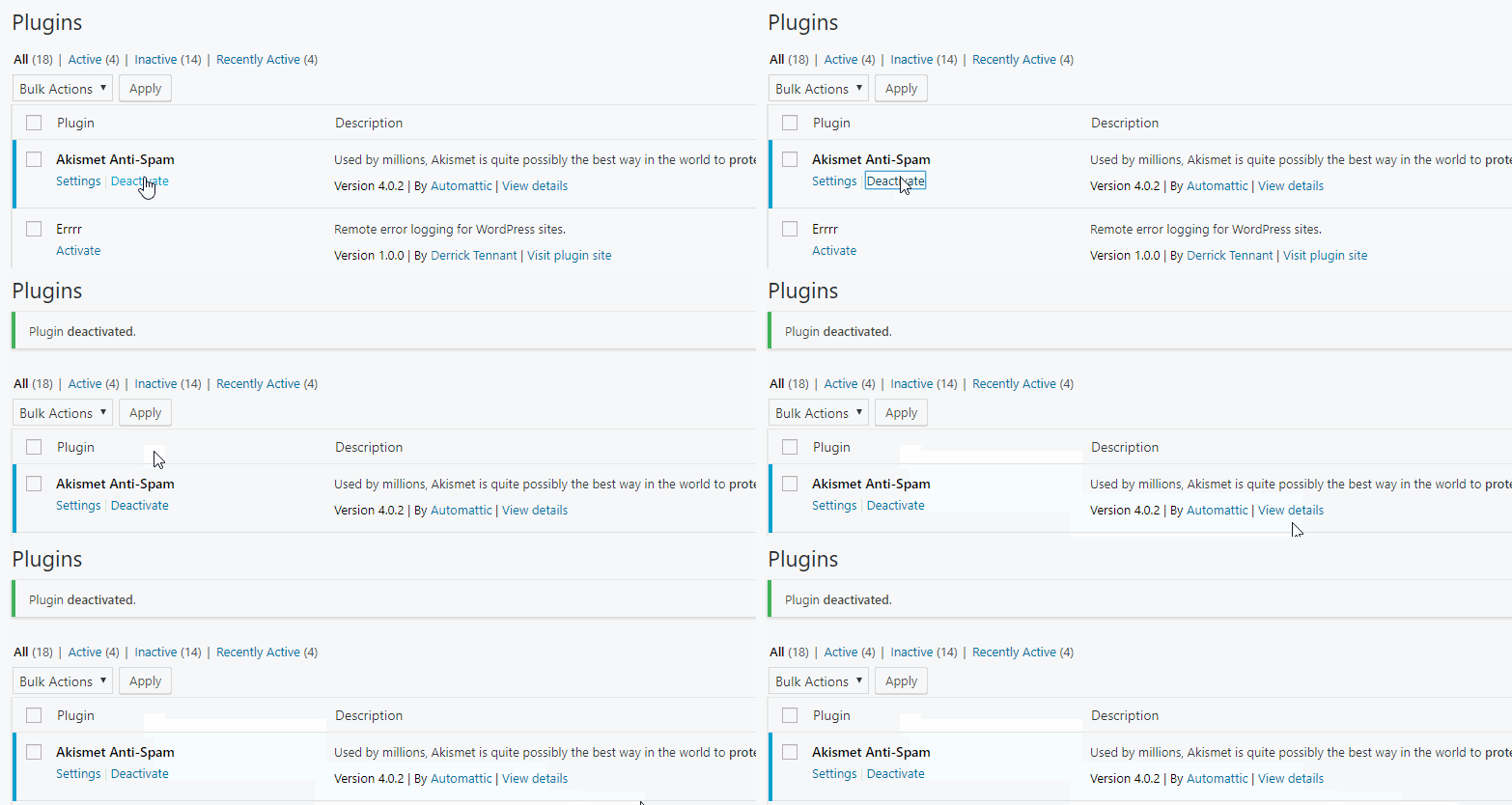
    The problem came up recently about how to make sure plugins activated in the WordPress plugin UI don’t get deactivated if they are necessary for a site to function.  I thought that was an interesting thought puzzle worth spending 15 minutes on, so I came up with this function as a solution:

    function dt_force_plugin_active( $plugin ) {
    add_filter( 'pre_update_option_active_plugins', function ( $active_plugins ) use ( $plugin ) {
    // Match if properly named: wp-plugin (wp-plugin/wp-plugin.php).
    $proper_plugin_name = $plugin . '/' . $plugin . '.php';
    <pre><code>    if (
            file_exists( WP_PLUGIN_DIR . '/' . $proper_plugin_name )
            &amp;amp;&amp;amp; is_file( WP_PLUGIN_DIR . '/' . $proper_plugin_name )
            &amp;amp;&amp;amp; ! in_array( $proper_plugin_name, $active_plugins, true )
        ) {
            $active_plugins[] = $proper_plugin_name;
            return array_unique( $active_plugins );
        }
    
        // Match if improperly named: wp-plugin/cool-plugin.php.
        if (
            file_exists( WP_PLUGIN_DIR . '/' . $plugin )
            &amp;amp;&amp;amp; is_file( WP_PLUGIN_DIR . '/' . $plugin )
            &amp;amp;&amp;amp; ! in_array( $plugin, $active_plugins, true )
        ) {
            $active_plugins[] = $plugin;
            return array_unique( $active_plugins );
        }
    
        return array_unique( $active_plugins );
    }, 1000, 1 );Code language: PHP (php)

    Which can be activated in your theme’s functions.php like so:

    dt_force_plugin_active( 'akismet' ); or dt_force_plugin_active( 'wordpress-seo/wp-seo.php' );

    The only downside that I’ve seen so far is that you still get the Plugin deactivated. message in the admin notices.