
echo $(echo 66 85 84 84 83 | awk '{for(i=1;i<=NF;i++) printf "%c", $i}')
Author: Derrick
-

Bash Script: Calculate before/after 2: Calculate Harder
As an update, or an evolution of my earlier script that did some simple math for me, I’ve made one that will full-on test a URL while I’m making changes to see what the impact performance is of my updates.
$ abtesturl.sh --url=https://example.com/ --count=10
Press any key to run initial tests...
Initial average TTFB: 3.538 seconds
Press any key to re-run tests...

Running second test...
Second average TTFB: 1.975 seconds
Before TTFB: 3.538 seconds
After TTFB: 1.975 seconds
Change in TTFB: -1.563 seconds
Percentage Change: -44.00%
It makes it much simpler to gather data to write reports or figure out of a change is worth the effort.
Well, that’s about it so here’s the script:
#!/bin/bash

function show_usage() {
	echo "Usage: $0 --url=<URL> [--count=<number of requests>]"
	echo "  --url        Specifies the URL to test."
	echo "  --count      Optional. Specifies the number of requests to send. Default is 6."
	echo
	echo "Example: $0 --url=https://example.com/ --count=5"
	exit
}

function average_ttfb() {
	local URL=""
	local COUNT=6 # Default COUNT to 6 if not supplied
	local CURL_OPTS="-s"

	# Parse arguments
	for arg in "$@"; do
		case $arg in
			--url=*)
			URL="${arg#*=}"
			shift # Remove argument from processing
			;;
		--count=*)
			COUNT="${arg#*=}"
			shift # Remove argument from processing
			;;
		*)
			# Unknown option
			;;
		esac
	done

	if [[ -z "$URL" ]]; then
		exit 1
	fi

	local total_time=0
	local count_success=0

	for ((i=1; i<=COUNT; i++))
	do
		# Perform the curl command, extracting the time to first byte
		ttfb=$(curl $CURL_OPTS -o /dev/null -w "%{time_starttransfer}\n" $URL)

		# Check if the curl command was successful
		if [ $? -eq 0 ]; then
			total_time=$(echo "$total_time + $ttfb" | bc)
			((count_success++))
		else
			echo "Request $i failed." >&2
		fi
	done

	if [ $count_success -eq 0 ]; then
		echo "All requests failed." >&2
		return 1
	fi

	# Calculate the average TTFB
	average_time=$(echo "scale=3; $total_time / $count_success" | bc)
	echo $average_time # This line now simply outputs the average time
}

function ab_test_ttfb() {
	# Run initial test
	read -p "Press any key to run initial tests..." -n 1 -r
	initial_ttfb=$(set -e; average_ttfb "$@"; set +e)
	echo "Initial average TTFB: $initial_ttfb seconds"

	# Wait for user input to proceed
	read -p "Press any key to re-run tests..." -n 1 -r
	echo # Move to a new line

	# Run second test
	echo "Running second test..."
	second_ttfb=$(average_ttfb "$@")
	echo "Second average TTFB: $second_ttfb seconds"

	# Calculate and output the difference and percentage change
	difference=$(echo "$second_ttfb - $initial_ttfb" | bc)
	percent_change=$(echo "scale=2; ($difference / $initial_ttfb) * 100" | bc)

	echo "Before TTFB: $initial_ttfb seconds"
	echo "After TTFB: $second_ttfb seconds"
	echo "Change in TTFB: $difference seconds"
	echo "Percentage Change: $percent_change%"
}

# Check if help is requested or no arguments are provided
if [[ " $* " == *" --help "* ]] || [[ "$#" -eq 0 ]]; then
	show_usage
fi

# Check if --url is in the arguments
url_present=false
for arg in "$@"; do
	if [[ $arg == --url=* ]]; then
		url_present=true
		break
	fi
done

if [ "$url_present" = false ]; then
	echo "Error: --url argument is required."
	show_usage
fi

ab_test_ttfb "$@"
Don’t break anything!
-

Code Sweep: A Simple Approach to a Neater WordPress User List
Feel like clearing out your spam users? With the snippet below we can make your job much easier!
/**
 * Adds a new column to the user management screen for displaying the number of comments.
 *
 * @param array $columns The existing columns in the user management screen.
 *
 * @return array The modified columns array with the new 'comments_count' column added.
 */
function emrikol_add_comments_column( array $columns ): array {
	$columns['comments_count'] = esc_html__( text: 'Comments', domain: 'default' );
	return $columns;
}
add_filter( 'manage_users_columns', 'emrikol_add_comments_column' );

/**
 * Displays the number of comments for a user in the custom column.
 *
 * @param string $output       The value to be displayed in the column.
 * @param string $column_name  The name of the custom column.
 * @param int    $user_id      The ID of the user.
 *
 * @return string              The updated value to be displayed in the column.
 */
function emrikol_show_comments_count( string $output, string $column_name, int $user_id ): string {
	if ( 'comments_count' == $column_name ) {
		$args           = array(
			'user_id' => $user_id,
			'count'   => true,
		);
		$comments_count = get_comments( args: $args );
		return number_format_i18n( number: $comments_count );
	}

	return $output;
}
add_action( 'manage_users_custom_column', 'emrikol_show_comments_count', 10, 3 );
This will add a “Comments” count to the WordPress user list so you can easily determine which users you can delete:
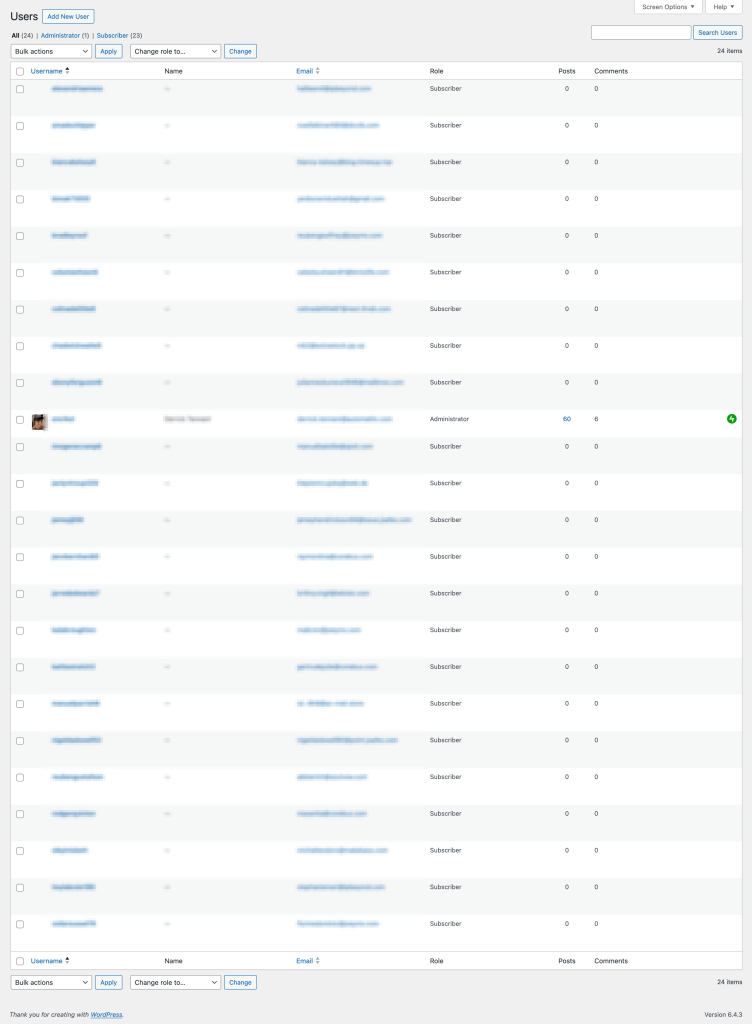
What a sad state this blarg is in…
-

Matrix Reimagined: Crafting Digital Rain with Bash and ChatGPT
Just for fun, and I have no idea why I thought about it, I decided to work with ChatGPT (4) to build a simple bash-based version of the Matrix Digital Rain. I know there’s already better versions, like cmatrix, but we do not do things because they are easy. We do them because we are bored.

I’ve asked ChatGPT to heavily comment the code for us so that we can see exactly what’s going on:
#!/bin/bash

# This script creates a Matrix-style falling text effect in the terminal.

# Define strings for extra characters (Japanese Katakana) and extended ASCII characters
extra_chars="カキクケコサシスセソタチツテトナニヌネノハヒフヘホマミムメモヤユヨラリルレロワン"
extended_ascii="│┤┐└┴┬├─┼┘┌≡"

# Define arrays of color codes for a fading green color effect, and a static color
fade_colors=('\033[38;2;0;255;0m' '\033[38;2;0;192;0m' '\033[38;2;0;128;0m' '\033[38;2;0;64;0m' '\033[38;2;0;32;0m' '\033[38;2;0;32;0m' '\033[38;2;0;32;0m' '\033[38;2;0;32;0m' '\033[38;2;0;32;0m' '\033[38;2;0;32;0m' '\033[38;2;0;32;0m' '\033[38;2;0;32;0m' '\033[38;2;0;32;0m' '\033[38;2;0;32;0m' '\033[38;2;0;32;0m' '\033[38;2;0;32;0m' '\033[38;2;0;32;0m' '\033[38;2;0;32;0m' '\033[38;2;0;32;0m' '\033[38;2;0;32;0m' '\033[38;2;0;16;0m' '\033[38;2;0;8;0m') # Fading green colors
static_color='\033[38;2;0;0;0m' # Static dark green color
white_bold='\033[1;37m' # White and bold for the primary character

# Get terminal dimensions
COLUMNS=$(tput cols) # Number of columns in the terminal
ROWS=$(tput lines) # Number of rows in the terminal


# Hide the cursor for a cleaner effect and clear the screen
echo -ne '\033[?25l'
clear

# Function to generate a random character from the set of extra characters and extended ASCII
random_char() {
	local chars="abcdefghijklmnopqrstuvwxyzABCDEFGHIJKLMNOPQRSTUVWXYZ0123456789${extra_chars}${extended_ascii}"
	echo -n "${chars:RANDOM%${#chars}:1}"
}

# Generate a list of 1000 random characters
random_chars=""
for (( i=0; i<1000; i++ )); do
	random_chars+=$(random_char) # Add a random character to the end of the string
done

# Initialize a counter for cycling through the random characters
char_counter=0 # Counter for cycling through the random characters

# Initialize arrays to keep track of the position and trail characters of each column
positions=() # Array to store the current position in each column
trail_chars=() # Array to store the trail characters in each column
for (( c=1; c<=COLUMNS; c++ )); do
	positions[$c]=$((RANDOM % ROWS)) # Random starting position for each column
	trail_chars[$c]="" # Start with an empty trail for each column
done

# Function to update the display with the falling text effect
update_line() {
	local last_pos=0  # Track the last position to optimize cursor movement

	for (( c=1; c<=COLUMNS; c++ )); do
		# Randomly skip updating some columns to create a dynamic effect
		if [ $((RANDOM % 4)) -ne 0 ]; then
			continue
		fi

		local new_char=${random_chars:$char_counter:1} # Select the next character from the random string
		char_counter=$(( (char_counter + 1) % 1000 )) # Update the counter, cycling back after 1000

		local pos=${positions[$c]} # Current position in this column
		local trail=${trail_chars[$c]} # Current trail of characters in this column

		trail_chars[$c]="${new_char}${trail:0:$((ROWS - 1))}" # Update the trail by adding new character at the top

		# Render the trail of characters
		for (( i=0; i<${#trail}; i++ )); do
			local trail_pos=$((pos - i)) # Calculate the position for each character in the trail
			if [ $trail_pos -ge 0 ] && [ $trail_pos -lt $ROWS ]; then
				local color=${fade_colors[i]:-$static_color} # Choose color from the fade array or static color if beyond the array
				if [ $i -eq 0 ]; then
					color=$white_bold # First character in the trail is white and bold
				fi
				if [ $last_pos -ne $trail_pos ]; then
					printf "%b" "\033[${trail_pos};${c}H" # Move cursor to the right position
					last_pos=$trail_pos
				fi
				printf "%b" "${color}${trail:$i:1}\033[0m" # Print the character with color
			fi
		done

		positions[$c]=$((pos + 1)) # Update the position for the next cycle
		if [ $pos -ge $((ROWS + ${#fade_colors[@]})) ]; then
			positions[$c]=0 # Reset position if it moves off screen
			trail_chars[$c]=""
		fi
	done
}

# Main loop for continuous execution of the update_line function
while true; do
	update_line
done

# Reset terminal settings on exit (show cursor, clear screen, reset text format)
echo -ne '\033[?25h' # Show cursor
clear
tput sgr0 # Reset text format
Challenges Faced
Developing the Matrix Digital Rain script presented specific challenges, especially in terms of performance. The initial use of
tputfor cursor manipulation proved inefficient for the dynamic text display. This issue was resolved by switching toprintfand ANSI escape sequences, which significantly enhanced the rendering performance.Another problem arose with the use of fullwidth Katakana characters, which were incompatible with monospaced fonts, disrupting the visual flow. The solution involved adopting halfwidth Katakana, ensuring better compatibility and preserving the uniformity essential for the Matrix-style effect.
Another notable challenge emerged in development: the inefficiency of generating random characters on the fly. Due to Bash’s slower handling of string functions, this method significantly hindered performance. To tackle this, a strategic shift was made from real-time character generation to utilizing a predefined lookup table.
This approach involved generating a large set of pseudorandom characters before entering the main loop of the program. By doing so, I could rapidly access this table during runtime, boosting performance. This change played a crucial role in maintaining fluidity and responsiveness. It also preserved the illusion of randomness, essential for the authentic Matrix effect, thus striking a balance between performance efficiency and visual fidelity.
If you’d like to see what it looks like, here’s an example:
So yeah. That’s it I guess? Enjoy!
-

Quick Tip: Add Screen Name to Bash Prompt
I often SSH into servers to get some work done, and one of the things I discovered recently is that I may not always know or remember if I’m in a screen session.
So I had the bright idea to just add it to my shell prompt!
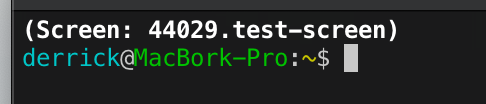
Simply just add one of these to your RC file of choice:
Bash
# Add Screen name to PS1 if we're in a screen.
if [ -n "$STY" ]; then
	PS1="\[\e[1m\](Screen: $STY)\[\e[0m\]\n$PS1"
fi
ZSH
# Add Screen name to PROMPT if we're in a screen.
if [[ -n "$STY" ]]; then
	PROMPT="%B(Screen: $STY)%b"$'\n'"$PROMPT"
fi
And remember, if you’re asking yourself if you should run something in a screen, you’re already too late!
-

Bash Script: Calculate before/after averages
I’ve been doing some performance testing, and wanted a quick way to test how well or poorly changes affect a site. Normally I’d whip out the ol’ calculator app and do this manually. That got tiring after a while, so instead with the help of ChatGPT, I made this little bash script that will do the work for you:
#!/bin/bash

# Function to calculate the average of a list of numbers
average() {
	local sum=0
	local count=0

	for num in "$@"; do
		sum=$(echo "$sum + $num" | bc -l)
		count=$((count+1))
	done

	echo "$sum / $count" | bc -l
}

# Parse arguments
for i in "$@"; do
	case $i in
		--before=*)
		BEFORE="${i#*=}"
		shift
		;;
		--after=*)
		AFTER="${i#*=}"
		shift
		;;
		*)
		# unknown option
		;;
	esac
done

# Check if both BEFORE and AFTER parameters are provided
if [ -z "$BEFORE" ] || [ -z "$AFTER" ]; then
	echo "Error: Missing required parameters."
	echo "Usage: $0 --before=<comma-separated-values> --after=<comma-separated-values>"
	exit 1
fi

IFS=',' read -ra BEFORE_LIST <<< "$BEFORE"
IFS=',' read -ra AFTER_LIST <<< "$AFTER"

# Calculate average for before and after lists
BEFORE_AVG=$(printf "%.2f\n" $(average "${BEFORE_LIST[@]}"))
AFTER_AVG=$(printf "%.2f\n" $(average "${AFTER_LIST[@]}"))

echo "Before average: $BEFORE_AVG"
echo "After average: $AFTER_AVG"

# Calculate average percent increase, decrease or no change for the list
if [ "$BEFORE_AVG" != "0.00" ]; then
	PERCENT_CHANGE=$(echo "(($AFTER_AVG - $BEFORE_AVG) / $BEFORE_AVG) * 100" | bc -l)
	if [ "$(echo "$PERCENT_CHANGE > 0" | bc -l)" -eq 1 ]; then
		printf "Average percent increased: %.2f%%\n" "$PERCENT_CHANGE"
	elif [ "$(echo "$PERCENT_CHANGE < 0" | bc -l)" -eq 1 ]; then
		printf "Average percent decreased: %.2f%%\n" "$PERCENT_CHANGE" | tr -d '-'
	else
		echo "No change in average."
	fi
else
	echo "Percent change from before to after: undefined (division by zero)"
fi
It runs like this:
$ average.sh --before=13.07,9.75,16.14,7.71,10.32 --after=1.22,1.28,1.13,1.19,1.26
Before average: 11.40
After average: 1.22
Average percent decreased: 89.30%
In this instance, it was calculating seconds–but you need to remember that it only goes to two decimal places, so if you need something finer you’ll need to adjust the code or your inputs.
Happy Slacking!
-

Meet The Plugin That Lists All Your Multisite’s Sites: Multisite Site List
Have you ever found yourself in this common situation?
“I’ve got this lovely WordPress Multisite, but I’d like to list every site on it in a post or page!”
Of course you have–we’ve all been there.
Well, let me introduce you to my newest plugin:
site-listInstalling the Plugin
Installing it is a breeze, and using it is as easy as pie—assuming you find pie easy. Just clone the git repository, grab the code, upload it to your WordPress site, and enable it. Don’t forget to constantly check back in the repository for updates that will probably never come because I didn’t upload this to the WordPress.org Plugin Repository.
Example Output
This plugin does one thing: It adds a new block called “Multisite Site List” that lists the site in a multisite in an unordered list, like this:
<ul class="ms-sites-list">
	<li>
		<a href="https://example.com/">My Website</a>
		<p>The Super Awesome Site Tagline</p>
	</li>
	<li>
		<a href="https://example.com/better-site">My Even Better Website</a>
		<p>The Better Site Tagline</p>
	</li>
	<li>
		<a href="https://example.com/garbage-site">My Blarg</a>
		<p>Why are you even reading this?</p>
	</li>
</ul>
Customizing the Output
“But Derrick, what if I want to hide a site, or change something?”
Why would you? This is perfect as-is. *sigh* Oh, you want to be the captain of your ship? Fine, here’s a filter for you:
/**
 * Filters the list of sites retrieved by the `get_sites()` function.
 *
 * This filter allows developers to modify the list of sites before
 * they are processed and rendered in the `ms_sites_list_block_render()` function.
 * It can be useful for modifying, adding, or removing sites based on custom criteria
 * or to inject additional information into the sites' data.
 *
 * @param array $sites An array of `WP_Site` objects representing each site in the WordPress multisite network.
 */
$sites = apply_filters( 'site_list_get_sites', get_sites() );
Happy now?
So yeah, this is a thing. Do what you want with it, and enjoy.
-

Guerilla Ad-Blocking: Taking Back the Web with WordPress
I have a new favorite WordPress plugin that I’ve just installed on my site:
This plugin, by Stefan Bohacek, adds a notice to your site whenever a visitor comes that does not have an ad blocker installed:

Using an ad blocker isn’t just about security and privacy, it also helps conserve your precious bandwidth. By blocking resource-intensive ads, it improves the loading speed of websites and saves you time.
Additionally, an ad blocker protects your information from being harvested by advertisers, giving some peace of mind while browsing the web.
You’ll also cut your “web carbon footprint” to a fraction of itself! Ugh, what a parasitic industry.
My favorite is uBlock Origin, but I also love Pi-Hole for network-level blocking <3
-

Macbook Battery Stats in Your ZSH Terminal Prompt
As a power user of my Macbook, I’ve found that I often overlook the small battery icon on my menu bar, especially when I’m immersed in a fun project. This minor inconvenience sparked a thought: why not incorporate the battery status directly into my terminal prompt? Thus, I embarked on a fun exploration into ZSH scripting. With a bit of coding magic, I was able to enhance my terminal prompt to dynamically display my Macbook’s battery percentage. Let me guide you through the process.
We start by loading the ZSH hook module. This module allows us to add functions that run before and/or after each command, giving us the ability to update our battery status prompt in real-time.
autoload -U add-zsh-hookThe Battery Status Function
Next, I crafted a function,
terminal_battery_stats, that retrieves battery information and displays it in the terminal prompt. Here’s how it works:function terminal_battery_stats { # Retrieve battery statistics using the pmset command. This is a macOS # command that allows power management and battery status retrieval. # The awk command is used to format the output into a useful string. bat_info=$(pmset -g batt | awk 'NR==2 {gsub(/;/,""); print $3 " " $4}') # Extract the battery percentage and state from the bat_info string. bat_percent=$(echo $bat_info | cut -d' ' -f1 | tr -d '%') bat_state=$(echo $bat_info | cut -d' ' -f2) # Check if the battery is charging or on AC power. if [ $bat_state = 'charging' ] || [ $bat_state = 'AC' ] || [ $bat_state = 'charged' ] || [ $bat_state = 'finishing' ]; then # If the battery is over 66%, don't display a battery prompt. if [ $bat_percent -gt 66 ]; then bat_prompt="" else # Otherwise, set the battery icon to a plug, and the color to green. bat_icon='🔌' bat_color='%F{green}' # Format the prompt with the battery color, percentage, and icon. bat_prompt="〔$bat_color$bat_percent%% $bat_icon%f〕" fi else # If the battery is discharging, choose a battery icon and color based on the battery level. if [ $bat_percent -le 33 ]; then bat_icon='🪫' bat_color='%F{red}' elif [ $bat_percent -gt 66 ]; then bat_icon='🔋' bat_color='%F{green}' else bat_icon='🔋' bat_color='%F{yellow}' fi # Format the prompt with the battery color, percentage, and icon. bat_prompt="〔$bat_color$bat_percent%% $bat_icon%f〕" fi # Check if the current prompt already contains a battery status. if [[ "$PROMPT" == *"〔"* ]]; then # If it does, remove the existing battery status from the prompt. PROMPT=${PROMPT#*"〕"} fi # Add the new battery status to the prompt. PROMPT="${bat_prompt}${PROMPT}" }To get some basic understanding of the magic behind ZSH scripting and manipulating the terminal prompt, check this helpful resource.
Applying the Battery Status Function
After creating the function, I added
terminal_battery_statsto the command prompt via ZSH’s pre-command hook. Now, my function runs before each command entered in the terminal, keeping the battery stats up-to-date.add-zsh-hook precmd terminal_battery_statsAll the above code is added to my
~/.zshrcfile, turning my terminal prompt into a dynamic display of my Macbook’s battery status. The resulting terminal prompt looks like this:
Conclusion
Through the power of ZSH scripting magic, my terminal now offers real-time updates of my Macbook’s battery status after every command. I set it to disappear once the battery reaches 67%, a level I consider to be within the safe zone. This is an excellent example of how minor inconveniences can lead to innovative solutions that enhance productivity.
Here’s the full script ready to drop in to your own
~/.zshrcfile:
# Load the zsh hook module. This is a module that allows adding functions
# that get run before and/or after each command.
autoload -U add-zsh-hook

# Function to retrieve and display battery statistics in the terminal prompt.
# Uses the pmset command to retrieve battery information, and awk to format
# it into a useful string. Depending on the battery's state and level,
# different icons and colors will be displayed in the terminal prompt.
#
# @return void
function terminal_battery_stats {
    # Retrieve battery statistics using the pmset command. This is a macOS
    # command that allows power management and battery status retrieval.
    # The awk command is used to format the output into a useful string.
    bat_info=$(pmset -g batt | awk 'NR==2 {gsub(/;/,""); print $3 " " $4}')

    # Extract the battery percentage and state from the bat_info string.
    bat_percent=$(echo $bat_info | cut -d' ' -f1 | tr -d '%')
    bat_state=$(echo $bat_info | cut -d' ' -f2)

    # Check if the battery is charging or on AC power.
    if [ $bat_state = 'charging' ] || [ $bat_state = 'AC' ] || [ $bat_state = 'charged' ] || [ $bat_state = 'finishing' ]; then
        # If the battery is over 66%, don't display a battery prompt.
        if [ $bat_percent -gt 66 ]; then
            bat_prompt=""
        else
            # Otherwise, set the battery icon to a plug, and the color to green.
            bat_icon='🔌'
            bat_color='%F{green}'
            # Format the prompt with the battery color, percentage, and icon.
            bat_prompt="〔$bat_color$bat_percent%% $bat_icon%f〕"
        fi
    else
        # If the battery is discharging, choose a battery icon and color based on the battery level.
        if [ $bat_percent -le 33 ]; then
            bat_icon='🪫'
            bat_color='%F{red}'
        elif [ $bat_percent -gt 66 ]; then
            bat_icon='🔋'
            bat_color='%F{green}'
        else
            bat_icon='🔋'
            bat_color='%F{yellow}'
        fi
        # Format the prompt with the battery color, percentage, and icon.
        bat_prompt="〔$bat_color$bat_percent%% $bat_icon%f〕"
    fi

    # Check if the current prompt already contains a battery status.
    if [[ "$PROMPT" == *"〔"* ]]; then
        # If it does, remove the existing battery status from the prompt.
        PROMPT=${PROMPT#*"〕"}
    fi

    # Add the new battery status to the prompt.
    PROMPT="${bat_prompt}${PROMPT}"
}

# Adds the function terminal_battery_stats to the command prompt
# meaning it will be run before each command entered in the terminal.
add-zsh-hook precmd terminal_battery_stats
Good luck!