Tag: scripting

  • Command Timing in ZSH

    Command Timing in ZSH

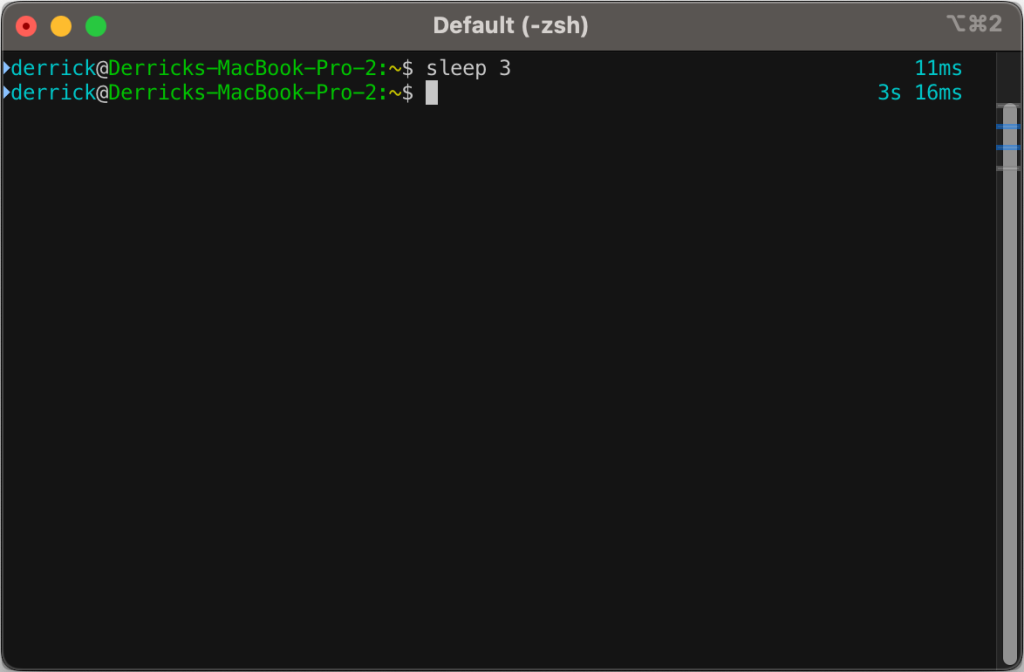
    I’ve had a few snippets in my .zshrc file for a while now that will output how long a command takes to process.

    First off, I’d like to say that I did not come up with this idea, and I didn’t really write the code. I’ve snipped it from somewhere and modified it over time, so I am very sorry to the original author for not being able to give full credit. I didn’t save where I got it from–so if anyone comes across this in the future and might know where the idea came from, drop it in the comments.

    Now, on to the fun:

    The original script only went down to the second, but I wanted more granularity than that, so I went down to the millisecond.
    You’ll likely need to install gdate (brew install gdate) for this to work properly.

    The code (added to ~/.zshrc):

    function preexec() {
    	timer=$(($(gdate +%s%0N)/1000000))
    }
    
    function precmd() {
    	if [ "$timer" ]; then
    		now=$(($(gdate +%s%0N)/1000000))
    		elapsed=$now-$timer
    
    		reset_color=$'\e[00m'
    		RPROMPT="%F{cyan} $(converts "$elapsed") %{$reset_color%}"
    		export RPROMPT
    		unset timer
    	fi
    }
    
    converts() {
    	local t=$1
    
    	local d=$((t/1000/60/60/24))
    	local h=$((t/1000/60/60%24))
    	local m=$((t/100/60%60))
    	local s=$((t/1000%60))
    	local ms=$((t%1000))
    
    	if [[ $d -gt 0 ]]; then
    			echo -n " ${d}d"
    	fi
    	if [[ $h -gt 0 ]]; then
    			echo -n " ${h}h"
    	fi
    	if [[ $m -gt 0 ]]; then
    			echo -n " ${m}m"
    	fi
    	if [[ $s -gt 0 ]]; then
    		echo -n " ${s}s"
    	fi
    	if [[ $ms -gt 0 ]]; then
    		echo -n " ${ms}ms"
    	fi
    	echo
    }Code language: PHP (php)


  • Quick Tip: Bash CLI params

    Quick Tip: Bash CLI params

    While working on a bash script, I stumbled upon what I think may be the cleanest and simplest way to add CLI params to a bash script so far:

    https://stackoverflow.com/questions/192249/how-do-i-parse-command-line-arguments-in-bash/14203146#14203146

    This lets you use short (-V), long (--version), space separated (--user john), and equal separated (--user=john) arguments.

    It’s not perfect, but for a quick bash script hack, I’ve found it very useful!

  • Quick Tip: Export WordPress SQL output via WP-CLI

    Quick Tip: Export WordPress SQL output via WP-CLI

    If for some reason you can’t run wp db query, but need to export SQL output to a CSV or other file, then have a look at this small WP-CLI command I whipped up that should allow this:

    /**
     * Runs a SQL query against the site database.
     *
     * ## OPTIONS
     *
     * 
     * : SQL Query to run.
     *
     * [--format=]
     * : Render output in a particular format.
     * ---
     * default: table
     * options:
     * - table
     * - csv
     * - json
     * - count
     * - yaml
     * ---
     *
     * [--dry-run=]
     * : Performa a dry run
     *
     * @subcommand sql
     */
    public function sql( $args, $assoc_args ) {
         global $wpdb;
     
         $sql     = $args[0];
         $format  = WP_CLI\Utils\get_flag_value( $assoc_args, 'format', 'table' );
         $dry_run = WP_CLI\Utils\get_flag_value( $assoc_args, 'dry-run', 'true' );
     
         // Just some precautions.
         if ( preg_match( '/[update|delete|drop|insert|create|alter|rename|truncate|replace]/i', $sql ) ) {
             WP_CLI::error( 'Please do not modify the database with this command.' );
         }
     
         if ( 'false' !== $dry_run ) {
             WP_CLI::log( WP_CLI::colorize( '%gDRY-RUN%n: <code>EXPLAIN</code> of the query is below: https://mariadb.com/kb/en/explain/' ) );
             $sql = 'EXPLAIN ' . $sql;
         }
     
         // Fetch results from database.
         $results = $wpdb->get_results( $sql, ARRAY_A ); // phpcs:ignore WordPress.DB
     
         // Output data.
         WP_CLI\Utils\format_items( $format, $results, array_keys( $results[0] ) );
    }Code language: PHP (php)

    I’d add an example here, but I don’t have any right now that I can share 😐 I’ll try to find one later (don’t hold your breath on me remembering to do that)

  • Pi-hole, Google Wifi, and Device Names

    Pi-hole, Google Wifi, and Device Names

    One of the things that bothered me for quite some time with my Pi-Hole was that using it with Google Wifi (first gen), it wouldn’t automatically detect device hostnames. I’d done a lot of googling and never could get it to work even after a lot of different trials with multiple settings.

    Eventually I gave up and instead wrote a command that would use nmap to help fill in the gaps, and output to /etc/pihole/custom.list:

    #!/bin/bash
    if [ "$(id -u)" != "0" ]; then
    	echo "This script must be run as root" 1>&2
    	exit 1
    fi
    
    echo -n "Looking up MAC and IPs"
    for ip in "192.168.1.0" "192.168.2.0" "192.168.3.0"; do
    	echo -n .
    	# This is very slow.
    	nmap -sP "$ip"/20 > "$ip"-nmap.txt
    done
    echo
    
    # Mega-command to turn the nmap output into a CSV.
    cat 192.168.?.0-nmap.txt \
    	| sed '/^Starting Nmap/ d' \
    	| sed '/^Host is up/ d' \
    	| sed '/^Stats:/ d' \
    	| sed '/^Ping Scan Timing:/ d' \
    	| sed '/^Nmap done:/ d' \
    	| sed -z 's/\nMAC/,MAC/g' \
    	| sed -e 's/Nmap scan report for //g' \
    	| sed -e 's/MAC Address: //g' \
    	| sed -e 's/ (/,(/g' \
    	| grep -Ev $'^[0-9.]+$' \
    	| sort -u > ip-mac-mapping.csv
    
    rm /etc/pihole/custom.list 2> /dev/null
    while IFS=, read -r col1 col2 col3
    do
    	# Strip out opening and closing parenthesis.
    	col3="${col3//[\(\)]/}"
    
    	# Replace all non-alphanumeric characters with dashes.
    	col3="${col3//[^[:alnum:]]/-}"
    
    	# Manually name some of the MACs I already know.
    	case "$col2" in
    	"24:05:88:XX:XX:XX")
    		col3="Google-Wifi"
    		;;
    	"B0:19:C6:XX:XX:XX")
    		col3="Derricks-iPhone"
    		;;
    	"CC:44:63:XX:XX:XX")
    		col3="iPad-Pro"
    		;;
    	"C8:D0:83:XX:XX:XX")
    		col3="Apple-TV-Den"
    		;;
    	"50:32:37:XX:XX:XX")
    		col3="Apple-TV-Bedroom"
    		;;
    	"DC:A6:32:XX:XX:XX")
    		col3="Ubuntu-Server"
    		;;
    	"38:F9:D3:XX:XX:XX")
    		col3="Derrick-MBP"
    		;;
    	*)
    		echo -n
    		;;
    	esac
    
    	# For some reason, this one is still funky, so I'm adding in a special case for it.
    	# Could have just been weird caching during my testing.
    	case "$col1" in
    	"192.168.1.1")
    		col3="Google-Wifi"
    		;;
    	*)
    		echo -n
    		;;
    	esac
    
    	# The PiHole custom.list is supposed to follow the hosts standard, but it seems that
    	# it is not happy with tabs and comments :sadpanda:
    	echo "$col1	$col3 # $col2"
    	echo "$col1 $col3" >> /etc/pihole/custom.list
    done < ip-mac-mapping.csvCode language: PHP (php)

    This will attempt to grab some info about all the devices on your network via nmap, but also allow you to manually override that per IP or per MAC. I have of course stripped out some devices and semi-anonymized my MACs in the above example.

    The nmap can be pretty slow, especially if you’re running this on a first gen Raspberry Pi like I am.

  • Converting CSV to SQL

    Converting CSV to SQL

    I was recently working on an issue that required me to dig through gigabytes of CSV files to look for patterns and data points. I had no intention of bringing all of this data in to Excel, because there’s not enough RAM on earth for that to work. Instead I thought it would be easier to dump the data into MariaDB (MySQL would be fine as well) and just write some simple SQL statements.

    There were a few things I tried, such as LOAD DATA INFILE and other SQL type things. Nothing really worked properly, so instead I decided to just convert the CSV files into SQL statements I could import.

    This is a bad idea! Don’t ever let this touch a live production database!

    I wrote this little PHP script to convert all of the CSV files in a directory to SQL:

    <?php
    $files    = glob( './*.{csv}', GLOB_BRACE );
    $db_table = 'csv_table';
    
    foreach ( $files as $file ) {
    	$row       = 0;
    	$handle    = fopen( $file, 'rb' );
    	$row_names = '';
    
    	if ( false !== $handle ) {
    		while ( false !== ( $data = fgetcsv( $handle ) ) ) {
    			$row++;
    			$values = '';
    
    			if ( 1 === $row ) {
    				// Do Header things.
    				$index  = 0;
    
    				echo sprintf( 'DROP TABLE IF EXISTS `%s`;' . PHP_EOL, $db_table );
    				echo sprintf( 'CREATE TABLE `%s` (' . PHP_EOL, $db_table );
    
    				foreach ( $data as $key => $value ) {
    					$index++;
    					$data[ $key ] = strtolower( preg_replace( '/[^A-Za-z0-9]/', '_', $value ) );
    
    					// Add a comma if we're not at the end of the array.
    					if ( count( $data ) !== $index ) {
    						echo sprintf( '	`%s` text NOT NULL,' . PHP_EOL, $data[ $key ] );
    					} else {
    						echo sprintf( '	`%s` text NOT NULL' . PHP_EOL, $data[ $key ] );
    					}
    				}
    
    				echo ') ENGINE=InnoDB DEFAULT CHARSET=utf8mb4;' . PHP_EOL;
    				$row_names = '(`' . implode( '`,`', $data ) . '`)';
    				continue;
    			}
    
    			foreach ( $data as $key => $value ) {
    				$data[ $key ] = fake_sql_escape( $value );
    			}
    
    			$values = '(\'' . implode( '\',\'', $data ) . '\')';
    
    			echo sprintf( 'INSERT INTO `%s` %s VALUES %s;' . PHP_EOL, $db_table, $row_names, $values );
    		}
    		fclose( $handle );
    	}
    }
    
    function fake_sql_escape( $value ) {
    	// https://stackoverflow.com/questions/1162491/alternative-to-mysql-real-escape-string-without-connecting-to-db/1163091#1163091
    	// Totaly not safe for production!
    	$return = '';
    	$length = strlen( $value );
    
    	for ( $i = 0; $i < $length; ++$i ) {
    		$char = $value[ $i ];
    		$ord  = ord( $char );
    		if (
    			"'" !== $char &&
    			'"' !== $char &&
    			'\\' !== $char &&
    			$ord >= 32 &&
    			$ord <= 126
    		) {
    			$return .= $char;
    		} else {
    			$return .= '\\x' . dechex( $ord );
    		}
    	}
    	return $return;
    }Code language: PHP (php)

    Borrowing the example airtravel.csv from https://people.sc.fsu.edu/~jburkardt/data/csv/csv.html this is what the output looks like:

    DROP TABLE IF EXISTS `csv_table`;
    CREATE TABLE `csv_table` (
    	`month` text NOT NULL,
    	`1958` text NOT NULL,
    	`1959` text NOT NULL,
    	`1960` text NOT NULL
    ) ENGINE=InnoDB DEFAULT CHARSET=utf8mb4;
    INSERT INTO `csv_table` (`month`,`1958`,`1959`,`1960`,`type`) VALUES ('JAN','  340','  360','  417');
    INSERT INTO `csv_table` (`month`,`1958`,`1959`,`1960`,`type`) VALUES ('FEB','  318','  342','  391');
    INSERT INTO `csv_table` (`month`,`1958`,`1959`,`1960`,`type`) VALUES ('MAR','  362','  406','  419');
    INSERT INTO `csv_table` (`month`,`1958`,`1959`,`1960`,`type`) VALUES ('APR','  348','  396','  461');
    INSERT INTO `csv_table` (`month`,`1958`,`1959`,`1960`,`type`) VALUES ('MAY','  363','  420','  472');
    INSERT INTO `csv_table` (`month`,`1958`,`1959`,`1960`,`type`) VALUES ('JUN','  435','  472','  535');
    INSERT INTO `csv_table` (`month`,`1958`,`1959`,`1960`,`type`) VALUES ('JUL','  491','  548','  622');
    INSERT INTO `csv_table` (`month`,`1958`,`1959`,`1960`,`type`) VALUES ('AUG','  505','  559','  606');
    INSERT INTO `csv_table` (`month`,`1958`,`1959`,`1960`,`type`) VALUES ('SEP','  404','  463','  508');
    INSERT INTO `csv_table` (`month`,`1958`,`1959`,`1960`,`type`) VALUES ('OCT','  359','  407','  461');
    INSERT INTO `csv_table` (`month`,`1958`,`1959`,`1960`,`type`) VALUES ('NOV','  310','  362','  390');
    INSERT INTO `csv_table` (`month`,`1958`,`1959`,`1960`,`type`) VALUES ('DEC','  337','  405','  432');Code language: JavaScript (javascript)

    And if you’re too lazy to see what the input CSV looks like (I would be) here it is, in its LGPL glory:

    "Month", "1958", "1959", "1960"
    "JAN",  340,  360,  417
    "FEB",  318,  342,  391
    "MAR",  362,  406,  419
    "APR",  348,  396,  461
    "MAY",  363,  420,  472
    "JUN",  435,  472,  535
    "JUL",  491,  548,  622
    "AUG",  505,  559,  606
    "SEP",  404,  463,  508
    "OCT",  359,  407,  461
    "NOV",  310,  362,  390
    "DEC",  337,  405,  432Code language: JavaScript (javascript)

    There’s a lot of ways that this could be made better, but it works in a quick pinch. If you need something similar, feel free to take this as a starting point.

  • Deleting Old Post Revisions in WordPress with WP-CLI

    Deleting Old Post Revisions in WordPress with WP-CLI

    Recently I’ve been working with a client who’s site we’re going to soon be migrating. To help with any downtime, we’ve been looking at reducing their database size, which is something around 50-60 gigabytes. After looking through the database, one easy win would be to purge as many post revisions as possible, since their wp_posts table was about 50% revisions 😱

    We couldn’t just mass delete anything with a revision post type though, because the client had some specific needs:

    • Keep all revisions for posts from the last 12 months.
    • Keep all revisions that were made after the post was published.
    • Keep a backup of all revisions deleted.

    To do this, I crafted a custom WP-CLI command to purge these revisions. I’ve accidentally deleted the final version of the script, since it was only a one-run thing, but here’s an earlier version that could be a good starting point for anyone else that has a similar need to prune revisions:

    /**
     * WP-CLI command that deletes pre-publish post revisions for posts older than 12 months.
     *
     * @subcommand prune-revisions [--live] [--verbose]
     */
    public function prune_revisions( $args, $assoc_args ) {
    	global $wpdb;
    
    	$live    = (bool) $assoc_args[ 'live' ];
    	$verbose = (bool) $assoc_args[ 'verbose' ];
    	$offset  = 0;
    	$limit   = 500;
    	$count   = 0;
    	$deletes = 0;
    
    	if ( $live ) {
    		$output_file = sanitize_file_name( sprintf( 'prune-revisions-backup_%d_%d.csv', get_bloginfo( 'name' ), current_time( 'timestamp', true ) ) );
    		$handle      = fopen( $output_file, 'wb' );
    
    		if ( false === $handle ) {
    			WP_CLI::error( sprintf( 'Error opening %s for writing!', $output_file ) );
    		}
    
    		// Headers.
    		$csv_headers = array(
    			'ID',
    			'post_author',
    			'post_date',
    			'post_date_gmt',
    			'post_content',
    			'post_title',
    			'post_excerpt',
    			'post_status',
    			'comment_status',
    			'ping_status',
    			'post_password',
    			'post_name',
    			'to_ping',
    			'pinged',
    			'post_modified',
    			'post_modified_gmt',
    			'post_content_filtered',
    			'post_parent',
    			'guid',
    			'menu_order',
    			'post_type',
    			'post_mime_type',
    			'comment_count',
    			'filter',
    		);
    
    		fputcsv(
    			$handle,
    			$csv_headers
    		);
    	}
    
    	$count_sql      = 'SELECT COUNT(ID) FROM ' . $wpdb->posts . ' WHERE post_type = "revision"';
    	$revision_count = (int) $wpdb->get_row( $count_sql, ARRAY_N )[0];
    	$progress       = \WP_CLI\Utils\make_progress_bar( sprintf( 'Checking %s revisions', number_format( $revision_count ) ), $revision_count );
    
    	do {
    		$sql       = $wpdb->prepare( 'SELECT ID FROM ' . $wpdb->posts . ' WHERE post_type = "revision" LIMIT %d,%d', $offset, $limit );
    		$revisions = $wpdb->get_results( $sql );
    
    		foreach ( $revisions as $revision ) {
    			$count++;
    			$post_parent_id = wp_get_post_parent_id( $revision->ID );
    
    			// Fail on either 0 or false.
    			if ( false == $post_parent_id ) {
    				WP_CLI::warning( sprintf( 'Revision %d does not have a parent!  Skipping!', $revision->ID ) );
    				continue;
    			}
    
    			$revision_modified   = get_post_modified_time( 'U', false, $revision->ID );
    			$parent_publish_time = get_post_time( 'U', false, $post_parent_id );
    
    			if ( $parent_publish_time < current_time( 'timestamp') - ( MONTH_IN_SECONDS * 12 ) ) {
    				// Post is older than 12 months, safe to delete pre-publish revisions.
    				if ( $revision_modified < $parent_publish_time ) {
    					if ( $live ) {
    						// We're doing it live!
    						WP_CLI::log( sprintf( 'Deleting revision %d for post %d. (%d%% done)', $revision->ID, $post_parent_id, ( $count / $revision_count ) * 100 ) );
    
    						// Backup data!
    						$output = [];
    						$data   = get_post( $revision->ID );
    
    						// Validate the field is set, just in case.  IDK how it couldn't be.
    						foreach ( $csv_headers as $field ) {
    							$output = isset( $data->$field ) ? $data->$field : '';
    						}
    
    						fputcsv( $handle, $output );
    
    						$did_delete = wp_delete_post_revision( $revision->ID );
    
    						// Something went wrong while deleting the revision?
    						if ( false === $did_delete || is_wp_error( $did_delete ) ) {
    							WP_CLI::warning( sprintf( 'Revision %d for post %d DID NOT DELETE! wp_delete_post_revision returned:', $revision->ID, $post_parent_id ) );
    						}
    						$deletes++;
    
    						// Pause after lots of db modifications.
    						if ( 0 === $deletes % 50 ) {
    							if ( $verbose ) {
    								WP_CLI::log( sprintf( 'Current Deletes: %d', $deletes ) );
    							}
    							sleep( 1 );
    						}
    					} else {
    						// Not live, just output info.
    						WP_CLI::log( sprintf( 'Will delete revision %d for post %d.', $revision->ID, $post_parent_id ) );
    					}
    				} else {
    					// Revision is after the post has been published.
    					if ( $verbose ) {
    						WP_CLI::log( sprintf( 'Post-Publish: Will NOT delete Revision %d for post %d.', $revision->ID, $post_parent_id ) );
    					}
    				}
    			} else {
    				// Post is too new to prune.
    				if ( $verbose ) {
    					WP_CLI::log( sprintf( 'Too-New: Will NOT delete Revision %d for post %d.', $revision->ID, $post_parent_id ) );
    				}
    			}
    		}
    
    		// Pause after lots of db reads.
    		if ( 0 === $count % 5000 ) {
    			if ( $verbose ) {
    				WP_CLI::log( sprintf( 'Current Count: %d', $count ) );
    			}
    			sleep( 1 );
    		}
    
    		// Free up memory.
    		$this->stop_the_insanity();
    
    		// Paginate.
    		if ( count( $revisions ) ) {
    			$offset += $limit;
    			$progress->tick( $limit );
    		} else {
    			WP_CLI::warning( 'Possible MySQL Error, retrying in 10 seconds!' );
    			sleep( 10 );
    		}
    
    	} while ( $count < $revision_count );
    
    	$progress->finish();
    
    	if ( $live ) {
    		fclose( $handle );
    		WP_CLI::success( sprintf( 'Deleted %d revisions', $deleted ) );
    	} else {
    		WP_CLI::success( sprintf( 'Processed %d revisions', $revision_count ) );
    	}
    }Code language: PHP (php)
  • Windows, SFTP, and the Registry

    Windows, SFTP, and the Registry

    One of the tasks that I have to do often at work is copying data to and from an SFTP directory.  Previously I had a constant domain and port that I was able to connect to, an I could save this in a WinSCP profile for ease of use.  Due to some recent architectural changes though, we’re now dynamically generating IPs and ports to connect to, which caused a bit of a headache.  Luckily though, we do get a really nice sftp://user@domain.example.com:1234 URI that gives us this information, and some terminal clients even allow you to click it (ConEmu).

    Unfortunately, I can’t just register WinSCP as the default handler for sftp URIs because I needed to provide other data, such as a private key and proxy information.

    To fix this,  I created a wrapper, poorly named scp.cmd that does all of this work:

    @echo off
    :: Set some necessary path variables.
    :: I would recommend WinSCP Portable, but that's just me.
    set WINSCP_PATH="C:\Path To\winscp.exe"
    set PRIVKEY_PPK="C:\Path To\Private Key.ppk"
    :: Run the actual SCP command.
    %WINSCP_PATH% %1 /privatekey=%PRIVKEY_PPK% /rawsettings ProxyMethod=2 ProxyHost="127.0.0.1" ProxyPort=8080
    :: Unset the variables now that we don't need them.
    set WINSCP_PATH=
    set PRIVKEY_PPK=Code language: PHP (php)

    From here I can create a Windows Registry file (or manually do it with regedit.exe but that’s crazy) to register the sftp URI handler and point it to my scp.cmd file:

    Windows Registry Editor Version 5.00
    
    [HKEY_CLASSES_ROOT\sftp\shell\open\command]
    @="\"C:\\Windows\\scp.cmd\" \"%1\""Code language: JavaScript (javascript)

    Now I can easily click on sftp links for work, I can paste them into the Windows Run dialog, or even open them via the command line with start.  This is a wonderful time saver!

  • Renewing Let’s Encrypt SSL on SABnzbd+

    Renewing Let’s Encrypt SSL on SABnzbd+

    Having a secure way to manage your usenet downloads of the hit movie Big Buck Bunny with SABnzbd+ is great, but one problem/feature of Let’s Encrypt is that the SSL certificates expire only after three months, requiring plenty of renewals.  Luckily this can be easily scripted and forgotten.

    The primary part of renewing the SSL certificates will be handled by a modified version of Erika Heidi‘s le-renew.sh script.  Erika’s script does a few things we don’t need, such as restarting Apache, so I forked it on GitHub and made a few changes.

    (more…)