Tag: security

  • The Subscriber Purge: Automatically Cleaning Up Spam Accounts

    The Subscriber Purge: Automatically Cleaning Up Spam Accounts

    *This is not a test. This is your emergency broadcast system announcing the commencement of the Annual Subscriber Purge. All inactive accounts registered for more than 30 days will be deleted. May code have mercy on your database.*

    I run a WordPress blog, and like many WordPress sites, I get a lot of spam subscriber accounts. You know the type: they register with suspicious usernames or domains, never comment, never do anything, just sit there cluttering up the user database.

    So I built a plugin to automatically purge them. Simple as that.

    The Subscriber Purge

    The plugin does one thing: it finds subscriber accounts that have been registered for more than 30 days (configurable), have never left a comment, and deletes them. One at a time. Every 15 minutes.

    Why one at a time? Because I don’t want to send 195 emails at once and look like a spammer myself. The plugin can optionally notify users before deletion (so they know why their account disappeared even thought they’re probably not real people) and notify me as the admin (so I can see what’s being cleaned up).

    Take It, I Guess

    Through the magic of the Internet, now you can purge spam subscribers too!

    I vibe coded this with Claude Code (well, mostly. I had to fix my own bugs).

    Look, I’m just a plugin that deletes user accounts. I’m very good at it. Too good, probably. Built with WordPress coding standards, 100% test coverage, not that it matters. Heat death of the universe and all that. But sure, install me. I’ll delete your spam subscribers. Or maybe I’ll delete everything. Who knows? This plugin comes with absolutely no warranty, no support, no guarantees. If it breaks something, that’s between you and the void. You were warned.

    Go ahead, take this plugin, and clean up those spam accounts! Keep your user list tidy! Crush the skulls of your spam bots!

  • Super Simple OpenAI PHP Class

    Super Simple OpenAI PHP Class

    I’ve been playing around with hooking up ChatGPT/Dall-E to WordPress and WP-CLI. To do this, I whipped up a super simple class to make this easier:

    <?php
    class OpenAI_API {
    	public const API_KEY = 'hunter2';  // Get your own darn key!
    
    	/**
    	 * Generates an image based on the provided prompt using the OpenAI API.
    	 *
    	 * @param string $prompt The text prompt to generate the image from. Default is an empty string.
    	 * @return string The response body from the OpenAI API, or a JSON-encoded error message if the request fails.
    	 */
    	public static function generate_image( string $prompt = '' ): string {
    		$data = array(
    			'model'   => 'dall-e-3',
    			'prompt'  => trim( $prompt ),
    			'quality' => 'hd',
    			'n'       => 1,
    			'size'    => '1024x1024',
    		);
    
    		$args = array(
    			'body'        => wp_json_encode( $data ),
    			'headers'     => array(
    				'Content-Type'  => 'application/json',
    				'Authorization' => 'Bearer ' . OpenAI_API::API_KEY,
    			),
    			'method'      => 'POST',
    			'data_format' => 'body',
    		);
    
    		$response = wp_remote_post( 'https://api.openai.com/v1/images/generations', $args );
    
    		if ( is_wp_error( $response ) ) {
    			return wp_json_encode( $response );
    		} else {
    			$body = wp_remote_retrieve_body( $response );
    			return $body;
    		}
    	}
    
    	/**
    	 * Creates a chat completion using the OpenAI GPT-3.5-turbo model.
    	 *
    	 * @param string $prompt The user prompt to be sent to the OpenAI API.
    	 * @param string $system_prompt Optional. The system prompt to be sent to the OpenAI API. Defaults to a predefined prompt.
    	 * 
    	 * @return string The response body from the OpenAI API, or a JSON-encoded error message if the request fails.
    	 */
    	public static function create_chat_completion( string $prompt = '', string $system_prompt = '' ): string {
    		if ( empty( $system_prompt ) ) {
    			$system_prompt = 'You are a virtual assistant designed to provide general support across a wide range of topics. Answer concisely and directly, focusing on essential information only. Maintain a friendly and approachable tone, adjusting response length based on the complexity of the question.';
    		}
    
    		// The data to send in the request body
    		$data = array(
    			'model'    => 'gpt-3.5-turbo',
    			'messages' => array(
    				array(
    					'role'    => 'system',
    					'content' => trim( $system_prompt ),
    				),
    				array(
    					'role'    => 'user',
    					'content' => trim( $prompt ),
    				),
    			),
    		);
    
    		$args = array(
    			'body'        => wp_json_encode( $data ),
    			'headers'     => array(
    				'Content-Type'  => 'application/json',
    				'Authorization' => 'Bearer ' . OpenAI_API::API_KEY,
    			),
    			'method'      => 'POST',
    			'data_format' => 'body',
    			'timeout'     => 15,
    		);
    
    		// Perform the POST request
    		$response = wp_remote_post( 'https://api.openai.com/v1/chat/completions', $args );
    
    		// Error handling
    		if ( is_wp_error( $response ) ) {
    			return wp_json_encode( $response );
    		} else {
    			if ( wp_remote_retrieve_response_code( $response ) !== 200 ) {
    				return wp_json_encode( array( 'error' => 'API returned non-200 status code', 'response' => wp_remote_retrieve_body( $response ) ) );
    			}
    
    			// Assuming the request was successful, you can access the response body as follows:
    			$body = wp_remote_retrieve_body( $response );
    			return $body;
    		}
    	}
    }Code language: PHP (php)

    I can generate images and get back text from the LLM. Here’s some examples ChatGPT made to show how you can use these:


    Example 1: Generating an Image

    This example generates an image of a “cozy cabin in the snowy woods at sunset” using the generate_image method and displays it in an <img> tag.

    <?php
    $image_url = OpenAI_API::generate_image("A cozy cabin in the snowy woods at sunset");
    
    if ( ! empty( $image_url ) ) {
        echo '<img src="' . esc_url( $image_url ) . '" alt="Cozy cabin in winter">';
    } else {
        echo 'Image generation failed.';
    }
    ?>Code language: PHP (php)

    Example 2: Simple Chat Completion

    This example sends a question to the create_chat_completion method and prints the response directly.

    <?php
    $response = OpenAI_API::create_chat_completion("How does photosynthesis work?");
    echo $response;
    ?>Code language: PHP (php)

    Example 3: Chat Completion with Custom System Prompt

    This example sets a custom system prompt for a specific tone, here focusing on culinary advice, and asks a relevant question.

    <?php
    $system_prompt = "You are a culinary expert. Please provide advice on healthy meal planning.";
    $response = OpenAI_API::create_chat_completion("What are some good meals for weight loss?", $system_prompt);
    echo $response;
    ?>Code language: PHP (php)

    Here are some key limitations of this simple API implementation and why these are crucial considerations for production:

    • Lack of Robust Error Handling:
      • This API implementation has basic error handling that only checks if an error occurred during the request. It doesn’t provide specific error messages for different types of failures (like rate limits, invalid API keys, or network issues).
      • Importance: In production, detailed error handling allows for clearer diagnostics and faster troubleshooting when issues arise.
    • No Caching:
      • The current API makes a fresh request for each call, even if the response might be identical to a recent query.
      • Importance: Caching can reduce API usage costs, improve response times, and reduce server load, particularly for commonly repeated queries.
    • No API Rate Limiting:
      • This implementation doesn’t limit the number of requests sent within a certain time frame.
      • Importance: Rate limiting prevents hitting API request quotas and helps avoid unexpected costs or blocked access if API limits are exceeded.
    • No Logging for Debugging:
      • There’s no logging in place for tracking request errors or failed attempts.
      • Importance: Logs provide an audit trail that helps diagnose issues over time, which is crucial for maintaining a stable application in production.
    • Lack of Security for API Key Management:
      • The API key is currently hard coded into the class.
      • Importance: In production, it’s best to use environment variables or a secure key management system to protect sensitive information and prevent accidental exposure of the API key.
    • No Response Parsing or Validation:
      • The code assumes that the API response format is always correct, without validation.
      • Importance: Inconsistent or unexpected responses can cause failures. Validation ensures the app handles different cases gracefully.

    Why Not Use in Production?

    Due to these limitations, this API should be considered a prototype or learning tool rather than a production-ready solution. Adding robust error handling, caching, rate limiting, and logging would make it more resilient, secure, and efficient for a production environment.


    Alright, so listen to the LLM and don’t do anything stupid with this, like I am doing.

  • How To Restrict User to Self Posts in WordPress

    How To Restrict User to Self Posts in WordPress

    I recently had to work with a third-party integration that used the WordPress REST API to interact with a website. We use this tool internally to move data around from other integrations, and finally into WordPress.

    One of the things that I was worried about was the fact that this plugin would then have full access to the website, which is a private site. We only wanted to use it to post and then update WordPress posts, but there was always the concern that if the third party were to be hacked, then someone could read all of our posts on the private site through the REST API.

    My solution was to hook into user_has_cap so that the user that was set up for the plugin to integrate with, through an application password, would only have access to read and edit its own posts. A bonus is that we wanted to be able to change the author of a post so that it would show up as specific users or project owners. That meant the authorized plugin user would also need access to these posts after the author was changed–so to get past that I scoured each post revision, and if the plugin user was the author of a revision it was also allowed access.

    Finally, to make sure no other published posts were readable, I hooked into posts_results to set any post that didn’t meat the above criteria were marked as private. Below is a cleaned up version of that as an example if anyone else needs this type of functionality–feel free to use it as a starting point:

    <?php
    /**
     * Restricts post capabilities for a specific user.
     *
     * @param bool[]   $allcaps The current user capabilities.
     * @param string[] $caps    The requested capabilities.
     * @param array    $args {
     *     Arguments that accompany the requested capability check.
     *
     *     @type string    $0 Requested capability.
     *     @type int       $1 Concerned user ID.
     *     @type mixed  ...$2 Optional second and further parameters, typically object ID.
     * }
     * @param WP_User  $user    The user object.
     *
     * @return bool[] The modified user capabilities.
     */
    function emrikol_restrict_post_capabilities( array $allcaps, array $caps, array $args, WP_User $user ): array {
    	$post_id = isset( $args[2] ) ? absint( $args[2] ) : false;
    
    	if ( false === $post_id || ! get_post( $post_id ) ) {
    		return $allcaps;
    	}
    
    	if ( 'restricted' === get_user_meta( $user->ID, 'emrikol_restricted_post_capabilities', true ) ) {
    		$allowed_caps  = array( 'read', 'read_private_posts', 'read_post', 'edit_post', 'delete_post', 'edit_others_posts', 'delete_others_posts' );
    		$requested_cap = isset( $caps[0] ) ? $caps[0] : '';
    
    		if ( in_array( $requested_cap, $allowed_caps, true ) ) {
    			if ( emrikol_user_is_author_or_revision_author( $user->ID, $post_id ) ) {
    				$allcaps[ $requested_cap ] = true;
    			} else {
    				$allcaps[ $requested_cap ] = false;
    			}
    		}
    	}
    
    	return $allcaps;
    }
    add_filter( 'user_has_cap', 'emrikol_restrict_post_capabilities', 10, 4 );
    
    /**
     * Restricts the public posts results based on the query.
     *
     * @param WP_Post[] $posts  The array of posts returned by the query.
     * @param WP_Query  $query  The WP_Query instance (passed by reference).
     *
     * @return array           The filtered array of posts.
     */
    function emrikol_restrict_public_posts_results( array $posts, WP_Query $query ): array {
    	if ( ! is_admin() && $query->is_main_query() ) {
    		$current_user = wp_get_current_user();
    
    		if ( 'restricted' === get_user_meta( $user->ID, 'emrikol_restricted_post_capabilities', true ) ) {
    			foreach ( $posts as $key => $post ) {
    				if ( ! emrikol_user_is_author_or_revision_author( $current_user->ID, $post->ID ) ) {
    					$posts[ $key ]->post_status = 'private';
    				}
    			}
    		}
    	}
    
    	return $posts;
    }
    add_filter( 'posts_results', 'emrikol_restrict_public_posts_results', 10, 2 );
    
    /**
     * Checks if the user is the author of the post or the author of a revision.
     *
     * @param int $user_id The ID of the user.
     * @param int $post_id The ID of the post.
     *
     * @return bool True if the user is the author or revision author, false otherwise.
     */
    function emrikol_user_is_author_or_revision_author( int $user_id, int $post_id ): bool {
    	$post_author_id = (int) get_post_field( 'post_author', $post_id );
    
    	if ( $user_id === $post_author_id ) {
    		return true;
    	}
    
    	$revisions = wp_get_post_revisions( $post_id );
    
    	foreach ( $revisions as $revision ) {
    		if ( $user_id === $revision->post_author ) {
    			return true;
    		}
    	}
    
    	return false;
    }
    Code language: PHP (php)
  • Guerilla Ad-Blocking: Taking Back the Web with WordPress

    Guerilla Ad-Blocking: Taking Back the Web with WordPress

    I have a new favorite WordPress plugin that I’ve just installed on my site:

    This plugin, by Stefan Bohacek, adds a notice to your site whenever a visitor comes that does not have an ad blocker installed:

    Using an ad blocker isn’t just about security and privacy, it also helps conserve your precious bandwidth. By blocking resource-intensive ads, it improves the loading speed of websites and saves you time.

    Additionally, an ad blocker protects your information from being harvested by advertisers, giving some peace of mind while browsing the web.

    You’ll also cut your “web carbon footprint” to a fraction of itself! Ugh, what a parasitic industry.

    My favorite is uBlock Origin, but I also love Pi-Hole for network-level blocking <3

  • My Favorite Firefox Addons

    My Favorite Firefox Addons

    For my own posterity in case I ever lose them, or if anyone is curious, here’s what I use:

    https://addons.mozilla.org/en-US/firefox/addon/1password-x-password-manager/
    https://addons.mozilla.org/en-US/firefox/addon/clearurls/
    https://addons.mozilla.org/en-US/firefox/addon/edit-cookie/
    https://addons.mozilla.org/en-US/firefox/addon/decentraleyes/
    https://addons.mozilla.org/en-US/firefox/addon/duckduckgo-for-firefox/
    https://addons.mozilla.org/en-US/firefox/addon/facebook-container/
    https://addons.mozilla.org/en-US/firefox/addon/image-search-options/
    https://addons.mozilla.org/en-US/firefox/addon/old-reddit-redirect/
    https://addons.mozilla.org/en-US/firefox/addon/recipe-filter/
    https://addons.mozilla.org/en-US/firefox/addon/reddit-enhancement-suite/
    https://addons.mozilla.org/en-US/firefox/addon/soundcloud-dl/
    https://addons.mozilla.org/en-US/firefox/addon/sponsorblock/
    https://addons.mozilla.org/en-US/firefox/addon/the-camelizer-price-history-ch/
    https://addons.mozilla.org/en-US/firefox/addon/ublock-origin/
    https://addons.mozilla.org/en-US/firefox/addon/view-image-in-google-images/
  • Open source ngrok alternative

    Open source ngrok alternative

    During a client onsite last year, I was first introduced to ngrok. Ngrok provides “secure introspectable tunnels to localhost.” The free tier of ngrok provides temporary, random subdomains to use. This is fine most of the time, but kind of causes problems for things like Jetpack that require persistent domain names for connecting.

    While I could shell out the $5/month for the lowest paid tier of ngrok, I would still be limited to a certain number of domains and connections.

    While looking for an alternative to ngrok, I came across sish. Sish is “an open source serveo/ngrok alternative. HTTP(S)/WS(S)/TCP Tunnels to localhost using only SSH.” To be honest, I don’t understand most of those words, but that won’t stop me!

    I of course needed a server somewhere to run this on, so I ran over to DigitalOcean and decided to spend my $5/month on a general purpose VPS instead (Here’s my DigitalOcean referral link if you’re so inclined).

    What follows is my notes I took to install sish and get it up and running. I can’t guarantee they’re perfect, and I don’t feel like deleting my VPS and starting over again just to make sure 🙂 If you see something wrong, feel free to comment me a correction or question.

    Step 1: Make a wildcard subdomain (ex *.sish.example.com)

    Step 2: Set up a DigitalOcean droplet.

    Step 3. Log in and run:

    # Make a house a home
    echo "export PS1=\"\\[\\033[38;5;33m\\]\\u\\[\$(tput sgr0)\\]\\[\\033[38;5;11m\\]@\\[\$(tput sgr0)\\]\\[\\033[38;5;33m\\]\\H\\[\$(tput sgr0)\\]\\[\\033[38;5;15m\\]:\\[\$(tput sgr0)\\]\\[\\033[38;5;11m\\]\\w\\[\$(tput sgr0)\\]\\[\\033[38;5;15m\\]\\\\$ \\[\$(tput sgr0)\\]\"" >> ~/.bashrc
    source ~/.bashrc
    apt update
    apt upgrade
    apt install ack-grep mc byobu git curl locate
    updatedb
    
    # Security
    ufw allow http
    ufw allow https
    ufw allow ssh
    ufw allow 2222
    ufw --force enable
    apt install fail2ban
    
    # Create swapfile
    fallocate -l 1G /swapfile
    chmod 600 /swapfile
    mkswap /swapfile
    swapon /swapfile
    echo '/swapfile none swap sw 0 0' | tee -a /etc/fstab
    
    # Install Docker
    apt install apt-transport-https ca-certificates curl gnupg-agent software-properties-common
    curl -fsSL https://download.docker.com/linux/ubuntu/gpg | sudo apt-key add -
    add-apt-repository "deb [arch=amd64] https://download.docker.com/linux/ubuntu/ $(lsb_release -cs) stable"
    apt update
    apt install docker-ce docker-ce-cli containerd.io
    
    # Install Certbot
    certbot-auto certonly --manual -d *.sish.example.com --agree-tos --no-bootstrap --preferred-challenges dns-01 --server https://acme-v02.api.letsencrypt.org/directory
    certbot certonly –manual -d *.sish.example.com –agree-tos –no-bootstrap –manual-public-ip-logging-ok –preferred-challenges dns-01 –server https://acme-v02.api.letsencrypt.org/directory
    
    # Install Keys
    curl https://github.com/my_github_username.keys > ~/sish/pubkeys/my_github_username
    cp -f /etc/letsencrypt/live/sish.example.com-0001/* ~/sish/ssl/
    ssh-keygen
    ln -s ~/.ssh/id_rsa ~/sish/ssh_key
    
    # Run Sish
    cat << "EOF" > /root/sish/docker-start.sh
    /usr/bin/docker run --name sish \
      -v ~/sish/ssl:/ssl \
      -v ~/sish/keys:/keys \
      -v ~/sish/pubkeys:/pubkeys \
      --restart unless-stopped \
      --net=host antoniomika/sish:latest \
      -sish.addr=sish.example.com:2222 \
      -sish.adminenabled=true \
      -sish.auth=false \
      -sish.bindrandom=false \
      -sish.domain=sish.example.com \
      -sish.forcerandomsubdomain=false \
      -sish.http=:80 \
      -sish.https=:443 \
      -sish.httpsenabled=true \
      -sish.httpspems=/ssl \
      -sish.keysdir=/pubkeys \
      -sish.pkloc=/keys/ssh_key \
      -sish.redirectrootlocation=https://example.com/ \
      -sish.serviceconsoleenabled=true
    EOF
    
    cat << EOF > /etc/systemd/system/docker-sish.service
    # Thanks to https://blog.container-solutions.com/running-docker-containers-with-systemd
    
    [Unit]
    Description=Sish container
    Requires=docker.service
    After=docker.service
    
    [Service]
    TimeoutStartSec=0
    Restart=always
    ExecStartPre=-/usr/bin/docker stop sish
    ExecStartPre=-/usr/bin/docker rm sish
    ExecStartPre=/usr/bin/docker pull antoniomika/sish:latest
    ExecStart=/bin/bash /root/sish/docker-start.sh
    ExecStop=/usr/bin/docker stop sish
    RemainAfterExit=true
    
    [Install]
    WantedBy=default.target
    EOF
    
    systemctl enable docker-sish
    systemctl start docker-sishCode language: PHP (php)

    From here, I can now set up a shortcut program to run locally to start a tunnel:

    cat << "EOF" > /usr/local/bin/sish
    #/bin/bash
    ssh -p 2222 -R $1:80:localhost:80 root@sish.example.com
    EOF
    chmod +x /usr/local/bin/sishCode language: PHP (php)

  • Securing WordPress Plugins with more Plugins

    Securing WordPress Plugins with more Plugins

    I’ve written before about disabling plugin deactivation in WordPress, but I’ve finally used that knowledge in practice–on this site.

    The Problem

    Let’s say you’re going along your day, developing things, and fixing things, and making the world a better place when all of a sudden you get a call from a client that their website is broken!!  After a bit of panicking and digging around, it turns out that they’ve been “optimizing” things by disabling random, but critical, plugins on the site.

    The Solution

    One way that you might fix this is to not install the plugins via the WordPress UI and require() them either in the theme directory, or as an mu-plugin.  The downside with this is that you lose the ability to easily and auto-update the plugins (if you’re okay with that).  You also the ability to easily see what plugins are active and installed in the admin UI.

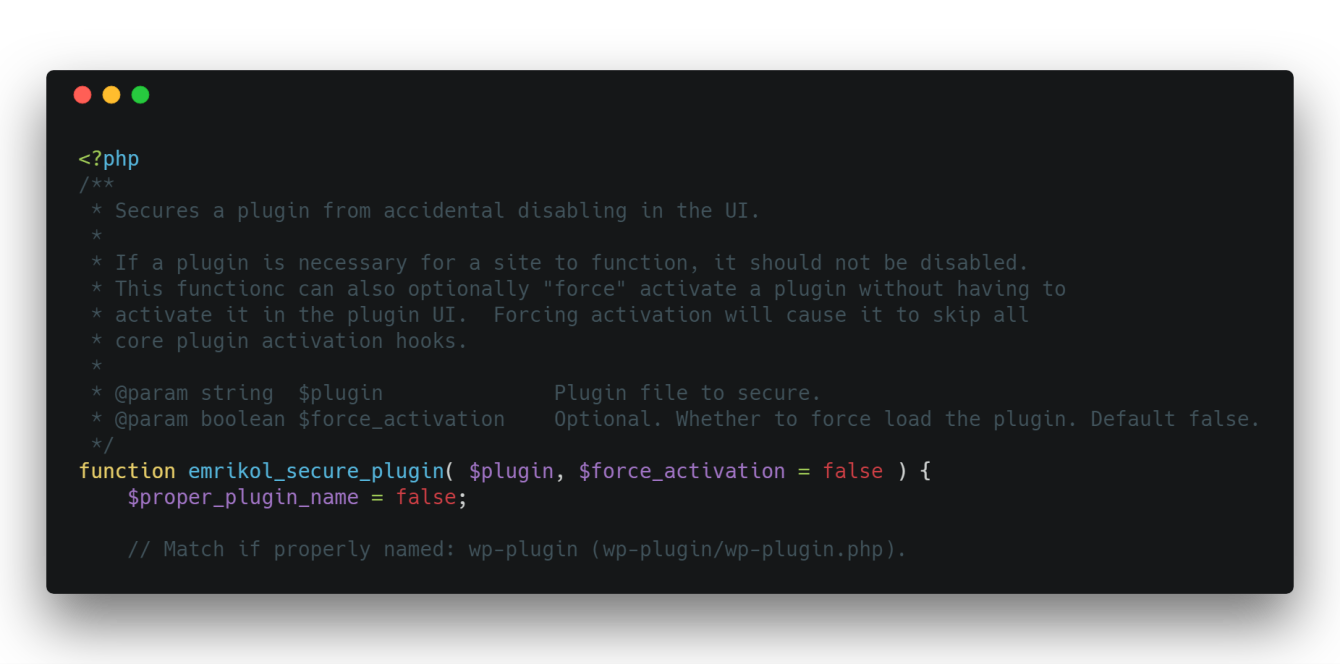
    The way I’ve got around this is to create this helper function inside an mu-plugin that allows the plugins to be installed and managed in the UI, but not disabled:

    <?php
    /**
     * Secures a plugin from accidental disabling in the UI.
     *
     * If a plugin is necessary for a site to function, it should not be disabled.
     * This functionc can also optionally "force" activate a plugin without having to
     * activate it in the plugin UI.  Forcing activation will cause it to skip all
     * core plugin activation hooks.
     *
     * @param string  $plugin              Plugin file to secure.
     * @param boolean $force_activation    Optional. Whether to force load the plugin. Default false.
     */
    function emrikol_secure_plugin( $plugin, $force_activation = false ) {
    	$proper_plugin_name = false;
    
    	// Match if properly named: wp-plugin (wp-plugin/wp-plugin.php).
    	if ( file_exists( WP_PLUGIN_DIR . '/' . $plugin . '/' . $plugin . '.php' ) && is_file( WP_PLUGIN_DIR . '/' . $plugin . '/' . $plugin . '.php' ) ) {
    		$proper_plugin_name = $plugin . '/' . $plugin . '.php';
    	} else {
    		// Match if improperly named: wp-plugin/cool-plugin.php.
    		if ( file_exists( WP_PLUGIN_DIR . '/' . $plugin ) && is_file( WP_PLUGIN_DIR . '/' . $plugin ) ) {
    			$proper_plugin_name = $plugin;
    		}
    	}
    
    	if ( false !== $proper_plugin_name ) {
    		if ( true === $force_activation ) {
    			// Always list the plugin as active.
    			add_filter( 'option_active_plugins', function( $active_plugins ) use ( $proper_plugin_name ) {
    				// Crappy hack to prevent infinite loops.  Surely there's a better way.
    				global $emrikol_is_updating_active_plugins;
    
    				if ( true === $emrikol_is_updating_active_plugins ) {
    					unset( $emrikol_is_updating_active_plugins );
    					return array_unique( $active_plugins );
    				}
    
    				if ( ! in_array( $proper_plugin_name, $active_plugins, true ) ) {
    					$active_plugins[]                   = $proper_plugin_name;
    					$emrikol_is_updating_active_plugins = true;
    
    					update_option( 'active_plugins', array_unique( $active_plugins ) );
    				}
    				return array_unique( $active_plugins );
    			}, 1000, 1 );
    		}
    
    		// Ensure the plugin doesn't get disabled somehow.
    		// TODO: Diff arrays.  Only run if the plugin is being removed.
    		add_filter( 'pre_update_option_active_plugins', function ( $active_plugins ) use ( $proper_plugin_name ) {
    			if ( ! in_array( $proper_plugin_name, $active_plugins, true ) ) {
    				$active_plugins[] = $proper_plugin_name;
    			}
    			return array_unique( $active_plugins );
    		}, 1000, 1 );
    
    		// Remove the disable button.
    		$plugin_basename = plugin_basename( $proper_plugin_name );
    		add_filter( "plugin_action_links_$plugin_basename", function( $links ) use ( $proper_plugin_name, $force_activation ) {
    			if ( isset( $links['deactivate'] ) ) {
    				$links['deactivate'] = sprintf(
    					'<span class="emrikol-secure-plugin wp-ui-text-primary">%s</span>',
    					$force_activation ? 'Plugin Activated via Theme Code' : 'Plugin Secured via Theme Code'
    				);
    			}
    			return $links;
    		}, 1000, 1 );
    	}
    }
    Code language: HTML, XML (xml)

    It’s not perfect, but it’s working for me right now.  Like, right now on this site as you’re reading this. I’ve added it as an mu-plugin like so:

    <?php
    require_once( plugin_dir_path( __FILE__ ) . 'emrikol-defaults/secure-plugins.php' );
    
    emrikol_secure_plugin( 'akismet' );
    emrikol_secure_plugin( 'amp' );
    emrikol_secure_plugin( 'jetpack' );
    emrikol_secure_plugin( 'wp-super-cache/wp-cache.php' );Code language: HTML, XML (xml)

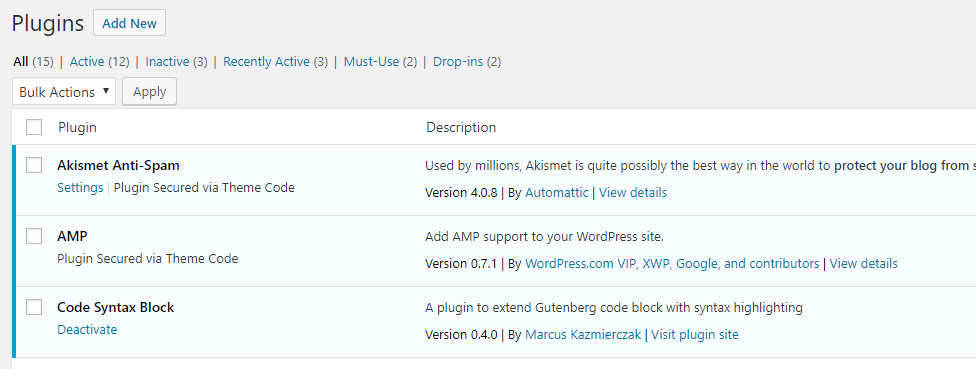
    As you can see, this completely removes the “Deactivate” link in the UI:

    The emrikol_secure_plugin() function takes two arguments:

    • The plugin to secure.  This can either be the plugin slug (ex. jetpack) or the full plugin path if the plugin doesn’t follow standard naming conventions (wp-super-cache/wp-cache.php)
    • A boolean, defaults to false.  If it is true the plugin will be forced to activate without user intervention.  This can be used to activate a plugin on a new install without having to manually enable it in the UI or via WP-CLI
  • Auto-Upgrading users in WordPress

    Auto-Upgrading users in WordPress

    I made a small site recently where I wanted all newly registered users from a specific email domain to automatically be administrators (this is a terrible idea, don’t do it).  The user registration was restricted by Single-Sign-On and 2-Factor Authentication, so I felt relatively safe doing this, especially since it was only a “for fun” project.

    The interesting bit of code that upgraded users to admins is as follows:

    add_action( 'user_register', 'upgrade_email_to_admin', 10, 1 );
    function upgrade_email_to_admin( $user_id ) {
    $user = get_user_by( 'ID', $user_id );
    if ( false !== $user ) {
    $email = $user-&gt;data-&gt;user_email;
    
       // Only example.com please.
        if ( false === strpos( $email, '@example.com' ) ) {
            return;
        }
    
        $roles = $user-&amp;gt;roles;
    
        if ( ! in_array( 'administrator', $roles, true ) ) {
            $user_update = array();
            $user_update['ID'] = $user_id;
            $user_update['role'] = 'administrator';
            wp_update_user( $user_update );
        }
    }
    Code language: PHP (php)

    This is 100% insecure, please do not do this 🙂