Tag: hooks

  • Stop WordPress From Sending Emails (And Log Them Too!)

    Stop WordPress From Sending Emails (And Log Them Too!)

    While doing some development work recently, I wanted to make sure that I disabled all email sending in my test site so that no users imported would get any weird emails.

    To do this I had ChatGPT whip me up a quick plugin, and after cleaning it up here it is to share with the world:

    <?php
    /**
     * Plugin Name: Restrict and Log Emails
     * Description: Blocks emails for users and logs all email attempts.
     * Version: 1.3
     * Author: Emrikol
     */
    
    if ( ! defined( 'ABSPATH' ) ) {
    	exit; // Prevent direct access.
    }
    define( 'REL_EMAIL_LOG_DB_VERSION', '1.2' );
    
    /**
     * Database installation and upgrade function.
     * Creates or updates the email_log table if needed based on a stored version option.
     *
     * @return void
     */
    function rel_install() {
    	global $wpdb;
    	$table_name      = $wpdb->prefix . 'email_log';
    	$charset_collate = $wpdb->get_charset_collate();
    
    	$sql = "CREATE TABLE $table_name (
    	   id mediumint(9) NOT NULL AUTO_INCREMENT,
    	   recipient_email varchar(100) NOT NULL,
    	   subject text NOT NULL,
    	   message text NOT NULL,
    	   status varchar(20) NOT NULL,
    	   sent_at datetime DEFAULT '0000-00-00 00:00:00' NOT NULL,
    	   PRIMARY KEY (id)
    	) $charset_collate;";
    
    	require_once ABSPATH . 'wp-admin/includes/upgrade.php';
    	dbDelta( $sql );
    
    	// Update the database version option.
    	update_option( 'rel_email_log_db_version', REL_EMAIL_LOG_DB_VERSION, false );
    }
    register_activation_hook( __FILE__, 'rel_install' );
    
    /**
     * Adds the Email Log submenu to Tools in the WordPress admin area.
     *
     * @return void
     */
    function rel_add_admin_menu(): void {
    	if ( function_exists( 'add_submenu_page' ) ) {
    		add_submenu_page(
    			'tools.php',
    			'Email Log',
    			'Email Log',
    			'manage_options',
    			'email-log',
    			'rel_email_log_page'
    		);
    	}
    }
    add_action( 'admin_menu', 'rel_add_admin_menu' );
    
    /**
     * Displays the Email Log page in the WordPress admin area.
     *
     * @return void
     */
    function rel_email_log_page(): void {
    	global $wpdb;
    	$table_name = $wpdb->prefix . 'email_log';
    	$logs       = $wpdb->get_results( "SELECT * FROM $table_name ORDER BY sent_at DESC LIMIT 50" ); // phpcs:ignore WordPress.DB.DirectDatabaseQuery.DirectQuery, WordPress.DB.DirectDatabaseQuery.NoCaching, WordPress.DB.PreparedSQL.InterpolatedNotPrepared
    
    	echo '<div class="wrap">';
    	echo '<h1>Email Log</h1>';
    
    	if ( current_user_can( 'manage_options' ) ) {
    		// Process toggle form submission.
    		if ( isset( $_POST['rel_toggle_blocking'] ) && check_admin_referer( 'rel_toggle_blocking_action', 'rel_toggle_blocking_nonce' ) ) {
    			// Sanitize and update the blocking option.
    			if ( isset( $_POST['rel_email_blocking_enabled'] ) && in_array( $_POST['rel_email_blocking_enabled'], array( 'enabled', 'disabled' ), true ) ) {
    				$blocking = $_POST['rel_email_blocking_enabled']; // phpcs:ignore WordPress.Security.ValidatedSanitizedInput.InputNotSanitized
    			} else {
    				$blocking = 'enabled';
    			}
    
    			update_option( 'rel_email_blocking_enabled', $blocking, false );
    			echo '<div class="updated notice"><p>Email blocking has been ' . ( 'enabled' === $blocking ? 'enabled' : 'disabled' ) . '.</p></div>';
    		}
    		$current_blocking = get_option( 'rel_email_blocking_enabled', true );
    
    		echo '<form method="post" style="margin-bottom:20px;">';
    		wp_nonce_field( 'rel_toggle_blocking_action', 'rel_toggle_blocking_nonce' );
    		echo '<p>Email blocking is currently <strong>' . ( 'enabled' === $current_blocking ? 'enabled' : 'disabled' ) . '</strong>.';
    		echo '<br/><br/><label for="rel_email_blocking_enabled">Toggle: </label>';
    		echo '<select id="rel_email_blocking_enabled" name="rel_email_blocking_enabled">';
    		echo '<option value="enabled"' . selected( $current_blocking, 'enabled', false ) . '>Enabled</option>';
    		echo '<option value="disabled"' . selected( $current_blocking, 'disabled', false ) . '>Disabled</option>';
    		echo '</select> ';
    		echo '<input type="submit" name="rel_toggle_blocking" value="Update" class="button-primary" />';
    		echo '</p>';
    		echo '</form>';
    	}
    
    	echo '<table class="widefat fixed" cellspacing="0">';
    	echo '<thead><tr><th>ID</th><th>Email</th><th>Subject</th><th>Message</th><th>Status</th><th>Sent At</th></tr></thead>';
    	echo '<tbody>';
    
    	if ( $logs ) {
    		foreach ( $logs as $log ) {
    			$truncated_message = ( strlen( $log->message ) > 30 ) ? substr( $log->message, 0, 30 ) . '…' : $log->message;
    			echo wp_kses_post(
    				'<tr>
    					<td>' . $log->id . '</td>
    					<td>' . $log->recipient_email . '</td>
    					<td>' . $log->subject . '</td>
    					<td>' . $truncated_message . '</td>
    					<td>' . $log->status . '</td>
    					<td>' . $log->sent_at . '</td>
    				  </tr>'
    			);
    		}
    	} else {
    		echo '<tr><td colspan="6">No emails logged yet.</td></tr>';
    	}
    
    	echo '</tbody></table>';
    	echo '</div>';
    }
    
    /**
     * Intercepts email sending attempts, restricts emails for users without the 'manage_options' capability, and logs the attempt.
     *
     * @param null|bool $short_circuit Default value if email is allowed.
     * @param array     $atts An array of email attributes (to, subject, etc.).
     * @return bool|null Returns a non-null value to short-circuit email sending if restricted.
     */
    function rel_prevent_email( $short_circuit, $atts ) {
    	global $wpdb;
    	$table_name = $wpdb->prefix . 'email_log';
    
    	$recipient_email = isset( $atts['to'] ) ? $atts['to'] : '';
    	$subject         = isset( $atts['subject'] ) ? $atts['subject'] : '';
    	$message         = isset( $atts['message'] ) ? $atts['message'] : '';
    	$sent_at         = current_time( 'mysql' );
    
    	// Check if email blocking is enabled (default true).
    	$blocking = get_option( 'rel_email_blocking_enabled', 'enabled' );
    	switch ( $blocking ) {
    		case 'enabled':
    			$blocking_enabled = true;
    			break;
    		case 'disabled':
    			$blocking_enabled = false;
    			break;
    		default:
    			$blocking_enabled = true;
    			break;
    	}
    
    	// Determine status based on blocking setting.
    	if ( true === $blocking_enabled ) {
    		$status = 'Blocked';
    	} else {
    		$status = 'Sent';
    	}
    
    	// Log the email attempt.
    	$wpdb->insert( // phpcs:ignore WordPress.DB.DirectDatabaseQuery.DirectQuery
    		$table_name,
    		array(
    			'recipient_email' => $recipient_email,
    			'subject'         => $subject,
    			'message'         => $message,
    			'status'          => $status,
    			'sent_at'         => $sent_at,
    		)
    	);
    
    	// If blocking is enabled and the current user cannot manage options, block the email, otherwise allow sending.
    	if ( $blocking_enabled ) {
    		return true;
    	}
    	return null;
    }
    add_filter( 'pre_wp_mail', 'rel_prevent_email', 10, 2 );
    
    /**
     * Checks the current database version and updates the email_log table if necessary.
     *
     * @return void
     */
    function rel_check_db_version() {
    	if ( get_option( 'rel_email_log_db_version' ) !== REL_EMAIL_LOG_DB_VERSION ) {
    		rel_install();
    	}
    }
    add_action( 'init', 'rel_check_db_version' );
    
    Code language: PHP (php)

    As usual, don’t use this slop, nor anything you read here because this is my blarg and I can’t be trusted to do anything correct.


  • How To Restrict User to Self Posts in WordPress

    How To Restrict User to Self Posts in WordPress

    I recently had to work with a third-party integration that used the WordPress REST API to interact with a website. We use this tool internally to move data around from other integrations, and finally into WordPress.

    One of the things that I was worried about was the fact that this plugin would then have full access to the website, which is a private site. We only wanted to use it to post and then update WordPress posts, but there was always the concern that if the third party were to be hacked, then someone could read all of our posts on the private site through the REST API.

    My solution was to hook into user_has_cap so that the user that was set up for the plugin to integrate with, through an application password, would only have access to read and edit its own posts. A bonus is that we wanted to be able to change the author of a post so that it would show up as specific users or project owners. That meant the authorized plugin user would also need access to these posts after the author was changed–so to get past that I scoured each post revision, and if the plugin user was the author of a revision it was also allowed access.

    Finally, to make sure no other published posts were readable, I hooked into posts_results to set any post that didn’t meat the above criteria were marked as private. Below is a cleaned up version of that as an example if anyone else needs this type of functionality–feel free to use it as a starting point:

    <?php
    /**
     * Restricts post capabilities for a specific user.
     *
     * @param bool[]   $allcaps The current user capabilities.
     * @param string[] $caps    The requested capabilities.
     * @param array    $args {
     *     Arguments that accompany the requested capability check.
     *
     *     @type string    $0 Requested capability.
     *     @type int       $1 Concerned user ID.
     *     @type mixed  ...$2 Optional second and further parameters, typically object ID.
     * }
     * @param WP_User  $user    The user object.
     *
     * @return bool[] The modified user capabilities.
     */
    function emrikol_restrict_post_capabilities( array $allcaps, array $caps, array $args, WP_User $user ): array {
    	$post_id = isset( $args[2] ) ? absint( $args[2] ) : false;
    
    	if ( false === $post_id || ! get_post( $post_id ) ) {
    		return $allcaps;
    	}
    
    	if ( 'restricted' === get_user_meta( $user->ID, 'emrikol_restricted_post_capabilities', true ) ) {
    		$allowed_caps  = array( 'read', 'read_private_posts', 'read_post', 'edit_post', 'delete_post', 'edit_others_posts', 'delete_others_posts' );
    		$requested_cap = isset( $caps[0] ) ? $caps[0] : '';
    
    		if ( in_array( $requested_cap, $allowed_caps, true ) ) {
    			if ( emrikol_user_is_author_or_revision_author( $user->ID, $post_id ) ) {
    				$allcaps[ $requested_cap ] = true;
    			} else {
    				$allcaps[ $requested_cap ] = false;
    			}
    		}
    	}
    
    	return $allcaps;
    }
    add_filter( 'user_has_cap', 'emrikol_restrict_post_capabilities', 10, 4 );
    
    /**
     * Restricts the public posts results based on the query.
     *
     * @param WP_Post[] $posts  The array of posts returned by the query.
     * @param WP_Query  $query  The WP_Query instance (passed by reference).
     *
     * @return array           The filtered array of posts.
     */
    function emrikol_restrict_public_posts_results( array $posts, WP_Query $query ): array {
    	if ( ! is_admin() && $query->is_main_query() ) {
    		$current_user = wp_get_current_user();
    
    		if ( 'restricted' === get_user_meta( $user->ID, 'emrikol_restricted_post_capabilities', true ) ) {
    			foreach ( $posts as $key => $post ) {
    				if ( ! emrikol_user_is_author_or_revision_author( $current_user->ID, $post->ID ) ) {
    					$posts[ $key ]->post_status = 'private';
    				}
    			}
    		}
    	}
    
    	return $posts;
    }
    add_filter( 'posts_results', 'emrikol_restrict_public_posts_results', 10, 2 );
    
    /**
     * Checks if the user is the author of the post or the author of a revision.
     *
     * @param int $user_id The ID of the user.
     * @param int $post_id The ID of the post.
     *
     * @return bool True if the user is the author or revision author, false otherwise.
     */
    function emrikol_user_is_author_or_revision_author( int $user_id, int $post_id ): bool {
    	$post_author_id = (int) get_post_field( 'post_author', $post_id );
    
    	if ( $user_id === $post_author_id ) {
    		return true;
    	}
    
    	$revisions = wp_get_post_revisions( $post_id );
    
    	foreach ( $revisions as $revision ) {
    		if ( $user_id === $revision->post_author ) {
    			return true;
    		}
    	}
    
    	return false;
    }
    Code language: PHP (php)
  • WordPress Performance: Caching Navigation Menus

    WordPress Performance: Caching Navigation Menus

    Background

    In the before time, WordPress developers used to build themes (and plugins?) using PHP. When we wanted to add a user generated navigation menu to sites, we had to use a function called wp_nav_menu(). Of course, now that we’re in the future, we don’t need to worry about such things.

    But if you’re still using PHP to build WordPress sites, and still using wp_nav_menu() you might not know that these menus can be performance killers!

    Problem!

    Under the hood, nav menus are stored as terms in a nav_menu taxonomy. For large sites with lots of terms and taxonomies, and complex menus (custom walkers, yay!) you can really start to see menus struggle. Sure, this might be only 50-100ms, but that really adds up after millions of pageviews.

    Caching Solution

    One of the solutions you can do us to wrap the wp_nav_menu() calls inside a caching function, like what the Cache Nav Menus plugin does. Of course, this can complicate things, and even require you to fork third party plugins and themes to maintain caching compatability.

    Another option you have is to cheat. By hooking into pre_wp_nav_menu you can cache the nav menus in place. Below is an example I’ve given customers before that shows how you can cache menus in place with a simple (mu) plugin:

    /**
     * Filters and caches the output of a WordPress navigation menu.
     *
     * This function is hooked to the 'pre_wp_nav_menu' action, it generates a unique cache key
     * for every individual menu based on the menu arguments and the last time the menu was modified.
     * This key is then used to store and retrieve cached versions of the menu.
     *
     * @param string|null $output Nav menu output to short-circuit with.
     * @param stdClas     $args   An object containing wp_nav_menu() arguments.
     *
     * @return string|null        Nav menu output.
     */
    function wpvip_pre_cache_nav_menu( string|null $output, $args ): string|null {
    	/**
    	 * Filters whether to enable caching for a specific menu.
    	 *
    	 * This filter can be used to selectively disable caching for specific WordPress navigation menus.
    	 * By default, all menus are cached for an hour.
    	 *
    	 * @param bool   $enable_cache Whether to enable caching for the menu. Default true.
    	 * @param string $args         An object containing wp_nav_menu() arguments.
    	 */
    	$enable_cache = apply_filters( 'wpvip_pre_cache_nav_menu', true, $args );
    
    	if ( ! $enable_cache ) {
    		return $output;
    	}
    
    	// Define a unique cache key.
    	$cache_key   = $args->menu . ':' . md5( serialize( $args ) ); // phpcs:ignore WordPress.PHP.DiscouragedPHPFunctions.serialize_serialize
    	$cache_group = 'wpvip_pre_cache_nav_menu';
    
    	// Try to get the cached menu.
    	$output = wp_cache_get( $cache_key, $cache_group );
    
    	// If the menu isn't cached, generate and cache it.
    	if ( false === $output ) {
    		$args->echo = false;
    		remove_action( 'pre_wp_nav_menu', 'wpvip_pre_cache_nav_menu', 10, 2 );
    		$output = wp_nav_menu( $args );
    		add_action( 'pre_wp_nav_menu', 'wpvip_pre_cache_nav_menu', 10, 2 );
    		wp_cache_set( $cache_key, $output, $cache_group, HOUR_IN_SECONDS );
    	}
    
    	return $output;
    }
    add_action( 'pre_wp_nav_menu', 'wpvip_pre_cache_nav_menu', 10, 2 );Code language: PHP (php)

    Now, due to the weird way that you can call menus via wp_nav_menu() this might require some tweaking depending on your needs (are you using an int, string, or WP_Query to query the desired menu? Why so many choices?)

    This is defaulting to caching for one hour, but you can likely cache for MUCH longer since menus rarely change. You could even cache forever and use the wp_update_nav_menu hook to purge and/or prime the cache.

    Now go away and break some stuff.

  • Macbook Battery Stats in Your ZSH Terminal Prompt

    Macbook Battery Stats in Your ZSH Terminal Prompt

    As a power user of my Macbook, I’ve found that I often overlook the small battery icon on my menu bar, especially when I’m immersed in a fun project. This minor inconvenience sparked a thought: why not incorporate the battery status directly into my terminal prompt? Thus, I embarked on a fun exploration into ZSH scripting. With a bit of coding magic, I was able to enhance my terminal prompt to dynamically display my Macbook’s battery percentage. Let me guide you through the process.

    We start by loading the ZSH hook module. This module allows us to add functions that run before and/or after each command, giving us the ability to update our battery status prompt in real-time.

    autoload -U add-zsh-hookCode language: Bash (bash)

    The Battery Status Function

    Next, I crafted a function, terminal_battery_stats, that retrieves battery information and displays it in the terminal prompt. Here’s how it works:

    function terminal_battery_stats {
        # Retrieve battery statistics using the pmset command. This is a macOS
        # command that allows power management and battery status retrieval.
        # The awk command is used to format the output into a useful string.
        bat_info=$(pmset -g batt | awk 'NR==2 {gsub(/;/,""); print $3 " " $4}')
        
        # Extract the battery percentage and state from the bat_info string.
        bat_percent=$(echo $bat_info | cut -d' ' -f1 | tr -d '%')
        bat_state=$(echo $bat_info | cut -d' ' -f2)
    
        # Check if the battery is charging or on AC power.
        if [ $bat_state = 'charging' ] || [ $bat_state = 'AC' ] || [ $bat_state = 'charged' ] || [ $bat_state = 'finishing' ]; then
            # If the battery is over 66%, don't display a battery prompt.
            if [ $bat_percent -gt 66 ]; then
                bat_prompt=""
            else
                # Otherwise, set the battery icon to a plug, and the color to green.
                bat_icon='🔌'
                bat_color='%F{green}'
                # Format the prompt with the battery color, percentage, and icon.
                bat_prompt="〔$bat_color$bat_percent%% $bat_icon%f〕"
            fi
        else
            # If the battery is discharging, choose a battery icon and color based on the battery level.
            if [ $bat_percent -le 33 ]; then
                bat_icon='🪫'
                bat_color='%F{red}'
            elif [ $bat_percent -gt 66 ]; then
                bat_icon='🔋'
                bat_color='%F{green}'
            else
                bat_icon='🔋'
                bat_color='%F{yellow}'
            fi
            # Format the prompt with the battery color, percentage, and icon.
            bat_prompt="〔$bat_color$bat_percent%% $bat_icon%f〕"
        fi
    
        # Check if the current prompt already contains a battery status.
        if [[ "$PROMPT" == *"〔"* ]]; then
            # If it does, remove the existing battery status from the prompt.
            PROMPT=${PROMPT#*"〕"}
        fi
    
        # Add the new battery status to the prompt.
        PROMPT="${bat_prompt}${PROMPT}"
    }Code language: Bash (bash)

    To get some basic understanding of the magic behind ZSH scripting and manipulating the terminal prompt, check this helpful resource.

    Applying the Battery Status Function

    After creating the function, I added terminal_battery_stats to the command prompt via ZSH’s pre-command hook. Now, my function runs before each command entered in the terminal, keeping the battery stats up-to-date.

    add-zsh-hook precmd terminal_battery_statsCode language: Bash (bash)

    All the above code is added to my ~/.zshrc file, turning my terminal prompt into a dynamic display of my Macbook’s battery status. The resulting terminal prompt looks like this:

    Conclusion

    Through the power of ZSH scripting magic, my terminal now offers real-time updates of my Macbook’s battery status after every command. I set it to disappear once the battery reaches 67%, a level I consider to be within the safe zone. This is an excellent example of how minor inconveniences can lead to innovative solutions that enhance productivity.

    Here’s the full script ready to drop in to your own ~/.zshrc file:


    # Load the zsh hook module. This is a module that allows adding functions
    # that get run before and/or after each command.
    autoload -U add-zsh-hook
    
    # Function to retrieve and display battery statistics in the terminal prompt.
    # Uses the pmset command to retrieve battery information, and awk to format
    # it into a useful string. Depending on the battery's state and level, 
    # different icons and colors will be displayed in the terminal prompt.
    # 
    # @return void
    function terminal_battery_stats {
        # Retrieve battery statistics using the pmset command. This is a macOS
        # command that allows power management and battery status retrieval.
        # The awk command is used to format the output into a useful string.
        bat_info=$(pmset -g batt | awk 'NR==2 {gsub(/;/,""); print $3 " " $4}')
        
        # Extract the battery percentage and state from the bat_info string.
        bat_percent=$(echo $bat_info | cut -d' ' -f1 | tr -d '%')
        bat_state=$(echo $bat_info | cut -d' ' -f2)
    
        # Check if the battery is charging or on AC power.
        if [ $bat_state = 'charging' ] || [ $bat_state = 'AC' ] || [ $bat_state = 'charged' ] || [ $bat_state = 'finishing' ]; then
            # If the battery is over 66%, don't display a battery prompt.
            if [ $bat_percent -gt 66 ]; then
                bat_prompt=""
            else
                # Otherwise, set the battery icon to a plug, and the color to green.
                bat_icon='🔌'
                bat_color='%F{green}'
                # Format the prompt with the battery color, percentage, and icon.
                bat_prompt="〔$bat_color$bat_percent%% $bat_icon%f〕"
            fi
        else
            # If the battery is discharging, choose a battery icon and color based on the battery level.
            if [ $bat_percent -le 33 ]; then
                bat_icon='🪫'
                bat_color='%F{red}'
            elif [ $bat_percent -gt 66 ]; then
                bat_icon='🔋'
                bat_color='%F{green}'
            else
                bat_icon='🔋'
                bat_color='%F{yellow}'
            fi
            # Format the prompt with the battery color, percentage, and icon.
            bat_prompt="〔$bat_color$bat_percent%% $bat_icon%f〕"
        fi
    
        # Check if the current prompt already contains a battery status.
        if [[ "$PROMPT" == *"〔"* ]]; then
            # If it does, remove the existing battery status from the prompt.
            PROMPT=${PROMPT#*"〕"}
        fi
    
        # Add the new battery status to the prompt.
        PROMPT="${bat_prompt}${PROMPT}"
    }
    
    # Adds the function terminal_battery_stats to the command prompt 
    # meaning it will be run before each command entered in the terminal. 
    add-zsh-hook precmd terminal_battery_stats
    
    Code language: Bash (bash)

    Good luck!

  • Stopping WordPress User Registration Spam

    Stopping WordPress User Registration Spam

    I’ve had a rash of user registration spam lately, and even though I’m sure the site is secure, it’s just very annoying. So I’ve whipped up a quick little hook that I’ve thrown in my mu-plugins to give me the ability to add email hostnames to a blocklist and disable user registration from them:

    /**
     * Hook into the user registration process to deny registration to a blocklist of hostnames.
     *
     * @param string   $sanitized_user_login The sanitized username.
     * @param string   $user_email The user's email address.
     * @param WP_Error $errors Contains any errors with the registration process.
     *
     * @return void
     */
    function emrikol_blocklist_email_registration( string $sanitized_user_login, string $user_email, WP_Error $errors ): void {
    	// Validate the email address.
    	if ( filter_var( $user_email, FILTER_VALIDATE_EMAIL ) ) {
    		// Extract the email hostname from the user's email address and normalize it.
    		$email_parts  = explode( '@', $user_email );
    		$email_hostname = strtolower( $email_parts[1] );
    
    		$blocklist = array(
    			'email.imailfree.cc',
    			'mail.imailfree.cc',
    			'mailbox.imailfree.cc',
    		);
    
    		// Check if the email hostname is in the blocklist.
    		if ( in_array( $email_hostname, $blocklist ) ) {
    			$errors->add( 'email_hostname_blocked', __( 'Sorry, registration using this email hostname is not allowed.', 'emrikol' ) );
    		}
    	}
    }
    add_action( 'register_post', 'emrikol_blocklist_email_registration', 10, 3 );
    Code language: PHP (php)

    There’s lots of different ways you could extend this for yourself, like adding a hostname regex, a filter, or an admin screen to allow updates to the blocklist without having to make a code deploy.

  • Command Timing in ZSH

    Command Timing in ZSH

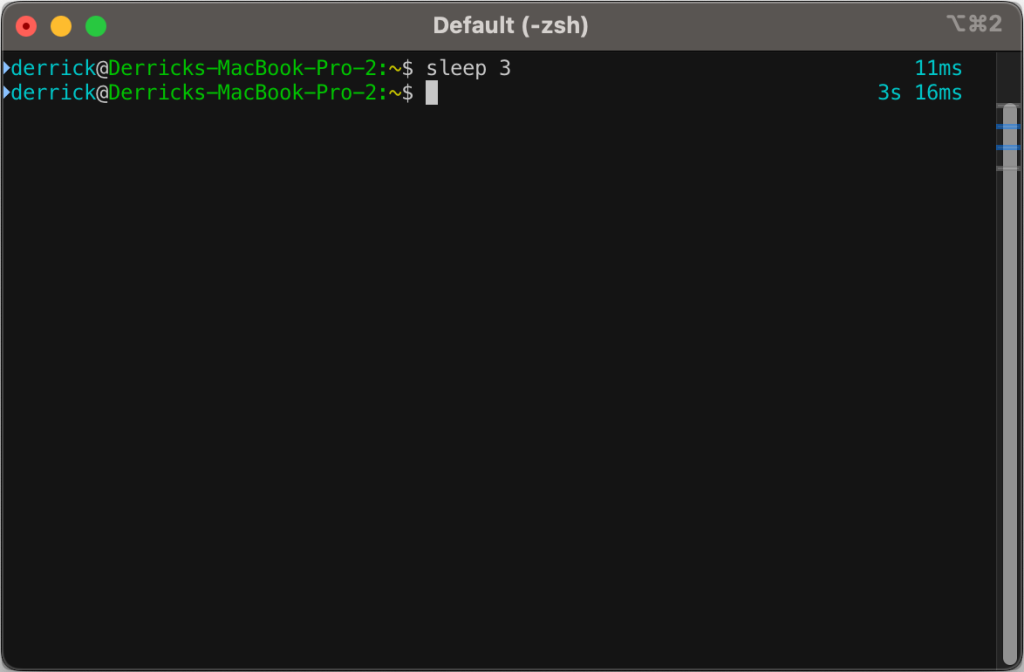
    I’ve had a few snippets in my .zshrc file for a while now that will output how long a command takes to process.

    First off, I’d like to say that I did not come up with this idea, and I didn’t really write the code. I’ve snipped it from somewhere and modified it over time, so I am very sorry to the original author for not being able to give full credit. I didn’t save where I got it from–so if anyone comes across this in the future and might know where the idea came from, drop it in the comments.

    Now, on to the fun:

    The original script only went down to the second, but I wanted more granularity than that, so I went down to the millisecond.

    You’ll likely need to install gdate (brew install gdate) for this to work properly.

    The code (added to ~/.zshrc):

    function preexec() {
    	timer=$(($(gdate +%s%0N)/1000000))
    }
    
    function precmd() {
    	if [ "$timer" ]; then
    		now=$(($(gdate +%s%0N)/1000000))
    		elapsed=$now-$timer
    
    		reset_color=$'\e[00m'
    		RPROMPT="%F{cyan} $(converts "$elapsed") %{$reset_color%}"
    		export RPROMPT
    		unset timer
    	fi
    }
    
    converts() {
    	local t=$1
    
    	local d=$((t/1000/60/60/24))
    	local h=$((t/1000/60/60%24))
    	local m=$((t/100/60%60))
    	local s=$((t/1000%60))
    	local ms=$((t%1000))
    
    	if [[ $d -gt 0 ]]; then
    			echo -n " ${d}d"
    	fi
    	if [[ $h -gt 0 ]]; then
    			echo -n " ${h}h"
    	fi
    	if [[ $m -gt 0 ]]; then
    			echo -n " ${m}m"
    	fi
    	if [[ $s -gt 0 ]]; then
    		echo -n " ${s}s"
    	fi
    	if [[ $ms -gt 0 ]]; then
    		echo -n " ${ms}ms"
    	fi
    	echo
    }Code language: PHP (php)
  • Limiting Featured Image Dimensions in WordPress

    Limiting Featured Image Dimensions in WordPress

    As a follow up to my last post about limiting file sizes during uploads, I had to come back to the problem with limiting image sizes for featured images. Not bytes this time, but pixel dimensions.

    Still being a bit of a block editor newb, this was an interesting challenge for me, and I was really surprised at how easy it was to implement. I basically googled around and found a few different things to put together that worked for me. The primary source was a post by Igor Benic on how to disable the publish button:

    After that, I discovered how to add notifications to the block editor, to tell when the image was too large, thanks to a post by David F. Carr:

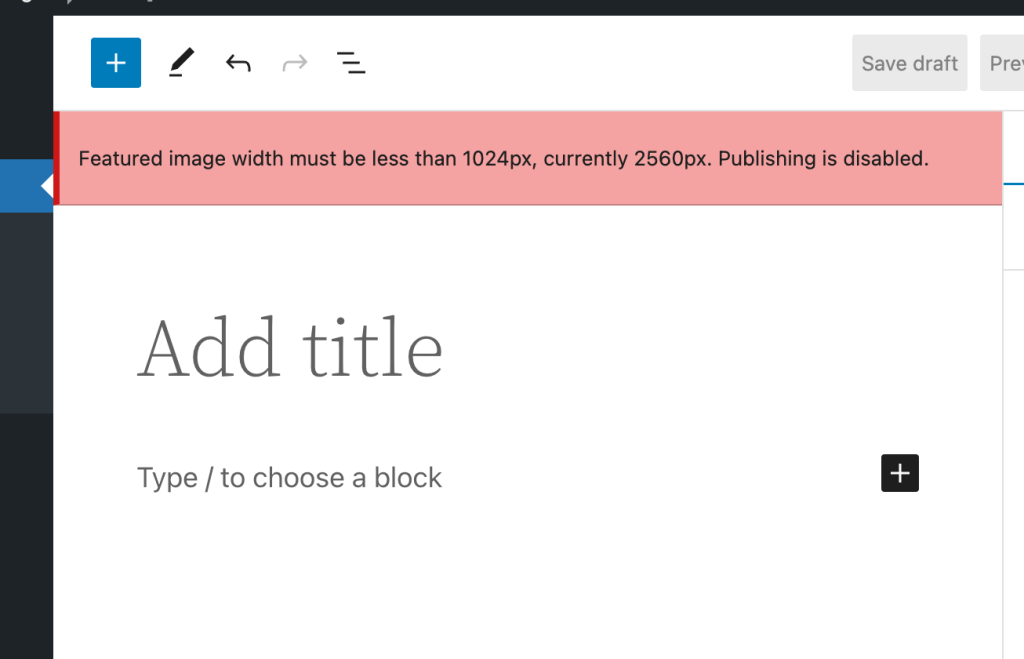
    So what’s it look like? Well, it’s pretty simple. If you choose a featured image that’s too large for the settings, it will add a non-dismissible error notification to the editor:

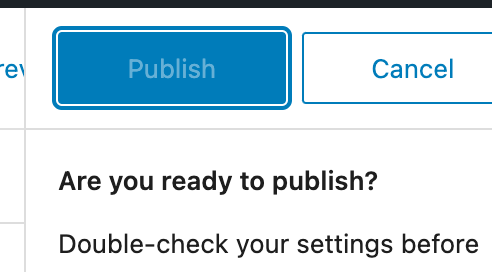
    Then it will block you from hitting the publish button:

    So, finally the code. This is just enqueued in as a simple add_action() during the enqueue_block_editor_assets hook. I’m absolutely not a good JS developer, so please don’t judge me too harshly. Also, that means this could be riddled with bugs. Use at your own risk 😀

    var postLocked = false;
    wp.domReady( () => {
    	wp.data.subscribe( function() {
    		var imageId = wp.data.select( 'core/editor' ).getEditedPostAttribute( 'featured_media' ); // Featured Image ID.
    
    		// If we have no image ID, and we already locked the post, we won't do anything.
    		if ( imageId ) {
    			blockEditorSettings = wp.data.select('core/block-editor').getSettings();
    
    			// Default to 1200px wide.
    			maxImageSize = 1200;
    			imageAttrs = wp.data.select('core').getMedia( imageId );
    
    			// Get the size for the "large image" and if it's available, use that instead.
    			if ( typeof blockEditorSettings !== 'undefined' && blockEditorSettings.hasOwnProperty( 'imageDimensions' ) ) {
    				maxImageSize = blockEditorSettings.imageDimensions.large.width;
    			}
    
    			if ( typeof imageAttrs !== 'undefined' && imageAttrs.hasOwnProperty( 'media_details') ) {
    				// Publish is not locked and width is too large.
    				if ( ! postLocked && imageAttrs.media_details.width > maxImageSize ) {
    					postLocked = true;
    					wp.data.dispatch( 'core/editor' ).lockPostSaving( 'featuredImageTooLarge' );
    
    					wp.data.dispatch('core/notices').createNotice(
    						'error', // Can be one of: success, info, warning, error.
    						wp.i18n.__( wp.i18n.sprintf( 'Featured image width must be less than %spx, currently %spx. Publishing is disabled.', maxImageSize, imageAttrs.media_details.width ) ),
    						{
    							id: 'featuredImageTooLarge', // Assigning an ID prevents the notice from being added repeatedly.
    							isDismissible: false, // Whether the user can dismiss the notice.
    						}
    					);
    				}
    
    			}
    		} else if ( postLocked ) {
    			postLocked = false;
    			wp.data.dispatch( 'core/editor' ).unlockPostSaving( 'featuredImageTooLarge' );
    			wp.data.dispatch('core/notices').removeNotice( 'featuredImageTooLarge' );
    		}
    	} );
    } );Code language: JavaScript (javascript)
  • Half Baked Idea: Limiting WordPress Image Upload Sizes

    Half Baked Idea: Limiting WordPress Image Upload Sizes

    If you want to be able to limit images (or any attachments) from being uploaded into the media library if they are too large, you can use the wp_handle_upload_prefilter filter to do this.

    Below is a really basic example I whipped up in a few minutes that I shared with a customer not too long ago:

    /**
     * Limits the maximum size of images that can be uploaded.
     *
     * @param array $file {
     *     Reference to a single element from `$_FILES`.
     *
     *     @type string $name     The original name of the file on the client machine.
     *     @type string $type     The mime type of the file, if the browser provided this information.
     *     @type string $tmp_name The temporary filename of the file in which the uploaded file was stored on the server.
     *     @type int    $size     The size, in bytes, of the uploaded file.
     *     @type int    $error    The error code associated with this file upload.
     * }
     *
     * @return array       Filtered file array, with a possible error if the file is too large.
     */
    function blarg_limit_max_image_upload_size( $file ) {
        if ( str_starts_with( $file['type'], 'image/' ) ) {
            $max_size = 1 * 1024; // 1kb.
    
            if ( $file['size'] > $max_size ) {
                // translators: %s: Human readable maximum image file size.
                $file['error'] .= sprintf( __( 'Uploaded images must be smaller than %s.' ), size_format( $max_size ) );
            }
        }
    
        return $file;
    
    }
    add_filter( 'wp_handle_upload_prefilter', 'blarg_limit_max_image_upload_size', 10, 1 );Code language: PHP (php)

    Good luck if you use any of my hot garbage in production 😀