Tag: api

  • Get OctoPrint Status via Bash

    Get OctoPrint Status via Bash

    I’m working on a module to add OctoPrint status to my zsh prompt, which I’ll probably write about in the future as a bigger post about my prompt customizations.

    To start with that though, I need to play around with accessing the API via curl.

    So here’s my super alpha version that will request the current status via HTTP and output it:

    #!/bin/bash
    
    OCTOPRINT_API="hunter2"
    BASE_URL="http://octoprint.example.com"
    JOB_ENDPOINT="${BASE_URL}/api/job"
    CURL_TIMEOUT="0.5"
    
    # Fetch the JSON from OctoPrint
    response="$(curl --max-time ${CURL_TIMEOUT} --silent --fail \
      --header "X-Api-Key: ${OCTOPRINT_API}" \
      "${JOB_ENDPOINT}")"
    
    # Extract fields with jq
    file_name=$(jq -r '.job.file.display' <<< "$response")
    completion=$(jq -r '.progress.completion' <<< "$response")
    state=$(jq -r '.state' <<< "$response")
    time_elapsed=$(jq -r '.progress.printTime' <<< "$response")
    time_left=$(jq -r '.progress.printTimeLeft' <<< "$response")
    
    # Round the completion percentage to two decimals
    completion_str=$(printf "%.2f" "$completion")
    
    # Convert seconds to H:MM:SS
    function fmt_time() {
      local total_seconds="$1"
      local hours=$((total_seconds / 3600))
      local minutes=$(((total_seconds % 3600) / 60))
      local seconds=$((total_seconds % 60))
      printf "%02d:%02d:%02d" "$hours" "$minutes" "$seconds"
    }
    
    # Convert the times
    time_elapsed_str=$(fmt_time "$time_elapsed")
    time_left_str=$(fmt_time "$time_left")
    
    # Print a readable summary
    echo "File: ${file_name}"
    echo "State: ${state}"
    echo "Completion: ${completion_str}%"
    echo "Time Elapsed: ${time_elapsed_str}"
    echo "Time Left: ${time_left_str}"
    Code language: Bash (bash)

    Do with this what you will.

  • Super Simple OpenAI PHP Class

    Super Simple OpenAI PHP Class

    I’ve been playing around with hooking up ChatGPT/Dall-E to WordPress and WP-CLI. To do this, I whipped up a super simple class to make this easier:

    <?php
    class OpenAI_API {
    	public const API_KEY = 'hunter2';  // Get your own darn key!
    
    	/**
    	 * Generates an image based on the provided prompt using the OpenAI API.
    	 *
    	 * @param string $prompt The text prompt to generate the image from. Default is an empty string.
    	 * @return string The response body from the OpenAI API, or a JSON-encoded error message if the request fails.
    	 */
    	public static function generate_image( string $prompt = '' ): string {
    		$data = array(
    			'model'   => 'dall-e-3',
    			'prompt'  => trim( $prompt ),
    			'quality' => 'hd',
    			'n'       => 1,
    			'size'    => '1024x1024',
    		);
    
    		$args = array(
    			'body'        => wp_json_encode( $data ),
    			'headers'     => array(
    				'Content-Type'  => 'application/json',
    				'Authorization' => 'Bearer ' . OpenAI_API::API_KEY,
    			),
    			'method'      => 'POST',
    			'data_format' => 'body',
    		);
    
    		$response = wp_remote_post( 'https://api.openai.com/v1/images/generations', $args );
    
    		if ( is_wp_error( $response ) ) {
    			return wp_json_encode( $response );
    		} else {
    			$body = wp_remote_retrieve_body( $response );
    			return $body;
    		}
    	}
    
    	/**
    	 * Creates a chat completion using the OpenAI GPT-3.5-turbo model.
    	 *
    	 * @param string $prompt The user prompt to be sent to the OpenAI API.
    	 * @param string $system_prompt Optional. The system prompt to be sent to the OpenAI API. Defaults to a predefined prompt.
    	 * 
    	 * @return string The response body from the OpenAI API, or a JSON-encoded error message if the request fails.
    	 */
    	public static function create_chat_completion( string $prompt = '', string $system_prompt = '' ): string {
    		if ( empty( $system_prompt ) ) {
    			$system_prompt = 'You are a virtual assistant designed to provide general support across a wide range of topics. Answer concisely and directly, focusing on essential information only. Maintain a friendly and approachable tone, adjusting response length based on the complexity of the question.';
    		}
    
    		// The data to send in the request body
    		$data = array(
    			'model'    => 'gpt-3.5-turbo',
    			'messages' => array(
    				array(
    					'role'    => 'system',
    					'content' => trim( $system_prompt ),
    				),
    				array(
    					'role'    => 'user',
    					'content' => trim( $prompt ),
    				),
    			),
    		);
    
    		$args = array(
    			'body'        => wp_json_encode( $data ),
    			'headers'     => array(
    				'Content-Type'  => 'application/json',
    				'Authorization' => 'Bearer ' . OpenAI_API::API_KEY,
    			),
    			'method'      => 'POST',
    			'data_format' => 'body',
    			'timeout'     => 15,
    		);
    
    		// Perform the POST request
    		$response = wp_remote_post( 'https://api.openai.com/v1/chat/completions', $args );
    
    		// Error handling
    		if ( is_wp_error( $response ) ) {
    			return wp_json_encode( $response );
    		} else {
    			if ( wp_remote_retrieve_response_code( $response ) !== 200 ) {
    				return wp_json_encode( array( 'error' => 'API returned non-200 status code', 'response' => wp_remote_retrieve_body( $response ) ) );
    			}
    
    			// Assuming the request was successful, you can access the response body as follows:
    			$body = wp_remote_retrieve_body( $response );
    			return $body;
    		}
    	}
    }Code language: PHP (php)

    I can generate images and get back text from the LLM. Here’s some examples ChatGPT made to show how you can use these:


    Example 1: Generating an Image

    This example generates an image of a “cozy cabin in the snowy woods at sunset” using the generate_image method and displays it in an <img> tag.

    <?php
    $image_url = OpenAI_API::generate_image("A cozy cabin in the snowy woods at sunset");
    
    if ( ! empty( $image_url ) ) {
        echo '<img src="' . esc_url( $image_url ) . '" alt="Cozy cabin in winter">';
    } else {
        echo 'Image generation failed.';
    }
    ?>Code language: PHP (php)

    Example 2: Simple Chat Completion

    This example sends a question to the create_chat_completion method and prints the response directly.

    <?php
    $response = OpenAI_API::create_chat_completion("How does photosynthesis work?");
    echo $response;
    ?>Code language: PHP (php)

    Example 3: Chat Completion with Custom System Prompt

    This example sets a custom system prompt for a specific tone, here focusing on culinary advice, and asks a relevant question.

    <?php
    $system_prompt = "You are a culinary expert. Please provide advice on healthy meal planning.";
    $response = OpenAI_API::create_chat_completion("What are some good meals for weight loss?", $system_prompt);
    echo $response;
    ?>Code language: PHP (php)

    Here are some key limitations of this simple API implementation and why these are crucial considerations for production:

    • Lack of Robust Error Handling:
      • This API implementation has basic error handling that only checks if an error occurred during the request. It doesn’t provide specific error messages for different types of failures (like rate limits, invalid API keys, or network issues).
      • Importance: In production, detailed error handling allows for clearer diagnostics and faster troubleshooting when issues arise.
    • No Caching:
      • The current API makes a fresh request for each call, even if the response might be identical to a recent query.
      • Importance: Caching can reduce API usage costs, improve response times, and reduce server load, particularly for commonly repeated queries.
    • No API Rate Limiting:
      • This implementation doesn’t limit the number of requests sent within a certain time frame.
      • Importance: Rate limiting prevents hitting API request quotas and helps avoid unexpected costs or blocked access if API limits are exceeded.
    • No Logging for Debugging:
      • There’s no logging in place for tracking request errors or failed attempts.
      • Importance: Logs provide an audit trail that helps diagnose issues over time, which is crucial for maintaining a stable application in production.
    • Lack of Security for API Key Management:
      • The API key is currently hard coded into the class.
      • Importance: In production, it’s best to use environment variables or a secure key management system to protect sensitive information and prevent accidental exposure of the API key.
    • No Response Parsing or Validation:
      • The code assumes that the API response format is always correct, without validation.
      • Importance: Inconsistent or unexpected responses can cause failures. Validation ensures the app handles different cases gracefully.

    Why Not Use in Production?

    Due to these limitations, this API should be considered a prototype or learning tool rather than a production-ready solution. Adding robust error handling, caching, rate limiting, and logging would make it more resilient, secure, and efficient for a production environment.


    Alright, so listen to the LLM and don’t do anything stupid with this, like I am doing.

  • How To Restrict User to Self Posts in WordPress

    How To Restrict User to Self Posts in WordPress

    I recently had to work with a third-party integration that used the WordPress REST API to interact with a website. We use this tool internally to move data around from other integrations, and finally into WordPress.

    One of the things that I was worried about was the fact that this plugin would then have full access to the website, which is a private site. We only wanted to use it to post and then update WordPress posts, but there was always the concern that if the third party were to be hacked, then someone could read all of our posts on the private site through the REST API.

    My solution was to hook into user_has_cap so that the user that was set up for the plugin to integrate with, through an application password, would only have access to read and edit its own posts. A bonus is that we wanted to be able to change the author of a post so that it would show up as specific users or project owners. That meant the authorized plugin user would also need access to these posts after the author was changed–so to get past that I scoured each post revision, and if the plugin user was the author of a revision it was also allowed access.

    Finally, to make sure no other published posts were readable, I hooked into posts_results to set any post that didn’t meat the above criteria were marked as private. Below is a cleaned up version of that as an example if anyone else needs this type of functionality–feel free to use it as a starting point:

    <?php
    /**
     * Restricts post capabilities for a specific user.
     *
     * @param bool[]   $allcaps The current user capabilities.
     * @param string[] $caps    The requested capabilities.
     * @param array    $args {
     *     Arguments that accompany the requested capability check.
     *
     *     @type string    $0 Requested capability.
     *     @type int       $1 Concerned user ID.
     *     @type mixed  ...$2 Optional second and further parameters, typically object ID.
     * }
     * @param WP_User  $user    The user object.
     *
     * @return bool[] The modified user capabilities.
     */
    function emrikol_restrict_post_capabilities( array $allcaps, array $caps, array $args, WP_User $user ): array {
    	$post_id = isset( $args[2] ) ? absint( $args[2] ) : false;
    
    	if ( false === $post_id || ! get_post( $post_id ) ) {
    		return $allcaps;
    	}
    
    	if ( 'restricted' === get_user_meta( $user->ID, 'emrikol_restricted_post_capabilities', true ) ) {
    		$allowed_caps  = array( 'read', 'read_private_posts', 'read_post', 'edit_post', 'delete_post', 'edit_others_posts', 'delete_others_posts' );
    		$requested_cap = isset( $caps[0] ) ? $caps[0] : '';
    
    		if ( in_array( $requested_cap, $allowed_caps, true ) ) {
    			if ( emrikol_user_is_author_or_revision_author( $user->ID, $post_id ) ) {
    				$allcaps[ $requested_cap ] = true;
    			} else {
    				$allcaps[ $requested_cap ] = false;
    			}
    		}
    	}
    
    	return $allcaps;
    }
    add_filter( 'user_has_cap', 'emrikol_restrict_post_capabilities', 10, 4 );
    
    /**
     * Restricts the public posts results based on the query.
     *
     * @param WP_Post[] $posts  The array of posts returned by the query.
     * @param WP_Query  $query  The WP_Query instance (passed by reference).
     *
     * @return array           The filtered array of posts.
     */
    function emrikol_restrict_public_posts_results( array $posts, WP_Query $query ): array {
    	if ( ! is_admin() && $query->is_main_query() ) {
    		$current_user = wp_get_current_user();
    
    		if ( 'restricted' === get_user_meta( $user->ID, 'emrikol_restricted_post_capabilities', true ) ) {
    			foreach ( $posts as $key => $post ) {
    				if ( ! emrikol_user_is_author_or_revision_author( $current_user->ID, $post->ID ) ) {
    					$posts[ $key ]->post_status = 'private';
    				}
    			}
    		}
    	}
    
    	return $posts;
    }
    add_filter( 'posts_results', 'emrikol_restrict_public_posts_results', 10, 2 );
    
    /**
     * Checks if the user is the author of the post or the author of a revision.
     *
     * @param int $user_id The ID of the user.
     * @param int $post_id The ID of the post.
     *
     * @return bool True if the user is the author or revision author, false otherwise.
     */
    function emrikol_user_is_author_or_revision_author( int $user_id, int $post_id ): bool {
    	$post_author_id = (int) get_post_field( 'post_author', $post_id );
    
    	if ( $user_id === $post_author_id ) {
    		return true;
    	}
    
    	$revisions = wp_get_post_revisions( $post_id );
    
    	foreach ( $revisions as $revision ) {
    		if ( $user_id === $revision->post_author ) {
    			return true;
    		}
    	}
    
    	return false;
    }
    Code language: PHP (php)
  • Sending Prowl Alerts via Bash

    Sending Prowl Alerts via Bash

    I’m working on some server scripting and I wanted to find a way to make sure I get proper alerts. I tried hard getting Twilio working cheaply, but that failed. So I remembered that I use Prowl for other things on my phone–so why not just send more alerts that way?

    So, again with the help of ChatGPT I have made a terrible monstrosity:

    #!/bin/bash
    
    # Exit if any command fails, if an unset variable is used, or if a command in a pipeline fails
    set -euo pipefail
    
    # Default values
    application="Shell Notification"
    priority=0
    event="Event"
    message=""
    logfile="/var/log/send-prowl-alert.log"
    url=""
    
    # Usage information
    usage() {
        echo "Usage: $0 --message=<message> [--application=<application>] [--event=<event>] [--description=<description>] [--priority=<priority>] [--url=<url>]"
        echo "Required:"
        echo "  --message=<message>       A description of the event, generally terse"
        echo "                            Maximum of 10000 bytes"
        echo "Optional:"
        echo "  --application=<application>  The name of the application (default: 'Shell Notification')"
        echo "                               Maximum of 256 bytes"
        echo "  --event=<event>              The name of the event or subject of the notification (default: 'Event')"
        echo "                               Maximum of 1024 bytes"
        echo "  --priority=<priority>        The priority of the alert (default: 0)"
        echo "                               An integer value ranging [-2, 2] representing:"
        echo "                                   -2 Very Low"
        echo "                                   -1 Moderate"
        echo "                                    0 Normal"
        echo "                                    1 High"
        echo "                                    2 Emergency"
        echo "                               Emergency priority messages may bypass quiet hours according to the user's settings."
        echo "  --url=<url>                  The URL which should be attached to the notification"
        echo "                               Maximum of 512 bytes"
        echo "  --help                       Displays this help message"
    }
    
    # URL Encodes a string
    urlencode() {
      local string="$1"
      local length="${#string}"
      local i
    
      for ((i = 0; i < length; i++)); do
        local c="${string:i:1}"
        case $c in
          [a-zA-Z0-9.~_-])
            printf '%s' "$c"
            ;;
          *)
            printf '%%%02X' "'$c"
            ;;
        esac
      done
    }
    
    # Check if the script is being run manually or via cron
    if [[ -t 1 ]]; then
        # Output to console if being run manually
        log_message() { echo "[$(date '+%Y-%m-%d %H:%M:%S')] $*"; }
    else
        # Output to log file if being run via cron
        log_message() {
            echo "[$(date '+%Y-%m-%d %H:%M:%S')] $*" >> "${logfile}"
            # Truncate the log file to 1 megabyte
            if [[ $(wc -c <"${logfile}") -gt 1000000 ]]; then
                tail -c 1000000 "${logfile}" > "${logfile}.tmp" && mv "${logfile}.tmp" "${logfile}"
            fi
        }
    fi
    
    # Parse arguments
    for arg in "$@"; do
        case "${arg}" in
            --message=*)
                message=${arg#*=}
                ;;
            --application=*)
                application=${arg#*=}
                ;;
            --event=*)
                event=${arg#*=}
                ;;
            --priority=*)
                priority=${arg#*=}
                ;;
            --url=*)
                url=${arg#*=}
                ;;
            --help)
                usage
                exit 0
                ;;
            *)
                echo "Error: Unsupported argument ${arg}"
                usage
                exit 1
                ;;
        esac
    done
    
    
    # Create a variable to store error messages
    errors=""
    
    # Check if curl is installed
    if ! command -v curl &> /dev/null; then
        errors+="Error: curl is not installed. Please install curl and try again.\n"
    fi
    
    # Check that a message was provided
    if [[ -z "${message}" ]]; then
        errors+="Error: No message provided."
    fi
    
    # Check if the URL is valid
    if [[ -n $url && ! $url =~ ^(https?://)[^\s/$.?#].[^\s]*$ ]]; then
        errors+="Error: Invalid URL.\n"
    fi
    
    # Check byte size of the parameters and append error if they exceed the max limit
    if [[ "${#url}" -gt 512 ]]; then
        errors+="Error: URL exceeds maximum byte limit (512 bytes).\n"
    fi
    
    if [[ "${#application}" -gt 256 ]]; then
        errors+="Error: Application name exceeds maximum byte limit (256 bytes).\n"
    fi
    
    if [[ "${#event}" -gt 1024 ]]; then
        errors+="Error: Event name exceeds maximum byte limit (1024 bytes).\n"
    fi
    
    if [[ "${#message}" -gt 10000 ]]; then
        errors+="Error: Message exceeds maximum length (10000 bytes).\n"
    fi
    
    if [[ ! "${priority}" =~ ^-?[0-2]$ ]]; then
        errors+="Error: Invalid priority. Must be an integer between -2 and 2.\n"
    fi
    
    # Check if the API key file exists and is not empty
    if [[ ! -s ~/.prowl_api_key ]]; then
        errors+="Error: The Prowl API key file does not exist or is empty. Please create a file at ~/.prowl_api_key and add your API key to it.\nExample:\n  echo 'your_api_key' > ~/.prowl_api_key\n  chmod 600 ~/.prowl_api_key\n"
    fi
    
    # Check the permissions on the API key file, if it exists
    # We have to do it in a convoluted cross platform way because macos does not support `stat -c`
    if [[ -f ~/.prowl_api_key ]]; then
        # Retrieve the file permissions and remove any trailing '@' symbol (indicating extended attributes)
        permissions=$(ls -l -d ~/.prowl_api_key | awk '{print $1}' | tr -d '@')
    
        # Check if the permissions are not set to '-rw-------'
        if [[ "$permissions" != "-rw-------" ]]; then
            # Add an error message to the 'errors' variable
            errors+="Error: The permissions on the API key file are not set correctly. Please run 'chmod 600 ~/.prowl_api_key' and try again.\n"
        fi
    fi
    
    # If any errors were detected, print the error messages and exit
    if [[ -n $errors ]]; then
        echo -e "${errors}"  # -e enables interpretation of backslash escapes like \n
        exit 1
    fi
    
    # Get the Prowl API key
    prowl_api_key=$(cat ~/.prowl_api_key)
    
    # Save the alert data for logging before we encode it
    alert_log_string="$application : $event : $priority : $url : $message"
    
    # URL-encode the variables
    prowl_api_key=$(urlencode "$prowl_api_key")
    application=$(urlencode "$application")
    event=$(urlencode "$event")
    message=$(urlencode "$message")
    priority=$(urlencode "$priority")
    url=$(urlencode "$url")
    
    # Send the alert
    response=$(curl -s "https://api.prowlapp.com/publicapi/add?apikey=${prowl_api_key}&application=${application}&event=${event}&description=${message}&priority=${priority}&url=${url}")
    
    # Check if the alert was sent successfully
    if [[ "${response}" != *"success code=\"200\""* ]]; then
        log_message "Error sending alert: ${alert_log_string}"
        log_message "Response: ${response}"
        exit 1
    fi
    
    log_message "Alert sent successfully: $alert_log_string"
    exit 0
    Code language: PHP (php)

    Good luck!

  • iOS Reminders to Habitica To Do’s via IFTTT

    iOS Reminders to Habitica To Do’s via IFTTT

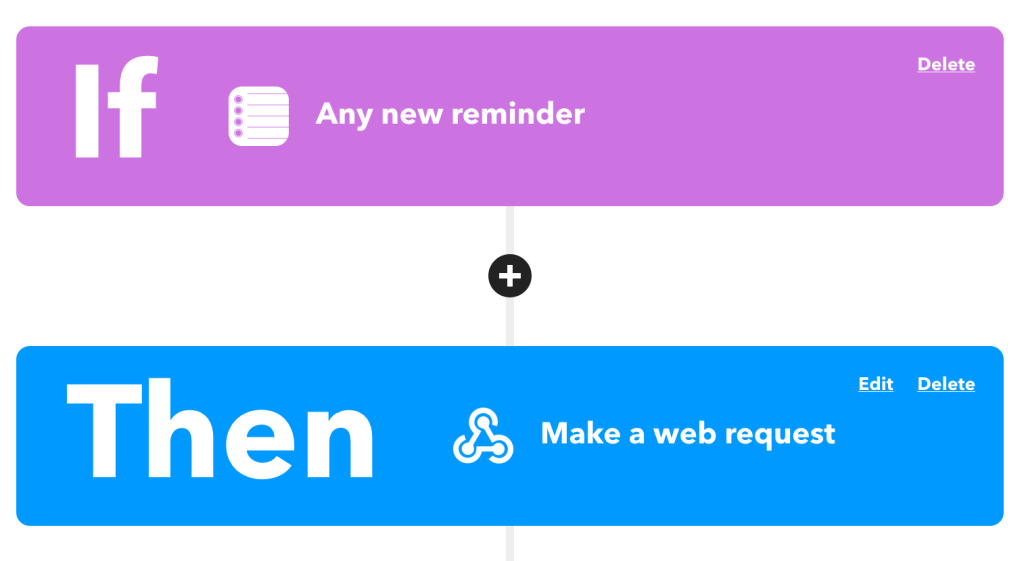
    After digging around for a while trying to see how I could link up iOS’s Reminders with Habitica‘s To Do’s to help keep me organized, I finally found an easy way through IFTTT.

    This works easily because Habitica offers a wonderful API💥

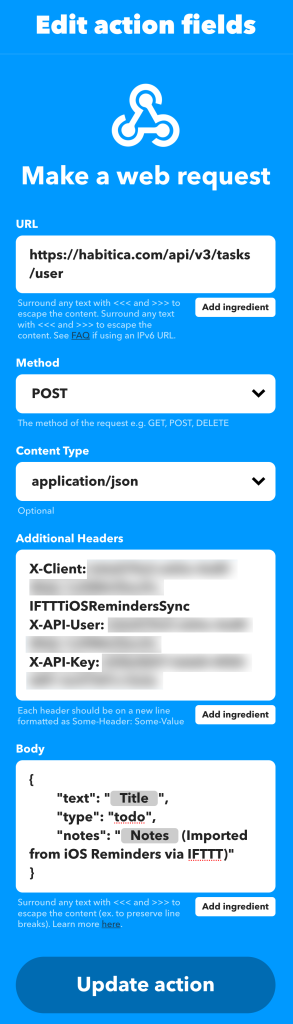
    Specifically we’re looking at the “Create a new task belonging to the user” API endpoint:

    https://habitica.com/api/v3/tasks/user

    With this, we’ll need to make a POST request with some special headers to authenticate and then a body payload made of JSON:

    Headers:

    X-Client: my-user-id-IFTTTiOSRemindersSync
    X-API-User: my-user-id
    X-API-Key: my-api-keyCode language: HTTP (http)

    Body:

    {
    	"text": "{{Title}}",
    	"type": "todo",
    	"notes": "{{Notes}} (Imported from iOS Reminders via IFTTT)"
    }Code language: JSON / JSON with Comments (json)

    From here, IFTTT will fill in the title, notes, and ship it off to Habitica for me to check off for some sweet XP!

  • Wisps, a WordPress Plugin

    Wisps, a WordPress Plugin

    Last year I had a need for an editable JSON file that was retrievable via HTTP. Of course there’s a million ways that I could do this, but the easiest I thought of would be to have it inside of WordPress, since all of the people that needed access to edit the file already had edit access to a specific site. So I built a plugin.

    Doing this inside WordPress already brings a lot of benefits with little to no effort:

    1. User Management
    2. Revision History
    3. oEmbed Support
    4. Permalinks
    5. Syntax Highlighting Code Editor
    6. Self-Hosted Data

    Possibly more benefits as well, depending on the setup, such as caching.

    I’ve tweaked the plugin some, and I’m almost ready to submit it to the WordPress.org Plugin Repository. I just need to do the hard part of figuring out artwork. Ugh.

    Introducing Wisps:

    Wisps are embeddable and sharable code snippets for WordPress.

    With Wisps, you can have code snippets similar to Gist, Pastebin, or similar code sharing sites. Using the built-in WordPress code editor, you can write snippets to post and share. This has the benefit of WordPress revisions, auto-drafts, etc to keep a record of how code changes.

    Wisps can be downloaded by appending /download/ to the permalink, or viewed raw by adding /view/ or /raw/. There is full oEmbed support so you can just paste in a link to a wisp in the editor and it will be fully embedded.

    PrismJS is used for syntax highlighting for oEmbeds.

    You can add Wisp support to your theme either by modifying the custom post type page-wisp.php template, which will continue to display Wisps in the loop securely, or you can use add_theme_support( 'wisps' ) to tell the plugin to not automatically escape the output. You can then do what you like, such as potentially adding frontend support for syntax highlighting.

    Here’s what the oEmbed data looks like:

    (Yeah, I totally stole the design from Gists, because I’m not talented 😬)

    View the example Wisp

    View it raw

    Download it

    Currently available on GitHub

    Hopefully one day available on the WordPress.org Plugin Repository 🙂

    If you give it a try and have any suggestions, or issues drop me a line here or on GitHub!

  • Better Caching in WordPress

    Better Caching in WordPress

    Caching data in WordPress is easy. Caching data in WordPress in a good and performant way takes a bit more work. For instance, many developers commonly use the Transients API to cache data. As the lowest common denominator in caching, this is okay. It’ll get the job done, even on a $10/year shared hosting plan. But what we should do instead is leverage the WP_Object_Cache functions to provide more functionality and better features.

    For instance, let’s say we want to cache the result of an external API request. One way we could do this would be this way:

    Note: These examples are terrible, but I hope they get the point across!

    function get_api( $value) {
    	$value = absint( $value );
    	$api_data = get_transient( 'example-api-data-' . $value );
    
    	if ( false === $api_data ) {
    		$api_data = file_get_contents( 'https://example.com/api/' . $value );
    		set_transient( 'example-api-data-' . $value, $api_data, HOUR_IN_SECONDS * 6 );
    	}
    
    	return json_decode( $api_data );
    }Code language: PHP (php)

    What’s one way we could make this better by using the WP_Object_Cache functions? Well, what happens if the API data structure changes, and you need to invalidate every cache value? It would be pretty hard to know the exact transient keys that you’d need to clear, and clearing the entire cache is a bit too nuclear for this (but it would work). Instead, wp_cache_*() could be used, which includes the ability to use a cache group that can be changed:

    function get_api( $value) {
    	$value = absint( $value );
    	$cache_group = 'example-api-data';
    
    	$api_data = wp_cache_get( $value, $cache_group );
    
    	if ( false === $api_data ) {
    		$api_data = file_get_contents( 'https://example.com/api/' . $value );
    		wp_cache_set( $value, $api_data, $cache_group, HOUR_IN_SECONDS * 6 );
    	}
    
    	return json_decode( $api_data );
    }Code language: PHP (php)

    With this, if we ever need to invalidate the cache for this API, we just need to change the $cache_group value, and all cache requests will be new.


    Another common theme I see is caching too much data. Let’s say you’re going to do a slow WP_Query, and want to cache the results for better performance:

    function get_new_posts() {
    	$posts = wp_cache_get( 'new-posts' );
    
    	if ( false === $posts ) {
    		$posts = new WP_Query( 'posts_per_page=5000' );
    		wp_cache_set( 'new-posts', $posts );
    	}
    
    	return $posts;
    }Code language: PHP (php)

    Sure, that’s fine and it’ll work but… the WP_Query object is huge!

    echo strlen( serialize( new WP_Query( 'posts_per_page=500' ) ) ); … 2,430,748

    That’s 2.5 megs of data needing to be transferred out of cache on every pageload. If your cache is accessed across the network on another server, this introduces more delay as it has to transfer. Also, some caching solutions might put a limit on the size of an individual cache object–which means that an object like this might never be cached!

    Instead, we can just grab the IDs of the posts, and do a second, much faster query:

    function get_new_posts() {
    	$post_ids = wp_cache_get( 'new-posts' );
    
    	if ( false === $posts ) {
    		$post_ids = new WP_Query( 'posts_per_page=5000&fields=ids' );
    		wp_cache_set( 'new-posts', $posts->posts );
    	}
    
    	$posts = new WP_Query( [ 'post__in' => $post_ids ] );
    
    	return $posts;
    }Code language: PHP (php)

    echo strlen( serialize( $posts->posts ) ); … only 88,838 bytes, that’s like a 96%-something difference!

    I had a few more ideas for this post, but it’s been sitting as a draft forever and I don’t remember. It’s possible this topic might be revisited some day 🙂