Tag: browser

  • How to Use Backticks for Inline Code in Google Docs with a Chrome Extension

    How to Use Backticks for Inline Code in Google Docs with a Chrome Extension

    https://chromewebstore.google.com/detail/backtick/gfollmknbahbmikbkhepbggabhdpjlhh

    Update from the extension author:

    Update Aug 11, 2023:

    About a year after this extension first came out, Google released built-in inline code markdown support for Google Docs, rendering this extension obsolete for most use-cases. The extension will remain for those want to continue using it, but I don’t intend on making any further updates. To get the built-in inline code and code blocks working via backticks, ensure the Tools -> Preferences -> “Automatically detect Markdown” checkbox is enabled inside Google Docs.


    Zach Brogan, you are my new best friend! I have to confess, I’m a big fan of Markdown. It’s an elegant and straightforward markup language that allows for easy formatting and structuring of text. Whether it’s writing blog posts, documentation, or even taking notes, Markdown is my go-to tool.

    One issue I’ve encountered, however, is that not all platforms fully support Markdown. For instance, when working in Google Docs, despite the presence of a “markdown” option, inline code blocks never seemed to work as expected. It was frustrating to say the least.

    That’s when I stumbled upon the “Backtick” Chrome extension, and it has been a game-changer for me. The extension seamlessly integrates into the Google Docs editor, allowing me to effortlessly insert inline code blocks using backticks. No more struggling with wonky formatting or trying to find workarounds.

    With the Backtick extension, I can write and format my inline code snippets in Markdown within Google Docs. It has truly revolutionized my workflow and made my writing experience a lot smoother and more enjoyable.

    So, if you enjoy Markdown as much as I do, I highly recommend giving the “Backtick” Chrome extension a try. It will save you time and frustration, and let you focus on what you do best – creating great content. Happy writing!

    Thank you!

    https://backtick.zachbrogan.com
  • My Favorite Firefox Addons

    My Favorite Firefox Addons

    For my own posterity in case I ever lose them, or if anyone is curious, here’s what I use:

    https://addons.mozilla.org/en-US/firefox/addon/1password-x-password-manager/
    https://addons.mozilla.org/en-US/firefox/addon/clearurls/
    https://addons.mozilla.org/en-US/firefox/addon/edit-cookie/
    https://addons.mozilla.org/en-US/firefox/addon/decentraleyes/
    https://addons.mozilla.org/en-US/firefox/addon/duckduckgo-for-firefox/
    https://addons.mozilla.org/en-US/firefox/addon/facebook-container/
    https://addons.mozilla.org/en-US/firefox/addon/image-search-options/
    https://addons.mozilla.org/en-US/firefox/addon/old-reddit-redirect/
    https://addons.mozilla.org/en-US/firefox/addon/recipe-filter/
    https://addons.mozilla.org/en-US/firefox/addon/reddit-enhancement-suite/
    https://addons.mozilla.org/en-US/firefox/addon/soundcloud-dl/
    https://addons.mozilla.org/en-US/firefox/addon/sponsorblock/
    https://addons.mozilla.org/en-US/firefox/addon/the-camelizer-price-history-ch/
    https://addons.mozilla.org/en-US/firefox/addon/ublock-origin/
    https://addons.mozilla.org/en-US/firefox/addon/view-image-in-google-images/
  • Quick Tip: Script Debugging in WordPress

    Quick Tip: Script Debugging in WordPress

    If you’re debugging core WordPress scripts, one thing you might run into is dealing with cached copies of the script. Due to how script-loader.php enqueues the core files, their versions are “hard coded” and short of editing script-loader.php as well, there’s a way to fix this via a filter:

    add_filter( 'script_loader_src', function( $src, $handle ) {
         if ( false !== strpos( $src, 'ver=' ) ) {
             $src = remove_query_arg( 'ver', $src );
             $src = add_query_arg( array( 'ver', rawurlencode( uniqid( $handle ) . '-' ) ), $src );
         }
         
         <span style="background-color: inherit; color: rgb(248, 248, 242); font-size: inherit; letter-spacing: -0.015em;">return $src;</span>
     }, -1, 2 );Code language: PHP (php)

    This will apply a unique ver argument to the core scripts on each refresh, so no matter what you’re editing you should get the most recent version from both any page cache you may have and also the browser cache (🤞).

    Also, don’t forget to enable SCRIPT_DEBUG if you’re hacking away at core scripts to debug issues.

    I couldn’t find a good related image, so enjoy this delicious toilet paper.

  • Quick Tip: Viewing Headers With Curl

    Quick Tip: Viewing Headers With Curl

    Something that I do often at work is to check HTTP headers for random things such as redirects, cache headers, proxies, ssl, etc.

    A common way this is done is by using the -I (--header) switch:

    $ curl -I http://example.com/
    HTTP/1.1 200 OK
    Content-Encoding: gzip
    Accept-Ranges: bytes
    Cache-Control: max-age=604800
    Content-Type: text/html
    Date: Wed, 27 Jun 2018 22:03:57 GMT
    Etag: "1541025663+gzip"
    Expires: Wed, 04 Jul 2018 22:03:57 GMT
    Last-Modified: Fri, 09 Aug 2013 23:54:35 GMT
    Server: ECS (atl/FC94)
    X-Cache: HIT
    Content-Length: 606
    Code language: JavaScript (javascript)

    The downside to this is that it uses an HTTP HEAD request, which can sometimes return different headers or different information than a standard GET request. This can be fixed by using the -X (--request) switch. This overrides the default HEAD?request with whatever you choose:

    $ curl -I -XGET http://example.com/
    HTTP/1.1 200 OK
    Accept-Ranges: bytes
    Cache-Control: max-age=604800
    Content-Type: text/html
    Date: Wed, 27 Jun 2018 22:07:47 GMT
    Etag: "1541025663"
    Expires: Wed, 04 Jul 2018 22:07:47 GMT
    Last-Modified: Fri, 09 Aug 2013 23:54:35 GMT
    Server: ECS (atl/FC90)
    Vary: Accept-Encoding
    X-Cache: HIT
    Content-Length: 1270
    Code language: JavaScript (javascript)

    I like to just combine them into one quick command: curl -IXGET http://example.com/

  • This is why I Ad Block

    This is why I Ad Block

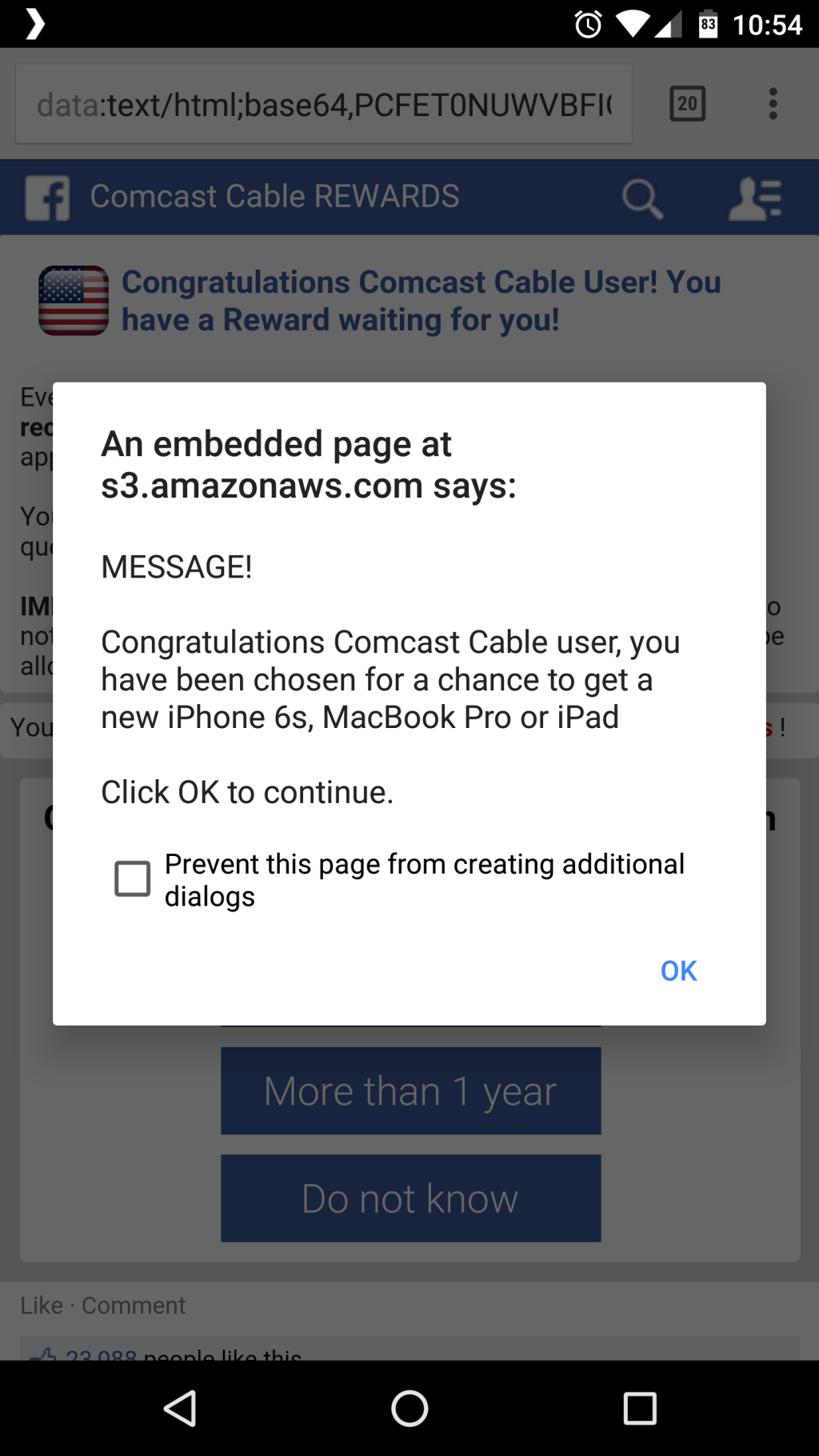
    An article served an ad that hijacked my browser and would not let me go back.  I had to kill the Chrome App and started fresh.