Tag: plugin-development

  • Guerilla Ad-Blocking: Taking Back the Web with WordPress

    Guerilla Ad-Blocking: Taking Back the Web with WordPress

    I have a new favorite WordPress plugin that I’ve just installed on my site:

    This plugin, by Stefan Bohacek, adds a notice to your site whenever a visitor comes that does not have an ad blocker installed:

    Using an ad blocker isn’t just about security and privacy, it also helps conserve your precious bandwidth. By blocking resource-intensive ads, it improves the loading speed of websites and saves you time.

    Additionally, an ad blocker protects your information from being harvested by advertisers, giving some peace of mind while browsing the web.

    You’ll also cut your “web carbon footprint” to a fraction of itself! Ugh, what a parasitic industry.

    My favorite is uBlock Origin, but I also love Pi-Hole for network-level blocking <3

  • Stopping WordPress User Registration Spam

    Stopping WordPress User Registration Spam

    I’ve had a rash of user registration spam lately, and even though I’m sure the site is secure, it’s just very annoying. So I’ve whipped up a quick little hook that I’ve thrown in my mu-plugins to give me the ability to add email hostnames to a blocklist and disable user registration from them:

    /**
     * Hook into the user registration process to deny registration to a blocklist of hostnames.
     *
     * @param string   $sanitized_user_login The sanitized username.
     * @param string   $user_email The user's email address.
     * @param WP_Error $errors Contains any errors with the registration process.
     *
     * @return void
     */
    function emrikol_blocklist_email_registration( string $sanitized_user_login, string $user_email, WP_Error $errors ): void {
    	// Validate the email address.
    	if ( filter_var( $user_email, FILTER_VALIDATE_EMAIL ) ) {
    		// Extract the email hostname from the user's email address and normalize it.
    		$email_parts  = explode( '@', $user_email );
    		$email_hostname = strtolower( $email_parts[1] );
    
    		$blocklist = array(
    			'email.imailfree.cc',
    			'mail.imailfree.cc',
    			'mailbox.imailfree.cc',
    		);
    
    		// Check if the email hostname is in the blocklist.
    		if ( in_array( $email_hostname, $blocklist ) ) {
    			$errors->add( 'email_hostname_blocked', __( 'Sorry, registration using this email hostname is not allowed.', 'emrikol' ) );
    		}
    	}
    }
    add_action( 'register_post', 'emrikol_blocklist_email_registration', 10, 3 );
    Code language: PHP (php)

    There’s lots of different ways you could extend this for yourself, like adding a hostname regex, a filter, or an admin screen to allow updates to the blocklist without having to make a code deploy.

  • Limiting Featured Image Dimensions in WordPress

    Limiting Featured Image Dimensions in WordPress

    As a follow up to my last post about limiting file sizes during uploads, I had to come back to the problem with limiting image sizes for featured images. Not bytes this time, but pixel dimensions.

    Still being a bit of a block editor newb, this was an interesting challenge for me, and I was really surprised at how easy it was to implement. I basically googled around and found a few different things to put together that worked for me. The primary source was a post by Igor Benic on how to disable the publish button:

    After that, I discovered how to add notifications to the block editor, to tell when the image was too large, thanks to a post by David F. Carr:

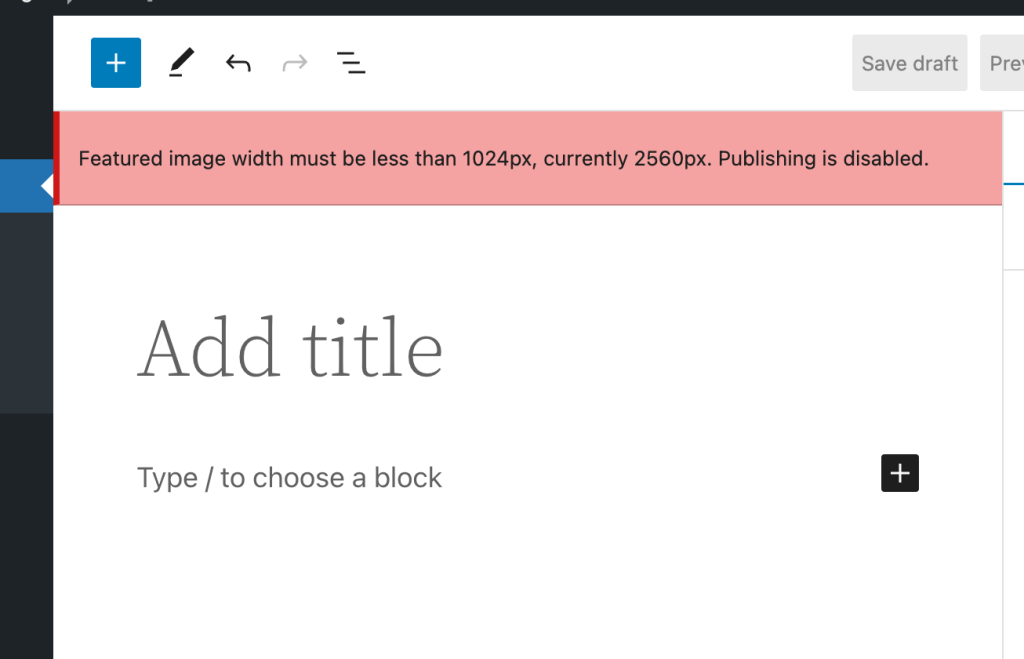
    So what’s it look like? Well, it’s pretty simple. If you choose a featured image that’s too large for the settings, it will add a non-dismissible error notification to the editor:

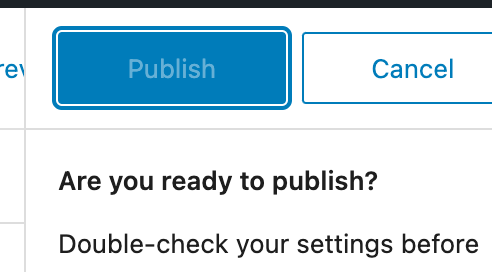
    Then it will block you from hitting the publish button:

    So, finally the code. This is just enqueued in as a simple add_action() during the enqueue_block_editor_assets hook. I’m absolutely not a good JS developer, so please don’t judge me too harshly. Also, that means this could be riddled with bugs. Use at your own risk 😀

    var postLocked = false;
    wp.domReady( () => {
    	wp.data.subscribe( function() {
    		var imageId = wp.data.select( 'core/editor' ).getEditedPostAttribute( 'featured_media' ); // Featured Image ID.
    
    		// If we have no image ID, and we already locked the post, we won't do anything.
    		if ( imageId ) {
    			blockEditorSettings = wp.data.select('core/block-editor').getSettings();
    
    			// Default to 1200px wide.
    			maxImageSize = 1200;
    			imageAttrs = wp.data.select('core').getMedia( imageId );
    
    			// Get the size for the "large image" and if it's available, use that instead.
    			if ( typeof blockEditorSettings !== 'undefined' && blockEditorSettings.hasOwnProperty( 'imageDimensions' ) ) {
    				maxImageSize = blockEditorSettings.imageDimensions.large.width;
    			}
    
    			if ( typeof imageAttrs !== 'undefined' && imageAttrs.hasOwnProperty( 'media_details') ) {
    				// Publish is not locked and width is too large.
    				if ( ! postLocked && imageAttrs.media_details.width > maxImageSize ) {
    					postLocked = true;
    					wp.data.dispatch( 'core/editor' ).lockPostSaving( 'featuredImageTooLarge' );
    
    					wp.data.dispatch('core/notices').createNotice(
    						'error', // Can be one of: success, info, warning, error.
    						wp.i18n.__( wp.i18n.sprintf( 'Featured image width must be less than %spx, currently %spx. Publishing is disabled.', maxImageSize, imageAttrs.media_details.width ) ),
    						{
    							id: 'featuredImageTooLarge', // Assigning an ID prevents the notice from being added repeatedly.
    							isDismissible: false, // Whether the user can dismiss the notice.
    						}
    					);
    				}
    
    			}
    		} else if ( postLocked ) {
    			postLocked = false;
    			wp.data.dispatch( 'core/editor' ).unlockPostSaving( 'featuredImageTooLarge' );
    			wp.data.dispatch('core/notices').removeNotice( 'featuredImageTooLarge' );
    		}
    	} );
    } );Code language: JavaScript (javascript)
  • Half Baked Idea: Limiting WordPress Image Upload Sizes

    Half Baked Idea: Limiting WordPress Image Upload Sizes

    If you want to be able to limit images (or any attachments) from being uploaded into the media library if they are too large, you can use the wp_handle_upload_prefilter filter to do this.

    Below is a really basic example I whipped up in a few minutes that I shared with a customer not too long ago:

    /**
     * Limits the maximum size of images that can be uploaded.
     *
     * @param array $file {
     *     Reference to a single element from `$_FILES`.
     *
     *     @type string $name     The original name of the file on the client machine.
     *     @type string $type     The mime type of the file, if the browser provided this information.
     *     @type string $tmp_name The temporary filename of the file in which the uploaded file was stored on the server.
     *     @type int    $size     The size, in bytes, of the uploaded file.
     *     @type int    $error    The error code associated with this file upload.
     * }
     *
     * @return array       Filtered file array, with a possible error if the file is too large.
     */
    function blarg_limit_max_image_upload_size( $file ) {
        if ( str_starts_with( $file['type'], 'image/' ) ) {
            $max_size = 1 * 1024; // 1kb.
    
            if ( $file['size'] > $max_size ) {
                // translators: %s: Human readable maximum image file size.
                $file['error'] .= sprintf( __( 'Uploaded images must be smaller than %s.' ), size_format( $max_size ) );
            }
        }
    
        return $file;
    
    }
    add_filter( 'wp_handle_upload_prefilter', 'blarg_limit_max_image_upload_size', 10, 1 );Code language: PHP (php)

    Good luck if you use any of my hot garbage in production 😀

  • Cool WordPress Plugins: Embed Extended

    Cool WordPress Plugins: Embed Extended

    If you saw my last post, you may have noticed some cool embeds. These are coming from the Embed Extended plugin. This plugin takes OpenGraph data and treats it more like oEmbed data for WordPress. It works great with the block editor as well!

  • Quick Tip: Export WordPress SQL output via WP-CLI

    Quick Tip: Export WordPress SQL output via WP-CLI

    If for some reason you can’t run wp db query, but need to export SQL output to a CSV or other file, then have a look at this small WP-CLI command I whipped up that should allow this:

    /**
     * Runs a SQL query against the site database.
     *
     * ## OPTIONS
     *
     * 
     * : SQL Query to run.
     *
     * [--format=]
     * : Render output in a particular format.
     * ---
     * default: table
     * options:
     * - table
     * - csv
     * - json
     * - count
     * - yaml
     * ---
     *
     * [--dry-run=]
     * : Performa a dry run
     *
     * @subcommand sql
     */
    public function sql( $args, $assoc_args ) {
         global $wpdb;
     
         $sql     = $args[0];
         $format  = WP_CLI\Utils\get_flag_value( $assoc_args, 'format', 'table' );
         $dry_run = WP_CLI\Utils\get_flag_value( $assoc_args, 'dry-run', 'true' );
     
         // Just some precautions.
         if ( preg_match( '/[update|delete|drop|insert|create|alter|rename|truncate|replace]/i', $sql ) ) {
             WP_CLI::error( 'Please do not modify the database with this command.' );
         }
     
         if ( 'false' !== $dry_run ) {
             WP_CLI::log( WP_CLI::colorize( '%gDRY-RUN%n: <code>EXPLAIN</code> of the query is below: https://mariadb.com/kb/en/explain/' ) );
             $sql = 'EXPLAIN ' . $sql;
         }
     
         // Fetch results from database.
         $results = $wpdb->get_results( $sql, ARRAY_A ); // phpcs:ignore WordPress.DB
     
         // Output data.
         WP_CLI\Utils\format_items( $format, $results, array_keys( $results[0] ) );
    }Code language: PHP (php)

    I’d add an example here, but I don’t have any right now that I can share 😐 I’ll try to find one later (don’t hold your breath on me remembering to do that)

  • Half-Baked Plugins: Embeds for Twitch and Gutenberg

    Half-Baked Plugins: Embeds for Twitch and Gutenberg

    In my forever attempt to learn and understand Gutenberg, React, and ES6 (which I am failing at horribly) I sometimes build WordPress plugins just for the learning experience. I don’t have any full intent on releasing these to the WordPress.org Plugin Repository because I honestly don’t feel like dealing with end users and support. I’m a horrible person, I know.

    One that I’ve got in my barrel of cobwebs is Embeds for Twitch and Gutenberg

    Allows Twitch channels, videos, and clips to be auto-embedded.
    https://github.com/emrikol/embed-twitch
    1 forks.
    1 stars.
    6 open issues.

    Recent commits:

    This allows you to embed Twitch channels, videos, and clips as a Gutenberg block in WordPress. Here’s some examples:

    Twitch Channel

    Twitch Video

    Twitch Clip

    Note: It seems that sometime between me finishing the current version of the plugin and the publishing of this post, Clips are borked. 🤷‍♂️

    Stay tuned for our next episode of Half-Baked Plugins where I do stupid things with images.

  • Wisps, a WordPress Plugin

    Wisps, a WordPress Plugin

    Last year I had a need for an editable JSON file that was retrievable via HTTP. Of course there’s a million ways that I could do this, but the easiest I thought of would be to have it inside of WordPress, since all of the people that needed access to edit the file already had edit access to a specific site. So I built a plugin.

    Doing this inside WordPress already brings a lot of benefits with little to no effort:

    1. User Management
    2. Revision History
    3. oEmbed Support
    4. Permalinks
    5. Syntax Highlighting Code Editor
    6. Self-Hosted Data

    Possibly more benefits as well, depending on the setup, such as caching.

    I’ve tweaked the plugin some, and I’m almost ready to submit it to the WordPress.org Plugin Repository. I just need to do the hard part of figuring out artwork. Ugh.

    Introducing Wisps:

    Wisps are embeddable and sharable code snippets for WordPress.

    With Wisps, you can have code snippets similar to Gist, Pastebin, or similar code sharing sites. Using the built-in WordPress code editor, you can write snippets to post and share. This has the benefit of WordPress revisions, auto-drafts, etc to keep a record of how code changes.

    Wisps can be downloaded by appending /download/ to the permalink, or viewed raw by adding /view/ or /raw/. There is full oEmbed support so you can just paste in a link to a wisp in the editor and it will be fully embedded.

    PrismJS is used for syntax highlighting for oEmbeds.

    You can add Wisp support to your theme either by modifying the custom post type page-wisp.php template, which will continue to display Wisps in the loop securely, or you can use add_theme_support( 'wisps' ) to tell the plugin to not automatically escape the output. You can then do what you like, such as potentially adding frontend support for syntax highlighting.

    Here’s what the oEmbed data looks like:

    (Yeah, I totally stole the design from Gists, because I’m not talented 😬)

    View the example Wisp

    View it raw

    Download it

    Currently available on GitHub

    Hopefully one day available on the WordPress.org Plugin Repository 🙂

    If you give it a try and have any suggestions, or issues drop me a line here or on GitHub!

  • Debugging WordPress Hooks: Speed

    Debugging WordPress Hooks: Speed

    If you google debugging WordPress hooks you’ll find a lot of information.

    About 1,180,000 results

    Let’s add another one.

    WordPress hooks are powerful, but also complex under the hood. There’s plenty of topics I could talk about here, but right now I’m only going to talk about speed. How long does it take for a hook to fire and return?

    Some cool work in this area has already been done thanks to Debug Bar Slow Actions and Query Monitor, but outside of something like Xdebug or New Relic, you’ll have a hard time figuring out how long each individual hook callback takes without modifying either WordPress core or each hook call.

    … or maybe not …

    While doing some client debugging for my job at WordPress VIP (did I mention we’re hiring?) I came across the need to do this exact thing. I’ve just finished the code that will make this happen, and I’m releasing it into the wild for everyone to benefit.

    What’s the problem we’re trying to solve? Well, this client has a sporadic issue where posts saving in the admin time out and sometimes fail. We’ve ruled out some potential issues, and are looking at a save_post hook going haywire.

    Now I can capture every single save_post action, what the callback was, and how long it took. Here’s an example for this exact post:

    START: 10:save_post, (Callback: `delete_get_calendar_cache`)
    STOP: 10:save_post, Taken 132.084μs (Callback: `delete_get_calendar_cache`)
    START: 10:save_post, (Callback: `sharing_meta_box_save`)
    STOP: 10:save_post, Taken 15.974μs (Callback: `sharing_meta_box_save`)
    START: 10:save_post, (Callback: `Jetpack_Likes_Settings::meta_box_save`)
    STOP: 10:save_post, Taken 19.073μs (Callback: `Jetpack_Likes_Settings::meta_box_save`)
    START: 10:save_post, (Callback: `SyntaxHighlighter::mark_as_encoded`)
    STOP: 10:save_post, Taken 19.073μs (Callback: `SyntaxHighlighter::mark_as_encoded`)
    START: 10:save_post, (Callback: `AMP_Post_Meta_Box::save_amp_status`)
    STOP: 10:save_post, Taken 16.928μs (Callback: `AMP_Post_Meta_Box::save_amp_status`)
    START: 20:save_post, (Callback: `Publicize::save_meta`)
    STOP: 20:save_post, Taken 428.915μs (Callback: `Publicize::save_meta`)
    START: 9000:save_post, (Callback: `Debug_Bar_Slow_Actions::time_stop`)
    STOP: 9000:save_post, Taken 11.921μs (Callback: `Debug_Bar_Slow_Actions::time_stop`)
    START: 1:save_post, (Callback: `The_SEO_Framework\Load::_update_post_meta`)
    STOP: 1:save_post, Taken 6.016ms (Callback: `The_SEO_Framework\Load::_update_post_meta`)
    START: 1:save_post, (Callback: `The_SEO_Framework\Load::_save_inpost_primary_term`)
    STOP: 1:save_post, Taken 1.535ms (Callback: `The_SEO_Framework\Load::_save_inpost_primary_term`)
    START: 10:save_post, (Callback: `delete_get_calendar_cache`)
    STOP: 10:save_post, Taken 179.052μs (Callback: `delete_get_calendar_cache`)
    START: 10:save_post, (Callback: `sharing_meta_box_save`)
    STOP: 10:save_post, Taken 247.002μs (Callback: `sharing_meta_box_save`)
    START: 10:save_post, (Callback: `Jetpack_Likes_Settings::meta_box_save`)
    STOP: 10:save_post, Taken 25.988μs (Callback: `Jetpack_Likes_Settings::meta_box_save`)
    START: 10:save_post, (Callback: `The_SEO_Framework\Load::delete_excluded_ids_cache`)
    STOP: 10:save_post, Taken 185.966μs (Callback: `The_SEO_Framework\Load::delete_excluded_ids_cache`)
    START: 10:save_post, (Callback: `SyntaxHighlighter::mark_as_encoded`)
    STOP: 10:save_post, Taken 15.020μs (Callback: `SyntaxHighlighter::mark_as_encoded`)
    START: 10:save_post, (Callback: `AMP_Post_Meta_Box::save_amp_status`)
    STOP: 10:save_post, Taken 12.875μs (Callback: `AMP_Post_Meta_Box::save_amp_status`)
    START: 20:save_post, (Callback: `Publicize::save_meta`)
    STOP: 20:save_post, Taken 377.893μs (Callback: `Publicize::save_meta`)
    START: 9000:save_post, (Callback: `Debug_Bar_Slow_Actions::time_stop`)
    STOP: 9000:save_post, Taken 14.067μs (Callback: `Debug_Bar_Slow_Actions::time_stop`)Code language: CSS (css)

    So how does it work?

    1. We add an all action that will fire for every other action.
    2. In the all callback, we make sure we’re looking for the correct hook.
    3. We then build an array to store some data, use the $wp_filter global to fill out information such as the priority and the callback, and store the start time.
    4. Next we have to add a new action to run for our hook right before the callback we want to time. We use the fact that, even though add_action() is supposed to use an int for the priority, it will also accept a string. We add new hooks, and re-prioritze all of the existing hooks with floats that are stringified.
    5. This allows us to capture the start time and end time of each individual callback, instead of the priority group as a whole.

    Of course, this does add a tiny bit of overhead, and could cause some problems if any other plugins use stringified hook priorities, or other odd issues–so be careful 🙂

    Finally, here’s the code:

    class VIP_Hook_Timeline {
    	public $hook;
    	public $callbacks     = [];
    	public $callback_mod  = 0.0001;
    	public $callback_mods = [];
    
    	public function __construct( $hook ) {
    		$this->hook = $hook;
    		add_action( 'all', array( $this, 'start' ) );
    	}
    
    	public function start() {
    		// We only want to get a timeline for one hook.
    		if ( $this->hook !== current_filter() ) {
    			return;
    		}
    
    		global $wp_filter;
    
    		// Iterate over each priority level and set up array.
    		foreach( $wp_filter[ $this->hook ] as $priority => $callback ) {
    			// Make the mod counter if not exists.
    			if ( ! isset( $this->callback_mods[ $priority ] ) ) {
    				$this->callback_mods[ $priority ] = $priority - $this->callback_mod;
    			}
    
    			// Make the array if not exists.
    			if ( ! is_array( $this->callbacks[ $priority ] ) ) {
    				$this->callbacks[ $priority ] = [];
    			}
    
    			// Iterate over each callback and set up array.
    			foreach( array_keys( $callback ) as $callback_func ) {
    				if ( ! is_array( $this->callbacks[ $priority ][ $callback_func ] ) ) {
    					$this->callbacks[ $priority ][ $callback_func ] = [ 'start' => 0, 'stop' => 0 ];
    				}
    			}
    		}
    
    		foreach( $this->callbacks as $priority => $callback ) {
    			foreach ( array_keys( $callback ) as $callback_func ) {
    
    				// Get data befmore we move things around.
    				$human_callback = $this->get_human_callback( $wp_filter[ $this->hook ][ $priority ][$callback_func] );
    
    				// Modify the priorities.
    				$pre_callback_priority = $this->callback_mods[ $priority ];
    				$this->callback_mods[ $priority ] = $this->callback_mods[ $priority ] + $this->callback_mod;
    
    				$new_callback_priority = $this->callback_mods[ $priority ];
    				$this->callback_mods[ $priority ] = $this->callback_mods[ $priority ] + $this->callback_mod;
    
    				$post_callback_priority = $this->callback_mods[ $priority ];
    				$this->callback_mods[ $priority ] = $this->callback_mods[ $priority ] + $this->callback_mod;
    
    				// Move the callback to our "new" priority.
    				if ( $new_callback_priority != $priority ) {
    					$wp_filter[ $this->hook ]->callbacks[ strval( $new_callback_priority ) ][ $callback_func ] = $wp_filter[ $this->hook ]->callbacks[ $priority ][ $callback_func ];
    					unset( $wp_filter[ $this->hook ]->callbacks[ $priority ][ $callback_func ] );
    					if ( empty( $wp_filter[ $this->hook ]->callbacks[ $priority ] ) ) {
    						unset( $wp_filter[ $this->hook ]->callbacks[ $priority ] );
    					}
    				}
    
    				// Add a new action right before the one we want to debug to capture start time.
    				add_action( $this->hook, function( $value = null ) use ( $callback_func, $priority, $human_callback ) {
    					$this->callbacks[ $priority ][ $callback_func ]['start'] = microtime( true );
    
    					// Uncomment this if you just want to dump data to the PHP error log, otherwise add your own logic.
    					//$message = 'START: %d:%s, (Callback: `%s`)';
    					// phpcs:ignore WordPress.PHP.DevelopmentFunctions.error_log_error_log
    					//error_log( sprintf( $message,
    					//	$priority,
    					//	$this->hook,
    					//	$human_callback,
    					//) );
    
    					// Just in case it's a filter, return.
    					return $value;
    				}, strval( $pre_callback_priority ) );
    
    				// Add a new action right after the one we want to debug to capture end time.
    				add_action( $this->hook, function( $value = null ) use ( $callback_func, $priority, $human_callback ) {
    					$this->callbacks[ $priority ][ $callback_func ]['stop'] = microtime( true );
    
    					// Uncomment this if you just want to dump data to the PHP error log, otherwise add your own logic.
    					//$message = 'STOP: %d:%s, Taken %s (Callback: `%s`)';
    					// phpcs:ignore WordPress.PHP.DevelopmentFunctions.error_log_error_log
    					//error_log( sprintf( $message,
    					//	$priority,
    					//	$this->hook,
    					//	$this->get_human_diff( $priority, $callback_func ),
    					//	$human_callback,
    					//) );
    
    					// Just in case it's a filter, return.
    					return $value;
    				}, strval( $post_callback_priority ) );
    				
    			}
    		}
    	}
    
    	public function get_human_callback( $callback ) {
    		$human_callback = '[UNKNOWN HOOK]';
    		if ( is_array( $callback['function'] ) && count( $callback['function'] ) == 2 ) {
    			list( $object_or_class, $method ) = $callback['function'];
    			if ( is_object( $object_or_class ) ) {
    				$object_or_class = get_class( $object_or_class );
    			}
    			$human_callback =  sprintf( '%s::%s', $object_or_class, $method );
    		} elseif ( is_object( $callback['function'] ) ) {
    			// Probably an anonymous function.
    			$human_callback =  get_class( $callback['function'] );
    		} else {
    			$human_callback =  $callback['function'];
    		}
    		return $human_callback;
    	}
    
    	public function get_start( $priority, $callback_func ) {
    		return (float) $this->callbacks[ $priority ][ $callback_func ]['start'];
    	}
    
    	public function get_stop( $priority, $callback_func ) {
    		return (float) $this->callbacks[ $priority ][ $callback_func ]['stop'];
    	}
    
    	public function get_diff( $priority, $callback_func ) {
    		return (float) ( $this->get_stop( $priority, $callback_func ) - $this->get_start( $priority, $callback_func ) );
    	}
    
    	public function get_human_diff( $priority, $callback_func ) {
    		$seconds = $this->get_diff( $priority, $callback_func );
    
    		// Seconds.
    		if ( $seconds >= 1 || $seconds == 0 ) {
    			return number_format( $seconds, 3 ) . 's';
    		}
    
    		// Milliseconds.
    		if ( $seconds >= .001 ) {
    			return number_format( $seconds * 1000, 3 ) . 'ms';
    		}
    
    		// Microseconds.
    		if ( $seconds >= .000001 ) {
    			return number_format( $seconds * 1000000, 3 ) . 'μs';
    		}
    
    		// Nanoseconds.
    		if ( $seconds >= .000000001 ) {
    			// WOW THAT'S FAST!
    			return number_format( $seconds * 1000000000, 3 ) . 'ns';
    		}
    
    		return $seconds . 's?';
    	}
    }
    new VIP_Hook_Timeline( 'save_post' );Code language: PHP (php)