
Author: Derrick

  • iOS Reminders to Habitica To Do’s via IFTTT

    iOS Reminders to Habitica To Do’s via IFTTT

    After digging around for a while trying to see how I could link up iOS’s Reminders with Habitica‘s To Do’s to help keep me organized, I finally found an easy way through IFTTT.

    This works easily because Habitica offers a wonderful API💥
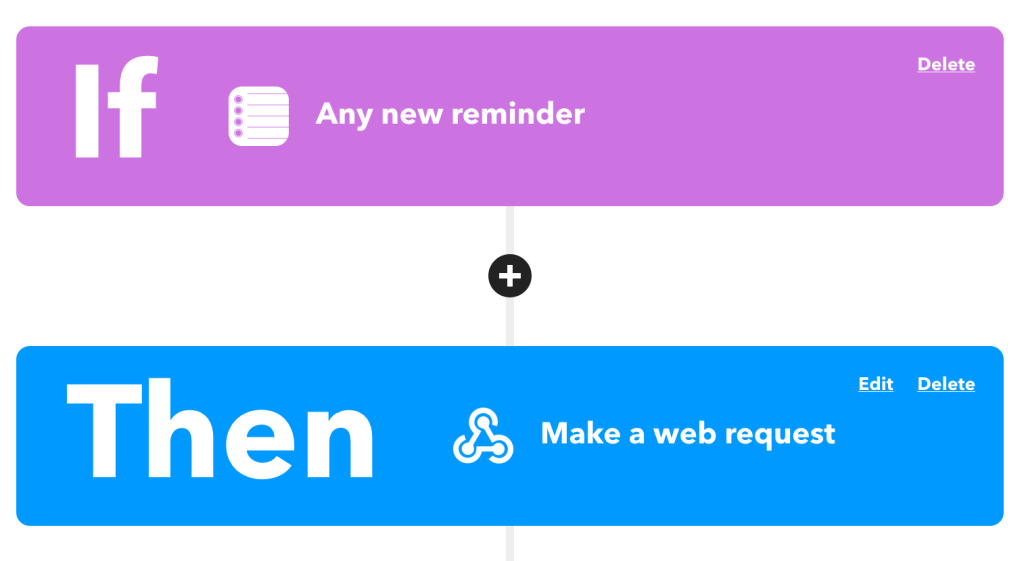
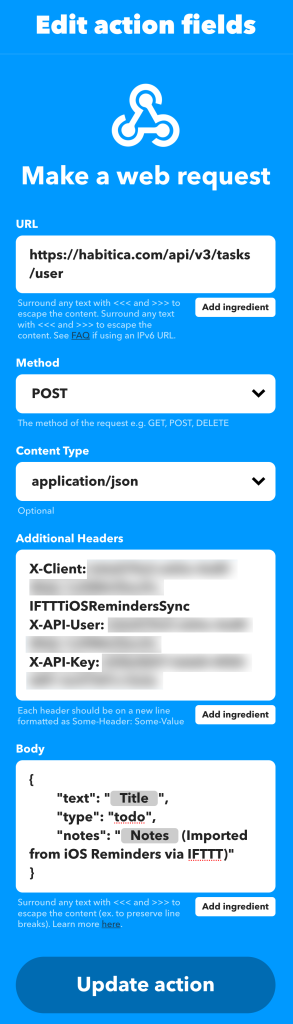
    Specifically we’re looking at the “Create a new task belonging to the user” API endpoint:

    https://habitica.com/api/v3/tasks/user

    With this, we’ll need to make a POST request with some special headers to authenticate and then a body payload made of JSON:

    Headers:

    X-Client: my-user-id-IFTTTiOSRemindersSync
    X-API-User: my-user-id
    X-API-Key: my-api-keyCode language: HTTP (http)

    Body:

    {
    	"text": "{{Title}}",
    	"type": "todo",
    	"notes": "{{Notes}} (Imported from iOS Reminders via IFTTT)"
    }Code language: JSON / JSON with Comments (json)

    From here, IFTTT will fill in the title, notes, and ship it off to Habitica for me to check off for some sweet XP!

  • Quick Tip: Get Size of Revisions in WordPress

    Quick Tip: Get Size of Revisions in WordPress

    One thing that you might not think of when watching the size of a large WordPress site grow, is unnecessary data in the database. With the introduction of the block editor years ago, there has been a large increase in the number of revisions a post makes when being edited.

    This can create a lot of revisions in the database if you’re not setting a limit.

    If you’d like to do a quick and dirty audit of your revision data, you can use a very ugly SQL query like this:

    SELECT COUNT( ID ) as revision_count, ( SUM( CHAR_LENGTH( ID ) ) + SUM( CHAR_LENGTH( post_author ) ) + SUM( CHAR_LENGTH( post_date ) ) + SUM( CHAR_LENGTH( post_date_gmt ) ) + SUM( CHAR_LENGTH( post_content ) ) + SUM( CHAR_LENGTH( post_title ) ) + SUM( CHAR_LENGTH( post_excerpt ) ) + SUM( CHAR_LENGTH( post_status ) ) + SUM( CHAR_LENGTH( comment_status ) ) + SUM( CHAR_LENGTH( ping_status ) ) + SUM( CHAR_LENGTH( post_password ) ) + SUM( CHAR_LENGTH( post_name ) ) + SUM( CHAR_LENGTH( to_ping ) ) + SUM( CHAR_LENGTH( pinged ) ) + SUM( CHAR_LENGTH( post_modified ) ) + SUM( CHAR_LENGTH( post_modified_gmt ) ) + SUM( CHAR_LENGTH( post_content_filtered ) ) + SUM( CHAR_LENGTH( post_parent ) ) + SUM( CHAR_LENGTH( guid ) ) + SUM( CHAR_LENGTH( menu_order ) ) + SUM( CHAR_LENGTH( post_type ) ) + SUM( CHAR_LENGTH( post_mime_type ) ) + SUM( CHAR_LENGTH( comment_count ) ) ) as post_size FROM wp_posts WHERE post_type='revision' GROUP BY post_type ORDER BY revision_count DESC;Code language: JavaScript (javascript)

    This will give you the number of revisions you have, and the approximate amount of data its using in the database:

    revision_count post_size
    441419 2842450412

    You can see now a very large WordPress site can amass a lot of unnecessary data in its database over a number of years. 2.8 Gigabytes of revisions is a lot of stuff if you’re never going to use them again.

  • Cool WordPress Plugins: Embed Extended

    Cool WordPress Plugins: Embed Extended

    If you saw my last post, you may have noticed some cool embeds. These are coming from the Embed Extended plugin. This plugin takes OpenGraph data and treats it more like oEmbed data for WordPress. It works great with the block editor as well!

  • My Favorite Firefox Addons

    My Favorite Firefox Addons

    For my own posterity in case I ever lose them, or if anyone is curious, here’s what I use:

    https://addons.mozilla.org/en-US/firefox/addon/1password-x-password-manager/
    https://addons.mozilla.org/en-US/firefox/addon/clearurls/
    https://addons.mozilla.org/en-US/firefox/addon/edit-cookie/
    https://addons.mozilla.org/en-US/firefox/addon/decentraleyes/
    https://addons.mozilla.org/en-US/firefox/addon/duckduckgo-for-firefox/
    https://addons.mozilla.org/en-US/firefox/addon/facebook-container/
    https://addons.mozilla.org/en-US/firefox/addon/image-search-options/
    https://addons.mozilla.org/en-US/firefox/addon/old-reddit-redirect/
    https://addons.mozilla.org/en-US/firefox/addon/recipe-filter/
    https://addons.mozilla.org/en-US/firefox/addon/reddit-enhancement-suite/
    https://addons.mozilla.org/en-US/firefox/addon/soundcloud-dl/
    https://addons.mozilla.org/en-US/firefox/addon/sponsorblock/
    https://addons.mozilla.org/en-US/firefox/addon/the-camelizer-price-history-ch/
    https://addons.mozilla.org/en-US/firefox/addon/ublock-origin/
    https://addons.mozilla.org/en-US/firefox/addon/view-image-in-google-images/
  • Quick Tip: Script Debugging in WordPress

    Quick Tip: Script Debugging in WordPress

    If you’re debugging core WordPress scripts, one thing you might run into is dealing with cached copies of the script. Due to how script-loader.php enqueues the core files, their versions are “hard coded” and short of editing script-loader.php as well, there’s a way to fix this via a filter:

    add_filter( 'script_loader_src', function( $src, $handle ) {
         if ( false !== strpos( $src, 'ver=' ) ) {
             $src = remove_query_arg( 'ver', $src );
             $src = add_query_arg( array( 'ver', rawurlencode( uniqid( $handle ) . '-' ) ), $src );
         }
         
         <span style="background-color: inherit; color: rgb(248, 248, 242); font-size: inherit; letter-spacing: -0.015em;">return $src;</span>
     }, -1, 2 );Code language: PHP (php)

    This will apply a unique ver argument to the core scripts on each refresh, so no matter what you’re editing you should get the most recent version from both any page cache you may have and also the browser cache (🤞).

    Also, don’t forget to enable SCRIPT_DEBUG if you’re hacking away at core scripts to debug issues.

    I couldn’t find a good related image, so enjoy this delicious toilet paper.

  • Quick Tip: Disable WordPress Block Editor Fullscreen Mode

    Quick Tip: Disable WordPress Block Editor Fullscreen Mode

    I don’t know why, but any time I edit posts on this site, the block editor always goes into fullscreen mode. Even if I disable it, the next time I edit a post or refresh, it goes right back. My preferences aren’t being saved.

    Oh well, we can fix that with some PHP!

    if ( is_admin() ) {
         function jba_disable_editor_fullscreen_by_default() {
             $script = "jQuery( window ).load(function() { const isFullscreenMode = wp.data.select( 'core/edit-post' ).isFeatureActive( 'fullscreenMode' ); if ( isFullscreenMode ) { wp.data.dispatch( 'core/edit-post' ).toggleFeature( 'fullscreenMode' ); } });";
             wp_add_inline_script( 'wp-blocks', $script );
         }
         add_action( 'enqueue_block_editor_assets', 'jba_disable_editor_fullscreen_by_default' );
     }Code language: PHP (php)

    Many thanks to Jean-Baptiste Audras for this snippet he shared on his site last year 🥳

  • Raspberry Pi: February 2021

    Raspberry Pi: February 2021

    I often feel like I don’t get enough use out of my Raspberry Pi devices. I have a Raspberry Pi Model B Revision 2.0 (512MB) and a Raspberry Pi 4 (4GB).

    Their current uses are as follows

    Raspberry Pi Model B:

    Raspberry Pi 4:

    I’d love to do more, but I’m really not sure what else I need. I don’t need some grandiose home server but I absolutely love playing with these little things!

  • Getting WordPress Database Size via WP-CLI

    Getting WordPress Database Size via WP-CLI

    One WP-CLI command that I’ve found handy is this db-size command. It allows you to output a site’s registered database tables along with the data and index size in any format that WP-CLI natively supports, with multiple sort options:

    /**
     * Gets size of database tables for the current site.
     *
     * ## OPTIONS
     *
     * [--raw]
     * : Outputs full size in bytes instead of human readable sizes.
     *
     * [--order_by=<Total><total>]
     * : Allows custom ordering of the data.
     * ---
     * default: Total
     * options:
     *   - Table
     *   - Data Size
     *   - Index Size
     *   - Total
     * ---
     *
     * [--order=<asc><asc>]
     * : Allows custom ordering direction of the data.
     * ---
     * default: asc
     * options:
     *   - asc
     *   - desc
     * ---
     *
     * [--format=<format><format>]
     * : Render output in a particular format.
     * ---
     * default: table
     * options:
     *   - table
     *   - csv
     *   - json
     *   - count
     *   - yaml
     * ---
     *
     * @subcommand db-size
     */
    public function db_size( $args, $assoc_args ) {
    	global $wpdb;
    
    	$output   = array();
    	$db_size  = array();
    	$order_by = WP_CLI\Utils\get_flag_value( $assoc_args, 'order_by', 'Total' );
    	$order    = WP_CLI\Utils\get_flag_value( $assoc_args, 'order', 'asc' );
    	$format   = WP_CLI\Utils\get_flag_value( $assoc_args, 'format', 'table' );
    	$raw      = (bool) WP_CLI\Utils\get_flag_value( $assoc_args, 'raw', false );
    
    	// Fetch list of tables from database.
    	$tables = array_map(
    		function( $val ) {
    			return $val[0];
    		},
    		$wpdb->get_results( 'SHOW TABLES;', ARRAY_N ) // phpcs:ignore WordPress.DB.DirectDatabaseQuery
    	);
    
    	// Fetch table information from database.
    	$report = array_map(
    		function( $table ) use ( $wpdb ) { // phpcs:ignore WordPress.DB.DirectDatabaseQuery
    			return $wpdb->get_row( "SHOW TABLE STATUS LIKE '$table'" ); // phpcs:ignore WordPress.DB.PreparedSQL.InterpolatedNotPrepared
    		},
    		$tables
    	);
    
    	foreach ( $report as $table ) {
    		// Keep a running total of sizes.
    		$db_size['data']  += $table->Data_length; // phpcs:ignore WordPress.NamingConventions.ValidVariableName.UsedPropertyNotSnakeCase
    		$db_size['index'] += $table->Index_length; // phpcs:ignore WordPress.NamingConventions.ValidVariableName.UsedPropertyNotSnakeCase
    
    		// Format output for WP-CLI's format_items function.
    		$output[] = array(
    			'Table'      => $table->Name, // phpcs:ignore WordPress.NamingConventions.ValidVariableName.UsedPropertyNotSnakeCase
    			'Data Size'  => $table->Data_length, // phpcs:ignore WordPress.NamingConventions.ValidVariableName.UsedPropertyNotSnakeCase
    			'Index Size' => $table->Index_length, // phpcs:ignore WordPress.NamingConventions.ValidVariableName.UsedPropertyNotSnakeCase
    			'Total'      => $table->Data_length + $table->Index_length, // phpcs:ignore WordPress.NamingConventions.ValidVariableName.UsedPropertyNotSnakeCase
    		);
    	}
    
    	// Sort table data.
    	self::sort_table_by( $order_by, $output, $order );
    
    	if ( ! $raw ) {
    		// Make data human readable.
    		foreach ( array_keys( $output ) as $key ) {
    			$output[ $key ]['Data Size']  = size_format( $output[ $key ]['Data Size'] );
    			$output[ $key ]['Index Size'] = size_format( $output[ $key ]['Index Size'] );
    			$output[ $key ]['Total']      = size_format( $output[ $key ]['Total'] );
    		}
    	}
    
    	// Output data.
    	WP_CLI\Utils\format_items( $format, $output, array( 'Table', 'Data Size', 'Index Size', 'Total' ) );
    
    	// Output totals if we're not piping somewhere.
    	if ( ! WP_CLI\Utils\isPiped() ) {
    		WP_CLI::success(
    			sprintf(
    				'Total size of the database for %s is %s. Data: %s; Index: %s',
    				home_url(),
    				WP_CLI::colorize( '%g' . size_format( $db_size['data'] + $db_size['index'] ) . '%n' ),
    				WP_CLI::colorize( '%g' . size_format( $db_size['data'] ) . '%n' ),
    				WP_CLI::colorize( '%g' . size_format( $db_size['index'] ) . '%n' )
    			)
    		);
    	}
    }
    
    /**
     * Sorts a table by a specific field and direction.
     *
     * @param string $field The field to order by.
     * @param array  &$array The table array to sort.
     * @param string $direction The direction to sort. Ascending ('asc') or descending ('desc').
     */
    private function sort_table_by( $field, &$array, $direction ) {
    	// Taken from https://joshtronic.com/2013/09/23/sorting-associative-array-specific-key/ Thanks!
    	usort(
    		$array,
    		function ( $a, $b ) use ( $field, $direction ) {
    			$a = $a[ $field ];
    			$b = $b[ $field ];
    
    			if ( $a === $b ) {
    				return 0;
    			}
    
    			switch ( $direction ) {
    				case 'asc':
    					return ( $a < $b ) ? -1 : 1;
    				case 'desc':
    					return ( $a > $b ) ? -1 : 1;
    				default:
    					return 0;
    			}
    		}
    	);
    	return true;
    }</format></asc></total>Code language: PHP (php)

    Here’s some example output from one of my test sites:

    $ wp test db-size
     +----------------------------+-----------+------------+-------+
     | Table                      | Data Size | Index Size | Total |
     +----------------------------+-----------+------------+-------+
     | wp_mlp_relationships       | 16KB      | 0B         | 16KB  |
     | wp_redacted_table          | 16KB      | 0B         | 16KB  |
     | wp_redacted_table          | 16KB      | 0B         | 16KB  |
     | wp_3_links                 | 16KB      | 16KB       | 32KB  |
     | wp_term_relationships      | 16KB      | 16KB       | 32KB  |
     | wp_site                    | 16KB      | 16KB       | 32KB  |
     | wp_registration_log        | 16KB      | 16KB       | 32KB  |
     | wp_mlp_site_relations      | 16KB      | 16KB       | 32KB  |
     | wp_mlp_languages           | 16KB      | 16KB       | 32KB  |
     | wp_mlp_content_relations   | 16KB      | 16KB       | 32KB  |
     | wp_links                   | 16KB      | 16KB       | 32KB  |
     | wp_redacted_table          | 16KB      | 16KB       | 32KB  |
     | wp_3_term_relationships    | 16KB      | 16KB       | 32KB  |
     | wp_blog_versions           | 16KB      | 16KB       | 32KB  |
     | wp_2_links                 | 16KB      | 16KB       | 32KB  |
     | wp_2_term_relationships    | 16KB      | 16KB       | 32KB  |
     | wp_2_term_taxonomy         | 16KB      | 32KB       | 48KB  |
     | wp_2_commentmeta           | 16KB      | 32KB       | 48KB  |
     | wp_2_postmeta              | 16KB      | 32KB       | 48KB  |
     | wp_term_taxonomy           | 16KB      | 32KB       | 48KB  |
     | wp_3_commentmeta           | 16KB      | 32KB       | 48KB  |
     | wp_2_termmeta              | 16KB      | 32KB       | 48KB  |
     | wp_2_terms                 | 16KB      | 32KB       | 48KB  |
     | wp_termmeta                | 16KB      | 32KB       | 48KB  |
     | wp_commentmeta             | 16KB      | 32KB       | 48KB  |
     | wp_blogmeta                | 16KB      | 32KB       | 48KB  |
     | wp_blogs                   | 16KB      | 32KB       | 48KB  |
     | wp_2_a8c_cron_control_jobs | 16KB      | 32KB       | 48KB  |
     | wp_redacted_table          | 16KB      | 32KB       | 48KB  |
     | wp_3_terms                 | 16KB      | 32KB       | 48KB  |
     | wp_3_termmeta              | 16KB      | 32KB       | 48KB  |
     | wp_3_term_taxonomy         | 16KB      | 32KB       | 48KB  |
     | wp_redacted_table          | 16KB      | 32KB       | 48KB  |
     | wp_terms                   | 16KB      | 32KB       | 48KB  |
     | wp_3_postmeta              | 16KB      | 32KB       | 48KB  |
     | wp_usermeta                | 16KB      | 32KB       | 48KB  |
     | wp_sitemeta                | 16KB      | 32KB       | 48KB  |
     | wp_users                   | 16KB      | 48KB       | 64KB  |
     | wp_postmeta                | 16KB      | 48KB       | 64KB  |
     | wp_posts                   | 16KB      | 64KB       | 80KB  |
     | wp_signups                 | 16KB      | 64KB       | 80KB  |
     | wp_2_posts                 | 16KB      | 64KB       | 80KB  |
     | wp_3_posts                 | 16KB      | 64KB       | 80KB  |
     | wp_2_comments              | 16KB      | 80KB       | 96KB  |
     | wp_comments                | 16KB      | 80KB       | 96KB  |
     | wp_3_comments              | 16KB      | 80KB       | 96KB  |
     | wp_2_options               | 80KB      | 32KB       | 112KB |
     | wp_3_options               | 80KB      | 32KB       | 112KB |
     | wp_options                 | 176KB     | 32KB       | 208KB |
     +----------------------------+-----------+------------+-------+
     Success: Total size of the database for https://www.example.com is 2.6MB. Data: 1MB; Index: 1.5MBCode language: JavaScript (javascript)

    Enjoy!

  • Nano: The One True Editor

    Nano: The One True Editor

    Forget about vi/vim/edlin. Nano is the only editor that you need in the console. Sure, it may not be perfect, but with a few extra steps in .nanorc it can really be a great experience. Here’s my .nanorc with some comments showing what’s changed:

    ## Automatically indent a newly created line to the same number of tabs and/or spaces as the previous line (or as the next line if the previous line is the beginning of a paragraph).
    unset autoindent
    
    ## Use bold instead of reverse video
    set boldtext
    
    ## Save the last hundred search strings and replacement strings and executed commands, so they can be easily reused in later sessions.
    set historylog
    
    ## Display line numbers to the left of the text area.
    set linenumbers
    
    ## Enable mouse support, if available for your system. When enabled, mouse clicks can be used to place the cursor, set the mark (with a double click), and execute shortcuts. The mouse will work in the X Window System, and on the console when gpm is running. Text can still be selected through dragging by holding down the Shift key.
    set mouse
    
    ## Save the cursor position of files between editing sessions. The cursor position is remembered for the 200 most-recently edited files.
    set positionlog
    
    ## Use a tab size of number columns. The value of number must be greater than 0. The default value is 8.
    set tabsize 4
    
    ## Default Syntax Highlighting
    include "/usr/share/nano/asm.nanorc"
    include "/usr/share/nano/autoconf.nanorc"
    include "/usr/share/nano/awk.nanorc"
    include "/usr/share/nano/c.nanorc"
    include "/usr/share/nano/changelog.nanorc"
    include "/usr/share/nano/cmake.nanorc"
    include "/usr/share/nano/css.nanorc"
    include "/usr/share/nano/debian.nanorc"
    include "/usr/share/nano/default.nanorc"
    include "/usr/share/nano/elisp.nanorc"
    include "/usr/share/nano/fortran.nanorc"
    include "/usr/share/nano/gentoo.nanorc"
    include "/usr/share/nano/go.nanorc"
    include "/usr/share/nano/groff.nanorc"
    include "/usr/share/nano/guile.nanorc"
    include "/usr/share/nano/html.nanorc"
    include "/usr/share/nano/java.nanorc"
    include "/usr/share/nano/javascript.nanorc"
    include "/usr/share/nano/json.nanorc"
    include "/usr/share/nano/lua.nanorc"
    include "/usr/share/nano/makefile.nanorc"
    include "/usr/share/nano/man.nanorc"
    include "/usr/share/nano/mgp.nanorc"
    include "/usr/share/nano/mutt.nanorc"
    include "/usr/share/nano/nanorc.nanorc"
    include "/usr/share/nano/nftables.nanorc"
    include "/usr/share/nano/objc.nanorc"
    include "/usr/share/nano/ocaml.nanorc"
    include "/usr/share/nano/patch.nanorc"
    include "/usr/share/nano/perl.nanorc"
    include "/usr/share/nano/php.nanorc"
    include "/usr/share/nano/po.nanorc"
    include "/usr/share/nano/postgresql.nanorc"
    include "/usr/share/nano/pov.nanorc"
    include "/usr/share/nano/python.nanorc"
    include "/usr/share/nano/ruby.nanorc"
    include "/usr/share/nano/rust.nanorc"
    include "/usr/share/nano/sh.nanorc"
    include "/usr/share/nano/spec.nanorc"
    include "/usr/share/nano/tcl.nanorc"
    include "/usr/share/nano/tex.nanorc"
    include "/usr/share/nano/texinfo.nanorc"
    include "/usr/share/nano/xml.nanorc"Code language: PHP (php)